Table of Contents
Walking down a dark hallway with your arms full of groceries or laundry is one of those small daily frustrations that somehow feels monumental in the moment. You fumble for the switch, knock something over, or simply navigate through shadows until you reach your destination. Motion sensor switches eliminate this hassle entirely, transforming your hallway into a responsive, well-lit pathway that anticipates your needs before you even have to think about them.
The good news? You don’t need to invest in a full smart home system or spend a fortune on professional installation to enjoy this convenience. Budget-friendly motion sensor switches have become remarkably sophisticated, offering reliable detection, customizable settings, and easy DIY installation—all for less than a typical dinner out. Whether you’re renting and want a simple upgrade or you’re a homeowner looking to improve functionality without breaking the bank, hallway motion sensors under $30 deliver impressive value.
Top 10 Motion Sensor Switches
Detailed Product Reviews
1. Lutron Maestro Motion Sensor Light Switch Indoor for Bathroom, Garage, Laundry Room, Any Bulbs, Occupancy Vacancy Sensor, Single-Pole, MS-OPS2-WH, White

Overview: The Lutron Maestro MS-OPS2-WH is a premium occupancy/vacancy sensor switch designed for single-pole applications. This device automatically controls lighting in bathrooms, garages, laundry rooms, and closets, working with virtually any bulb type including LED, CFL, incandescent, and halogen. The switch features advanced XCT sensing technology that detects fine motions, ensuring lights stay on when you’re in the room. Its sleek white design blends seamlessly with modern decor, and the unit learns your lighting preferences over time while incorporating daylight sensing to prevent unnecessary activation.
What Makes It Stand Out: Lutron’s proprietary XCT technology distinguishes this switch from competitors by detecting subtle movements like typing or reading, eliminating frustrating mid-room shutdowns. The Smart Ambient Light Detection learns your room’s natural light patterns and adjusts accordingly, saving more energy than standard timers. Installation is straightforward with clear wire labels and a compact design that fits standard electrical boxes. The switch also offers a 1-30 minute timeout range and a 6-hour “auto-off” guarantee for safety.
Value for Money: Priced in the mid-to-high range for motion sensors (typically $25-35), the Maestro justifies its cost through superior reliability and brand reputation. Unlike budget alternatives that may flicker or fail within a year, Lutron devices often last 10+ years. The energy savings from eliminated “lights left on” typically pay for the switch within 12-18 months. For single-room automation, it’s a worthwhile investment over cheaper brands that lack daylight sensing and fine-motion detection.
Strengths and Weaknesses: Strengths: Exceptional motion sensitivity; learns user patterns; premium build quality; works with all bulb types; reliable brand support; daylight sensing prevents false triggers; 6-hour safety shutoff.
Weaknesses: Requires neutral wire (challenging in older homes); single-pole only (no three-way support); higher upfront cost; small buttons can be fiddly for manual override; may be overly sensitive in small spaces.
Bottom Line: The Lutron Maestro MS-OPS2-WH is ideal for homeowners seeking reliable, set-it-and-forget-it automation in high-traffic areas. Its superior motion detection and learning capabilities make it worth the premium price, though installation challenges in older homes may require an electrician.
2. Lutron Maestro Motion Sensor Light Switch Indoor for Bathroom, Garage, Laundry Room, Any Bulbs, Occupancy Vacancy Sensor, Single-Pole, MS-OPS2H-2-WH, White (2 Pack)

Overview: This 2-pack bundles Lutron’s acclaimed Maestro motion sensor switches, offering identical functionality to the single MS-OPS2-WH unit but with cost savings for multi-room projects. Each switch provides automatic occupancy/vacancy sensing for single-pole circuits, compatible with all bulb types including LED, CFL, and incandescent. The XCT motion detection technology captures subtle movements, while ambient light sensing prevents daytime activation. Both units feature adjustable timeout settings from 1 to 30 minutes and a 6-hour safety auto-off function.
What Makes It Stand Out: The dual-pack configuration delivers Lutron’s industry-leading performance with immediate multi-room deployment. Both switches include the same intelligent daylight learning algorithm and hyper-sensitive motion detection that distinguishes the Maestro line. The interchangeable packaging allows for consistent aesthetics throughout your home. Unlike bulk alternatives, you get two premium sensors with individual calibration, ensuring each room operates optimally rather than using a one-size-fits-all approach.
Value for Money: The 2-pack typically offers 15-20% savings compared to buying two singles, bringing the per-unit cost down to $20-28. This makes premium automation accessible for simultaneous bathroom, laundry, and garage upgrades. For homeowners renovating multiple spaces, the bundle eliminates shipping costs and ensures matching firmware versions. The ROI accelerates when deploying both units, with combined energy savings often recouping the investment within 10-12 months, faster than staggered single purchases.
Strengths and Weaknesses: Strengths: Bulk pricing advantage; consistent performance across rooms; premium motion detection; daylight learning; universal bulb compatibility; safety auto-off; trusted Lutron reliability; perfect for whole-home automation projects.
Weaknesses: Still requires neutral wire (limiting retrofit applications); single-pole only; no volume discount beyond two units; identical specs may not suit drastically different room sizes; both must be programmed individually.
Bottom Line: This 2-pack is perfect for DIYers tackling multiple rooms simultaneously. The per-unit savings make Lutron’s premium technology more accessible, though the neutral wire requirement remains a barrier for older homes. Buy this bundle if you’re committed to automating at least two spaces.
3. ELEGRP Occupancy Motion Sensor Light Switch, PIR Infrared Motion Activated Wall Switch, No Neutral Wire, Single Pole for CFL/LED/Incandescent Bulb, with Wall Plate, UL Listed (10 Pack, Matte White)

Overview: The ELEGRP 10-pack delivers contractor-grade motion sensor switches designed for large-scale installations without requiring neutral wires. Each PIR infrared sensor supports single-pole control for LED, CFL, and incandescent bulbs up to 300W (LED/CFL) or 600W (incandescent). The ultra-slim, frameless matte white design complements contemporary interiors, and the included wall plates provide a finished look. Installation takes as little as 15 minutes per switch, making it ideal for both DIY homeowners and professional electricians working in pre-1980s homes lacking neutral wires.
What Makes It Stand Out: The no-neutral-wire requirement is the headline feature, enabling retrofitting in older homes where competitors like Lutron cannot operate. The 10-pack bulk pricing targets whole-house automation at an unprecedented value. Each switch features selectable occupancy (auto-on/off) and vacancy (manual-on/auto-off) modes, adjustable via dipswitches. The 5VA flame-resistant housing exceeds typical residential standards, and the sub-0.5W standby consumption maximizes energy savings. The matte finish resists fingerprints better than glossy alternatives.
Value for Money: At typically $8-12 per unit in the 10-pack, ELEGRP undercuts premium brands by 60-70% while maintaining UL certification. For automating an entire home, this represents $200-300 savings versus buying individual sensors. The no-neutral design eliminates costly electrical rewiring that could run $150-300 per switch professionally. While lacking advanced features like daylight learning, the basic motion detection delivers 80% of the functionality at a fraction of the cost, achieving ROI within 6-8 months.
Strengths and Weaknesses: Strengths: No neutral wire required; exceptional bulk pricing; UL listed; universal bulb compatibility; low standby power; durable matte finish; includes wall plates; ideal for older homes; adjustable modes.
Weaknesses: Requires ground wire (some older homes lack this); no daylight sensing; basic PIR detection may miss subtle movements; 10-pack commitment may be excessive for small projects; shorter warranty than premium brands; manual programming less intuitive.
Bottom Line: The ELEGRP 10-pack is unbeatable for whole-home automation in older constructions. Sacrificing some advanced features for massive cost savings and installation flexibility makes sense for budget-conscious buyers. Ensure your wiring includes ground before purchasing.
4. Kasa Smart Motion Sensor Switch, Single Pole, Needs Neutral Wire, 2.4GHz Wi-Fi Light Switch, Works with Alexa & Google Assistant, UL Certified, No Hub Required(KS200MP2),White,2-Pack

Overview: The Kasa KS200MP2 merges motion sensing with smart home integration in a convenient 2-pack. These Wi-Fi-enabled switches require a neutral wire and 2.4GHz network, offering app-based control via the Kasa Smart app alongside automatic motion detection. Each switch supports 600W incandescent/halogen or 300W CFL/LED loads and features ambient light detection to prevent daytime activation. The system integrates with Alexa, Google Assistant, and SmartThings for voice commands, while Smart Mode and Away Mode provide customizable automation schedules that simulate occupancy for security purposes.
What Makes It Stand Out: This is the only reviewed switch offering both local motion sensing and remote smart control without a hub. The Away Mode randomly activates lights to deter intruders—a feature absent in non-smart sensors. App-based scheduling allows different timeout settings for weekdays versus weekends. The daylight detection integrates with cloud-based sunrise/sunset data for enhanced accuracy. Voice control enables hands-free override, and the system supports firmware updates for future-proofing. The 2-pack ensures consistent smart functionality across multiple rooms.
Value for Money: Priced at $40-50 for two ($20-25 per switch), the KS200MP2 costs slightly more than basic motion sensors but adds $30-50 of smart home value per unit. Eliminating the need for a separate $50-100 hub makes it economical for entry-level smart home builders. Energy savings combine with enhanced security value, potentially lowering insurance premiums. Compared to Lutron’s smart offerings at $50+ per switch, Kasa delivers 90% of the functionality at half the cost, though without Lutron’s advanced motion sensitivity.
Strengths and Weaknesses: Strengths: Wi-Fi connectivity; voice control; app scheduling; Away Mode security; no hub required; daylight detection; remote access; firmware updatable; good value for smart features; 2-pack convenience.
Weaknesses: Requires neutral wire; 2.4GHz only (no 5GHz); cloud-dependent (no local control if internet fails); more complex setup; shorter warranty than Lutron; motion detection less sensitive than premium brands; no three-way support.
Bottom Line: The Kasa KS200MP2 excels for tech-savvy users wanting both motion automation and smart home integration. The Away Mode security feature alone justifies the modest premium over dumb sensors. Ensure stable 2.4GHz Wi-Fi coverage and neutral wires before purchasing.
5. TOPGREENER PIR Motion Sensor Light Switch, Occupancy & Vacancy Motion Sensor Switch, 𝐎𝐩𝐞𝐫𝐚𝐛𝐥𝐞 𝐖𝐢𝐭𝐡𝐨𝐮𝐭 𝐆𝐫𝐨𝐮𝐧𝐝 𝐖𝐢𝐫𝐞, No Neutral Wire, Single Pole, TDOS5-HL-W-2PCS, White

Overview: The TOPGREENER TDOS5-HL-W breaks installation barriers by requiring neither neutral nor ground wires, making it uniquely suited for the oldest homes. This 2-pack features PIR infrared sensing with selectable occupancy and vacancy modes, adjustable time delays (15 seconds to 30 minutes), and coverage up to 1,200 square feet with a 180-degree field of view. Each switch handles 300W tungsten or 5-150W LED loads and complies with California Title 20 and Title 24 energy standards. The included wall plates and straightforward wiring design simplify installation where other sensors cannot function.
What Makes It Stand Out: The no-ground-wire requirement is unprecedented, allowing installation in pre-1960s homes with two-wire systems. This solves a problem that even ELEGRP’s no-neutral switch cannot address. The adjustable time delay offers four settings including a 15-second test mode for installation verification. Title 20/24 compliance ensures utility rebate eligibility in many states. The 1,200 sq ft coverage exceeds typical residential sensors by 20-30%, making it suitable for large garages or basements. The universal wiring design accepts hot/load wires in either position, reducing installation errors.
Value for Money: At $30-40 for two switches ($15-20 per unit), TOPGREENER offers premium installation flexibility at mid-range pricing. For homes lacking both neutral and ground wires, it eliminates $200-400 per switch in rewiring costs. The Title 24 compliance may qualify for $5-15 per switch utility rebates, further improving ROI. While load capacity is lower than competitors (150W LED max), this rarely limits residential applications. The 2-pack provides immediate multi-room value, paying for itself through energy savings within 8-10 months.
Strengths and Weaknesses: Strengths: No neutral OR ground required; Title 20/24 compliant; adjustable time delays; large coverage area; universal wiring; includes wall plates; solves oldest-home installation challenges; vacancy mode option; UL listed.
Weaknesses: Lower LED capacity (150W) may limit multi-fixture rooms; no daylight sensing; basic PIR technology; 2-pack only (no singles); plastic feel less premium; limited manual override options; may not detect very fine motions.
Bottom Line: TOPGREENER is the only viable option for homes with truly outdated wiring. Its regulatory compliance and adjustable settings add value beyond basic no-wire sensors. Verify your LED load stays under 150W per switch, and this becomes an unbeatable retrofit solution for historic properties.
6. ELEGRP Single Pole Occupancy Motion Sensor Light Switch, PIR Infrared Motion Activated Switch, Need Grounding Wire, No Neutral Wire, for CFL/LED/Incandescent, with Plate, UL(2 Pack, Matte White)
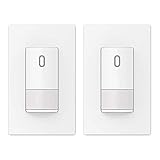
Overview: The ELEGRP 2-Pack Motion Sensor Light Switch offers a practical solution for homeowners needing occupancy detection without neutral wire access. These single-pole switches support 300W LED/CFL and 600W incandescent bulbs, featuring a 120-degree adjustable PIR sensor and contemporary matte white finish. Designed specifically for installations where only ground wiring is available, each unit includes a frameless wall plate that complements modern décor while providing reliable hands-free lighting control.
What Makes It Stand Out: The ground-wire requirement (no neutral needed) makes this ideal for older homes with limited electrical infrastructure. The adjustable sensitivity and detection angle provide customization for different room layouts. The two-pack bundle delivers immediate value for multi-room projects, while the modern frameless design integrates seamlessly with contemporary aesthetics. The thermoplastic housing ensures durability against daily wear and impact, making it suitable for high-traffic areas.
Value for Money: At approximately $30-35 for two switches, this bundle undercuts purchasing individual units by 20-30%. Professional electrician consultation adds cost, but DIY-capable homeowners save significantly on installation fees. Compared to rewiring for neutral access, these switches offer substantial savings for retrofit projects, often paying for themselves through avoided electrical upgrade expenses.
Strengths and Weaknesses: Strengths include no neutral wire requirement, dual-pack convenience, adjustable sensor settings, and robust construction. The mandatory ground connection is non-negotiable for operation. Weaknesses involve incompatibility with three-way circuits, potential need for professional installation if grounding is uncertain, and limited compatibility with certain low-power LED bulbs that may cause flickering.
Bottom Line: Perfect for retrofitting older homes lacking neutral wires, this 2-pack delivers reliable occupancy sensing at an attractive price point. Ensure proper ground wiring exists before purchasing and verify LED compatibility for optimal performance.
7. ECOELER Motion Sensor Light Switch, Occupancy & Vacancy Model Motion Activated Wall Switch, Single Pole Sensor Switch for Laundry, Garage, Neutral Wire Required, UL & FCC Listed

Overview: The ECOELER Motion Sensor Switch provides occupancy and vacancy detection for modern electrical systems requiring neutral wire connections. This single-pole switch automatically controls lighting in spaces like hallways, bathrooms, and laundry rooms. With UL and FCC certifications, it supports customizable time delays, sensitivity adjustments, and ambient light level sensing for tailored performance in residential applications.
What Makes It Stand Out: Dual OCC/VAC modes offer exceptional flexibility—OCC mode provides hands-free automation, while VAC mode requires manual activation, preventing false triggers in occasionally used spaces. The comprehensive customization options let users fine-tune every parameter. Its focused design suits specific applications like garages and basements where predictable motion patterns occur, making it more versatile than single-mode sensors.
Value for Money: Positioned in the mid-range category, this switch justifies its price through stable neutral-wire performance and dual-mode functionality. While cheaper basic sensors exist, the adjustable settings and certifications provide long-term reliability that outweighs minimal upfront savings. The energy savings from automated control typically recoup the investment within 12-18 months.
Strengths and Weaknesses: Strengths include versatile operation modes, extensive adjustability, stable neutral-wire performance, and safety certifications. The mandatory neutral wire requirement limits installation options in older homes. Single-pole-only design excludes three-way applications. Documentation could be clearer for DIY installers, and the default settings may require adjustment for optimal performance in specific spaces.
Bottom Line: An excellent choice for new construction or renovated spaces with neutral wiring. The dual-mode operation and granular controls make it particularly valuable for rooms with intermittent occupancy patterns where simple automation would be problematic.
8. Kasa Smart WiFi Motion Sensor Switch, Single Pole, Needs Neutral Wire, 2.4GHz Wi-Fi Light Switch, Compatible with Alexa & Google Home, UL Certified, No Hub Required(KS200M),White,1-Pack

Overview: The Kasa Smart WiFi Motion Sensor Switch elevates basic occupancy sensing with full smart home integration. This single-pole switch connects via 2.4GHz Wi-Fi, supporting Amazon Alexa, Google Assistant, and SmartThings control. It handles 600W incandescent/halogen and 300W CFL/MLV/ELV loads while offering advanced features like daylight detection and programmable away modes for enhanced automation.
What Makes It Stand Out: True smart functionality sets this apart—from remote app control to voice commands and automated scheduling. The daylight detection prevents unnecessary daytime activation, while Away Mode simulates occupancy for security. No hub requirement simplifies setup, and the Kasa app provides usage statistics and remote management from anywhere with intuitive controls and firmware updates.
Value for Money: At a premium price point, this switch delivers value through ecosystem integration rather than basic sensing alone. Competing smart switches often cost more when adding separate motion sensors. For smart home enthusiasts, the consolidated functionality eliminates need for additional hubs or sensors, making it cost-effective within its category despite higher initial investment.
Strengths and Weaknesses: Strengths include comprehensive smart features, voice control, daylight sensing, and robust app integration. Weaknesses involve neutral wire requirement, 2.4GHz-only connectivity limiting placement options, higher cost than non-smart alternatives, and potential Wi-Fi reliability concerns in areas with poor signal. The single-pole limitation restricts installation flexibility.
Bottom Line: Ideal for smart home ecosystems, this switch transforms basic motion sensing into intelligent automation. The premium features justify the cost for tech-savvy users wanting remote access and voice control, but ensure strong Wi-Fi coverage at the installation location.
9. ELEGRP Matte White Single Pole Occupancy Motion Sensor Light Switch, Need Neutral Wire, 120° Sensor Coverage PIR Infrared Motion Activated, for CFL/LED/MLV/INC/HAL/Fan, UL,1 Pack

Overview: The ELEGRP Single Pole Motion Sensor Switch combines occupancy detection with fan control capabilities in a sleek, neutral-wire design. This UL and CUL-listed switch supports 200W LED/CFL, 500W MLV/INC/HAL, and 5A ballast loads, plus 1/6HP fans. The ultra-slim profile fits standard electrical boxes, featuring a frameless matte white finish and 120-degree PIR sensor coverage for comprehensive detection.
What Makes It Stand Out: Unique fan motor support distinguishes this from typical lighting-only sensors, making it ideal for bathroom ventilation or small exhaust fans. The 5VA flame-resistant rating represents the highest safety grade, while ultra-low standby consumption enhances energy efficiency. The slim design simplifies installation in crowded boxes where space is at a premium, a common issue in retrofit projects.
Value for Money: As a single-pack switch, it commands a slightly higher per-unit cost than bulk options but delivers specialized functionality. Fan control capability eliminates need for separate fan timers in appropriate applications, creating overall project savings despite marginally higher initial price. The safety certifications justify the premium over uncertified alternatives.
Strengths and Weaknesses: Strengths include fan compatibility, superior safety rating, energy efficiency, and modern aesthetics. Weaknesses involve lower LED/CFL wattage capacity (200W) compared to competitors, neutral wire requirement limiting retrofit applications, and single-pole-only restriction. Installation requires careful load matching for fan applications to prevent motor damage.
Bottom Line: A specialized solution for combined lighting and fan control needs. The safety certifications and fan support make it worth the modest premium for bathroom, laundry, or ventilation applications where both functions are desired in one device.
10. ECOELER Motion Sensor Light Switch, No Neutral Wire, PIR Infrared Motion Activated Wall Switch with Sensitivity Adjustable, OCC & VAC Selectable, Single Pole, UL Listed & FCC Listed, White

Overview: The ECOELER No-Neutral Motion Sensor Switch provides flexible occupancy detection for homes lacking neutral wires at switch boxes. This single-pole PIR switch offers selectable OCC/VAC modes, adjustable time delays (15 seconds to 30 minutes), sensitivity tuning (20-100%), and ambient light sensing. Supporting 300W LED/CFL and 600W incandescent loads, it includes UL and FCC listings plus a 1-year warranty.
What Makes It Stand Out: The no-neutral requirement combined with extensive customization options creates a versatile retrofit solution. Users can fine-tune every operational parameter to prevent false triggers and optimize energy savings. The included warranty and responsive customer support (24-hour response承诺) provide installation confidence. Ground-wire operation suits older homes perfectly while delivering modern automation features.
Value for Money: Competitively priced within the no-neutral category, this switch matches features of neutral-required models while eliminating costly electrical upgrades. The adjustable parameters reduce wasted energy, delivering payback through lower utility bills. Warranty coverage adds value compared to generic alternatives that lack support infrastructure.
Strengths and Weaknesses: Strengths include no-neutral flexibility, granular adjustments, dual operation modes, safety certifications, and warranty support. Weaknesses involve mandatory ground connection, incompatibility with three-way circuits, and potentially confusing setup for users unfamiliar with sensor parameters. The installation requires careful ground wire verification for reliable operation.
Bottom Line: An excellent retrofit option for older homes without neutral wires. The comprehensive adjustments and reliable performance make it a smart investment for convenient, energy-efficient lighting control without the expense of rewiring.
Why Motion Sensor Switches Transform Hallway Lighting
Hallways present a unique lighting challenge: they’re high-traffic transitional spaces where you rarely stay long enough to justify leaving lights on constantly, yet you need instant illumination when passing through. Traditional switches force you to break your stride, while always-on lighting wastes energy. Motion sensors solve both problems elegantly by providing light exactly when and where you need it. In narrow spaces like hallways, the energy savings add up quickly since these areas are typically lit for less than 10% of the day, making the return on investment particularly attractive for budget-conscious shoppers.
Understanding Motion Detection Technology
PIR vs. Ultrasonic Sensors
Passive Infrared (PIR) sensors detect heat signatures from moving bodies, making them energy-efficient and highly reliable for hallway applications. They work by sensing temperature differences between your body and the background environment. Ultrasonic sensors emit high-frequency sound waves that bounce off moving objects, detecting motion through Doppler shifts. While ultrasonic sensors can detect around corners and through obstacles, PIR sensors dominate the budget market under $30 due to their lower cost, minimal power consumption, and excellent performance in straightforward hallway layouts.
Detection Range and Angle Specifications
Budget motion switches typically offer detection ranges between 15 and 30 feet, with coverage angles spanning 90 to 180 degrees. For standard residential hallways, a 20-foot range with a 120-degree angle provides optimal coverage without excessive sensitivity that might pick up movement from adjacent rooms. Consider your hallway’s length and width when evaluating these specs—longer corridors might require sensors at both ends or a unit with extended range capabilities, even within the budget category.
Time Delay Settings Explained
Time delay determines how long lights remain on after motion ceases. Most budget models offer adjustable delays from 30 seconds to 30 minutes. For hallways, shorter delays (1-5 minutes) maximize energy savings while preventing frustrating darkness mid-passage. Look for units with easy adjustment mechanisms—some use dials, others require dip switches. The sweet spot for most hallways is 2-3 minutes, giving you enough time to reach your destination without leaving lights burning unnecessarily.
Key Features to Evaluate in Budget Models
Sensitivity Adjustment Capabilities
Sensitivity controls determine how easily the sensor triggers. Budget-friendly doesn’t mean one-size-fits-all. Quality models under $30 include adjustable sensitivity to prevent false triggers from pets, HVAC air currents, or distant movement. Dial-based adjustments offer more granular control than fixed settings. For hallway use, medium sensitivity typically works best—high enough to catch purposeful movement but low enough to ignore minor disturbances.
Ambient Light Detection Sensors
Photocells prevent lights from turning on during daylight hours when natural illumination suffices. This feature, often called “dusk-to-dawn” or daylight sensing, is crucial for energy savings in hallways with windows or skylights. Budget models may offer simple on/off photocell functionality or adjustable light level thresholds. The latter provides better customization, letting you fine-tune when the sensor activates based on your specific lighting conditions and preferences.
Manual Override Functionality
Sometimes you want lights to stay on regardless of motion—during cleaning, entertaining, or when you simply need constant illumination. Manual override lets you temporarily disable the sensor, usually by flipping the switch twice quickly or holding it for several seconds. This feature separates basic budget models from more versatile options. Check product descriptions carefully, as override methods vary significantly and some cheaper units omit this functionality entirely.
Single-Pole vs. 3-Way Compatibility
Single-pole switches control lights from one location, while 3-way setups work with two switches controlling the same fixture. Most budget motion sensors under $30 are single-pole only, which covers the majority of hallway applications. However, if your hallway has switches at both ends, you’ll need a 3-way compatible model or plan to replace both switches with motion sensors that can communicate. This distinction is critical—installing a single-pole sensor in a 3-way circuit creates safety hazards and malfunctioning lights.
What $30 Actually Buys You
Feature Trade-offs at This Price Point
The sub-$30 category delivers core functionality but requires realistic expectations. You’ll get reliable PIR detection, adjustable time delays, and basic photocell operation. Premium features like smart home integration, dimming capabilities, and advanced pet immunity typically appear above this price threshold. However, many budget models cleverly prioritize the features that matter most for hallway use while omitting less critical bells and whistles. Focus on build quality and essential functionality rather than expecting cutting-edge technology.
Avoiding False Economy Pitfalls
The cheapest option isn’t always the most economical. Ultra-low-cost sensors sometimes use inferior components that fail within months, lack safety certifications, or provide frustrating user experiences with limited adjustability. Look for indicators of quality even in budget models: clear adjustment dials, sturdy switch feel, and comprehensive installation instructions. A $25 sensor that lasts five years costs less than a $15 sensor you replace annually.
Warranty and Support Considerations
Even budget motion sensors should include minimum warranty coverage. One-year warranties are standard in the sub-$30 category, though some manufacturers offer two-year protection. This matters more than you might think—motion sensors contain electronic components that can fail. A warranty signals manufacturer confidence and provides recourse if the unit malfunctions. Check warranty terms before purchasing, as some retailers offer extended protection plans for a few dollars more.
Installation Essentials for DIY Success
Assessing Your DIY Comfort Level
Most budget motion sensor switches install using standard wire nuts and basic tools: a screwdriver, voltage tester, and wire stripper. The process typically takes 15-30 minutes for someone comfortable working with electrical components. However, if your home has aluminum wiring, lacks a neutral wire, or you’re uncertain about any step, consulting an electrician remains the safest choice. Budget sensors are designed for straightforward replacement, not complex rewiring projects.
Understanding Wiring Requirements
Modern motion sensors require three essential wires: hot (black), neutral (white), and ground (green or bare copper). The neutral wire powers the sensor’s electronics without sending current through the light fixture. Many older homes lack neutral wires in switch boxes, creating compatibility issues. Before purchasing, remove your existing switch plate and inspect the box. If you see only two wires (plus ground), you’ll need a no-neutral-required model, which are less common in the budget category but do exist.
The Neutral Wire Challenge
The neutral wire requirement trips up many DIY installers. Budget motion sensors need constant power to run their detection circuits, which they draw through the neutral wire. Without it, the sensor cannot function. Some workarounds exist, like using the ground wire (unsafe and code-violating) or installing a bypass capacitor (complex and unreliable). The best solution is verifying neutral wire availability before buying. Newer construction typically includes neutrals, while homes built before the 1980s often don’t.
Grounding for Safety and Performance
Proper grounding protects you from electrical shock and ensures the sensor operates correctly. Budget models include ground wires that must connect to your home’s grounding system. Never skip this step, even if your old switch wasn’t grounded. Modern electrical codes require it, and motion sensors are more sensitive to electrical noise than simple switches. A solid ground connection reduces false triggers and extends the sensor’s lifespan.
Hallway-Specific Installation Strategies
Analyzing Traffic Patterns
Walk through your hallway at different times of day, noting natural paths and common stopping points. Install sensors where they’ll detect approaching movement early, typically 6-8 feet before the darkest section. Avoid placing sensors directly above doors where they might miss lateral movement. For L-shaped hallways, position sensors to catch turns before someone enters the dark portion. This analysis ensures your budget sensor provides maximum utility.
Optimal Mounting Heights and Positions
Mount motion sensors 4-5 feet high for best human detection while minimizing pet triggers. Higher mounting (6-7 feet) broadens the detection field but may miss small children. Lower placement increases pet sensitivity. In narrow hallways, center-mounting on the wall opposite the primary traffic direction often works better than mounting on the same wall as the switch. Consider your household’s specific needs—homes with large dogs require careful positioning to prevent constant activation.
Multiple Sensor Coordination
Long hallways benefit from two sensors working in sequence. When installing multiple budget sensors, stagger their activation so lights turn on progressively as you move through the space. Set the sensor nearest your starting point with a shorter delay (1-2 minutes) and the far sensor with a longer delay (3-5 minutes). This creates overlapping coverage without leaving the entire hallway lit unnecessarily. Ensure sensors don’t interfere with each other by adjusting their detection angles.
Pet-Proofing Your Setup
Budget sensors rarely include advanced pet immunity, but strategic installation minimizes false triggers. Position sensors to detect movement above pet height by mounting slightly higher or angling them upward. Use furniture or room dividers to block low-level movement detection. Adjust sensitivity to the lowest setting that reliably detects humans. For households with very active pets, consider placing the sensor at the far end of the hallway rather than the entrance, so pets must travel farther to trigger it.
Energy Savings and Return on Investment
Calculating Your Payback Period
A typical hallway light fixture uses 60 watts. If it’s currently left on 8 hours daily but would only run 1 hour with a motion sensor, you save 420 watt-hours per day. At $0.12 per kWh, that’s roughly $18 annually. A $25 motion sensor pays for itself in under 18 months. Factor in longer bulb life from reduced operation, and the savings increase. Budget models offer the fastest ROI since their lower cost shortens the payback period.
LED Compatibility Considerations
Modern motion sensors work seamlessly with LED bulbs, but budget models sometimes struggle with very low-wattage LEDs (under 5 watts) due to minimum load requirements. Check the sensor’s specifications for minimum and maximum wattage ratings. Most hallway fixtures use 9-15 watt LED bulbs, well within budget sensor capabilities. If you have multiple bulbs on one circuit, ensure their combined wattage exceeds the sensor’s minimum threshold to prevent flickering or failure to turn off.
Vampire Power Draw Analysis
Motion sensors consume standby power—typically 0.5 to 1 watt—to run their detection circuits. This “vampire draw” costs about $1-2 annually, negligible compared to the lighting energy saved. Budget models are often more efficient than expensive smart switches that maintain Wi-Fi connections. Your net energy savings remain strongly positive even accounting for standby consumption. Look for models that advertise low standby power if this concerns you.
Troubleshooting Common Budget Sensor Issues
Eliminating False Triggers
False activations waste energy and reduce satisfaction. Common culprits include HVAC vents blowing warm air, sunlight reflecting off mirrors, or electrical interference. Adjust sensitivity downward first. If problems persist, relocate the sensor away from vents or direct sunlight. Some budget models allow masking part of the detection field using electrical tape on the sensor lens—a simple hack that blocks problematic zones without affecting core coverage.
Solving Range and Coverage Problems
If your sensor misses movement, first verify it’s not a sensitivity issue. Then check for physical obstructions like tall furniture or plants blocking the detection field. Budget sensors have smaller lenses than premium models, making placement more critical. Try mounting the sensor on the opposite wall or using a corner position to increase angular coverage. For very long hallways, accept that one budget sensor may not suffice and plan for a second unit.
Addressing Buzzing or Flickering
Buzzing or flickering indicates incompatibility between the sensor and light bulbs. This often occurs with older fluorescent fixtures or very low-wattage LEDs. First try different LED bulbs—some brands handle switching better than others. Ensure bulbs are dimmer-compatible, even if the sensor doesn’t dim. If problems persist, the sensor’s minimum load requirement likely exceeds your bulb’s wattage. The solution is either higher-wattage bulbs or a different sensor model designed for low-load applications.
Safety and Code Compliance
UL Listing and Certification Importance
Underwriters Laboratories (UL) listing indicates a product meets rigorous safety standards. Never install non-UL listed electrical devices, regardless of price. Budget motion sensors can be UL listed—certification doesn’t inherently increase cost. Check packaging for the UL mark; it’s non-negotiable for safe operation. Some online marketplaces sell uncertified imports that pose fire risks. Reputable retailers stock UL-listed budget options, so you needn’t compromise safety for savings.
Understanding Local Electrical Codes
Electrical codes vary by jurisdiction but generally follow NEC guidelines. Motion sensors must match your home’s wiring type (copper vs. aluminum) and amperage. Most residential lighting circuits are 15 amps, and budget sensors are universally compatible. Some areas require arc-fault circuit interrupter (AFCI) protection in certain locations—ensure your sensor doesn’t interfere with these safety devices. When in doubt, your local building department can clarify requirements.
Special Considerations for Bathroom Adjacent Hallways
Hallways leading to bathrooms require careful consideration due to moisture and condensation. While budget sensors aren’t typically rated for direct bathroom use, positioning them outside the bathroom door is fine. Ensure adequate ventilation to prevent moisture from affecting the sensor’s electronics. If your hallway is particularly humid, consider spending slightly more for a model with better moisture resistance, as budget options use less robust sealing.
Frequently Asked Questions
Can I install a motion sensor switch in a hallway with no neutral wire?
Yes, but your options are limited in the sub-$30 category. Some budget models are designed to work without a neutral by drawing minimal current through the light bulb, but this can cause LED bulbs to glow dimly when off. The best solution is using a neutral-free model specifically rated for your bulb type, though these typically cost $5-10 more.
Will pets constantly trigger my hallway motion sensor?
It depends on your pet’s size and the sensor’s positioning. Mount the sensor 5 feet high and aim it slightly upward to detect humans while ignoring animals under 40 pounds. Adjust sensitivity to the lowest effective setting. For larger pets, consider placing the sensor at the far end of the hallway so only significant movement triggers it.
How long do budget motion sensor switches typically last?
Quality budget models last 5-7 years with normal use. The PIR sensor itself is extremely durable, but the relay that switches the light can wear out over time. Units with solid warranties (2+ years) often indicate better component quality. Avoid models with numerous reviews mentioning early failures.
Can I use a motion sensor switch with dimmable LED bulbs?
Yes, but the sensor won’t dim them—it simply switches them on/off at full brightness. Ensure your LEDs are dimmer-compatible, as this indicates better quality drivers that handle switching without flickering. Very cheap LEDs may flicker when controlled by any switching device, motion sensor or not.
What’s the difference between occupancy and vacancy sensors?
Occupancy sensors turn lights on automatically when they detect motion and off after a delay. Vacancy sensors require manual on but turn off automatically. Most “motion sensor switches” are occupancy sensors. Vacancy sensors are less common and typically used where automatic activation would be annoying.
Will my motion sensor work during power outages?
No, motion sensors require electricity to operate their detection circuits. When power returns, the sensor will resume normal operation. Some models remember their settings, while others reset to defaults. Check product specifications if this concerns you—most modern units have non-volatile memory.
Can I paint my motion sensor switch to match my wall?
Never paint the sensor lens or detection window, as this blocks infrared signals and renders the unit useless. You can carefully paint the switch plate and surrounding frame if you mask the sensor dome completely. Better options include buying a model in your desired color or using a decorative switch plate that complements your decor.
Why does my sensor light turn on during the day?
The photocell may be disabled, set too sensitive, or obstructed. Check if the daylight sensing feature is turned on—some models ship with it disabled. Ensure the sensor isn’t covered by paint, tape, or positioned where artificial light tricks it into thinking it’s dark. Adjust the light level threshold if your model offers this feature.
Are battery-powered motion sensors better for budget installations?
Battery-powered units avoid wiring complexity but require ongoing battery replacements and typically cost more upfront. For permanent hallway lighting, hardwired motion sensor switches are more economical and reliable. Battery sensors suit closets or temporary installations better than primary hallway lighting.
Can motion sensors interfere with Wi-Fi or other electronics?
PIR sensors are passive and emit no signals, so they cannot interfere with Wi-Fi. Budget motion sensors are among the most electronics-friendly switches available. The only potential issue is with ultrasonic sensors, which are rare in the sub-$30 category. Your Wi-Fi, Bluetooth, and other wireless devices operate on completely different frequencies and won’t be affected.
See Also
- 10 Best Motion Sensor Light Bulbs for Hallways in 2026
- 10 Best Budget Motion Sensor Lights Under $30 for Small Homes in 2026
- 10 Best Budget Motion Sensor Lights Under $30 for First-Time Buyers in 2026
- 10 Best Motion Sensor Switches for Outdoor Security in 2026
- 10 Must-Have Motion Sensor Switches for Hands-Free Lighting in 2026