Table of Contents
Transforming your home’s lighting from static to dynamic is one of the most impactful upgrades you can make in your smart home journey. Dimmer switches have evolved far beyond simple rotary knobs, becoming sophisticated control centers that shape ambiance, reduce energy consumption, and integrate seamlessly with your connected lifestyle. Whether you’re looking to create the perfect movie-watching atmosphere, simulate occupancy while traveling, or simply reduce your electricity bills, understanding the landscape of smart dimmer technology is essential before making any purchasing decisions.
The market offers an overwhelming array of options, each promising revolutionary features and compatibility with your existing setup. But not all dimmer switches are created equal, and the “best” choice depends entirely on your specific wiring configuration, bulb types, smart home ecosystem, and personal preferences. This comprehensive guide walks you through every critical consideration—from technical specifications that affect performance to design elements that impact daily use—empowering you to make an informed decision that you’ll be satisfied with for years to come.
Top 10 Smart Dimmer Switches
Detailed Product Reviews
1. Kasa Smart Dimmer Switch HS220, Single Pole, Needs Neutral Wire, 2.4GHz Wi-Fi Light Switch Works with Alexa and Google Home, UL Certified, No Hub Required, 1 Pack

Overview: The Kasa HS220 is TP-Link’s entry-level smart dimmer switch designed for single-pole installations. This UL-certified device transforms standard lighting into voice-controlled, app-managed illumination without requiring a separate hub. Operating exclusively on 2.4GHz Wi-Fi networks, it integrates seamlessly with Amazon Alexa and Google Assistant ecosystems while offering sophisticated scheduling capabilities for modern homes.
What Makes It Stand Out: The “Gentle Off” feature sets this dimmer apart, allowing users to double-click for a gradual fade-out—ideal for children’s bedtime routines. The Away Mode intelligently randomizes lighting patterns to simulate occupancy, enhancing security while you’re traveling. The app’s guided installation provides step-by-step wiring assistance, significantly reducing installation anxiety for DIY homeowners. Its compact design fits standard electrical boxes without overcrowding.
Value for Money: At approximately $20-25 for a single switch, the HS220 sits in the mid-range category. While not the cheapest option, it delivers exceptional reliability from a trusted brand with robust app support and regular firmware updates. The absence of required subscription fees or proprietary hubs adds long-term value. For single-room upgrades or testing smart lighting waters, it’s reasonably priced against comparable offerings from Leviton or Lutron’s entry-level lines.
Strengths and Weaknesses: Pros: Intuitive app-guided setup, reliable connectivity, Gentle Off/ Away Mode features, UL safety certification, no hub required, works with major voice assistants. Cons: Requires neutral wire (limiting older home compatibility), 2.4GHz-only Wi-Fi may congest busy networks, single-pack pricing less economical than multi-packs, no Apple HomeKit support, limited to single-pole configurations.
Bottom Line: The Kasa HS220 is an excellent choice for homeowners seeking a reliable, feature-rich smart dimmer for single-pole applications. Its user-friendly installation and unique Gentle Off function make it particularly valuable for bedrooms and nurseries. However, verify neutral wire availability before purchasing, and consider multi-pack options if outfitting multiple rooms.
2. Kasa Smart Dimmer Switch HS220P3, Single Pole, Needs Neutral Wire, 2.4GHz Wi-Fi Light Switch Works with Alexa and Google Home, UL Certified,, No Hub Required, 3-Pack

Overview: This three-pack bundle delivers the same HS220 technology for whole-home lighting projects. Each switch provides full-range dimming from 0-100% through physical buttons or smartphone control. Designed for batch installations, the package maintains identical specifications to the single-unit version—2.4GHz Wi-Fi, neutral wire requirement, and broad voice assistant compatibility—while offering significant per-unit cost savings.
What Makes It Stand Out: The primary advantage is economies of scale for multi-room smart lighting deployments. You get three identical, proven switches with synchronized app management through the unified Kasa ecosystem. The scheduling system allows room-specific automation—wake to gradual brightness in bedrooms, set kitchen lights for evening cooking, and program entryway lighting for security. The double-click fade-off feature remains a standout for households with children.
Value for Money: Priced around $45-55 for three units ($15-18 per switch), this bundle offers 25-30% savings compared to individual purchases. For projects requiring two or more dimmers, the value proposition is compelling. The cost approaches budget-brand territory while maintaining TP-Link’s quality assurance and robust customer support. This makes it ideal for renovating multiple rooms simultaneously without sacrificing features or reliability.
Strengths and Weaknesses: Pros: Significant multi-unit discount, consistent performance across all switches, centralized app control, Gentle Off and Away Mode features, UL certification, straightforward installation. Cons: Still requires neutral wires throughout home, 2.4GHz limitation affects large property coverage, no 3-way compatibility, lacks Apple HomeKit integration, overkill if you only need one switch.
Bottom Line: The HS220P3 three-pack is the smart choice for homeowners planning to upgrade multiple rooms. The per-unit savings are substantial enough to justify the bulk purchase even if you deploy only two switches immediately. Ensure your electrical system has neutral wires in all target locations before committing to this cost-effective bundle.
3. GHome Smart Dimmer Switch, Single Pole, 2.4GHz WiFi Dimmer Light Switch Works with Alexa and Google Home, Voice & APP Remote Control | Timer & Schedule | UL FCC Certified, Neutral Wire Required, 3 PCS

Overview: GHome’s three-pack offering targets budget-conscious consumers seeking basic smart dimming functionality. These UL/FCC-certified switches provide 1-100% smooth dimming through both capacitive touch sliders and app control. Compatible with Alexa and Google Assistant, they deliver core smart features—scheduling, timers, and remote access—without premium pricing. The package includes three units for comprehensive home coverage.
What Makes It Stand Out: The capacitive touch dimming slider offers tactile control absent in many competitors, allowing precise brightness adjustments with a finger swipe. The app supports group control for managing multiple switches simultaneously, creating scenes like “Movie Night” or “All Off.” Notably, GHome addresses low-brightness flickering through adjustable minimum dimming ranges, improving compatibility with sensitive LED bulbs. This attention to real-world performance issues demonstrates surprising sophistication for a value brand.
Value for Money: At roughly $30-35 for three switches ($10-12 per unit), this represents exceptional value—nearly half the cost of premium alternatives. While sacrificing some polish and brand recognition, the feature set remains competitive: full dimming range, voice control, scheduling, and safety certifications. For rental properties, garage lighting, or non-critical applications where absolute reliability isn’t paramount, the savings are compelling. However, long-term firmware support remains uncertain compared to established brands.
Strengths and Weaknesses: Pros: Aggressive pricing, touch slider control, flicker-reduction settings, group scene management, UL/FCC certified, no hub required. Cons: Lesser-known brand with potentially limited support, not compatible with smart bulbs (reduces flexibility), 2.4GHz-only connectivity, requires neutral wire, single-pole only, build quality may not match premium options.
Bottom Line: GHome’s three-pack delivers remarkable bang-for-buck for straightforward smart dimming needs. It’s ideal for outfitting secondary spaces like basements, laundry rooms, or garages where advanced features aren’t critical. Avoid if you need rock-solid reliability or plan to use smart bulbs, but embrace if budget is your primary constraint and you have neutral wires available.
4. TP-Link Tapo Matter Smart Dimmer Switch: Voice Control w/Siri, Alexa & Google Assistant, UL Certified, Timer & Schedule, Easy Guided Install, Neutral Wire Required, Single Pole, Tapo S505D(2-Pack)

Overview: The Tapo S505D represents TP-Link’s next-generation smart dimmer with Matter certification, ensuring cross-platform compatibility. This two-pack supports all major ecosystems including Apple HomeKit, Alexa, Google Home, and Samsung SmartThings. Operating on 2.4GHz Wi-Fi with neutral wire requirement, it future-proofs your smart home while delivering 0-100% dimming control through app, voice, or physical buttons.
What Makes It Stand Out: Matter certification is the headline feature, eliminating ecosystem lock-in and guaranteeing interoperability with future devices. This universal compatibility makes it uniquely valuable for mixed-platform households or those planning gradual smart home expansion. The Tapo app provides guided installation, while support for Samsung Bixby alongside Siri, Alexa, and Google Assistant demonstrates comprehensive voice ecosystem coverage. The switch maintains Tapo’s reputation for stable connectivity and regular security updates.
Value for Money: Priced around $40-50 for two units ($20-25 per switch), it commands a modest premium over non-Matter alternatives. This premium is justified for Apple HomeKit users who previously lacked Kasa compatibility, and for anyone prioritizing future-proofing. While more expensive than budget brands, the Matter certification and multi-platform support provide insurance against ecosystem obsolescence—a valuable investment for long-term smart home planning.
Strengths and Weaknesses: Pros: Matter-certified for universal compatibility, supports Apple HomeKit, works with all major voice assistants, reliable TP-Link engineering, guided installation, UL certified. Cons: Still requires neutral wire, 2.4GHz-only may limit range, single-pole only, slightly higher cost per switch, Tapo ecosystem less mature than Kasa (though converging).
Bottom Line: The Tapo S505D is the best choice for multi-platform smart homes or Apple-centric households needing HomeKit integration. Matter certification makes it a future-proof investment despite the small price premium. If you’re starting a smart home or value maximum flexibility, this two-pack offers the ecosystem compatibility that other switches simply cannot match.
5. Leviton Decora Smart Dimmer Switch, Wi-Fi 2nd Gen, Neutral Wire Required, Works with Matter, My Leviton, Alexa, Google Assistant, Apple Home/Siri & Wired or Wire-Free 3-Way, D26HD-1RW, White

Overview: Leviton’s second-generation Decora Smart Dimmer targets the premium market with professional-grade features and Matter certification. This single-pole/3-way compatible switch supports all major platforms through the My Leviton app while offering advanced lighting controls. Designed specifically to eliminate LED flickering, it includes customizable fade rates, preset light levels, and specialized Night Settings for late-hour illumination that won’t disrupt circadian rhythms.
What Makes It Stand Out: The 3-way compatibility (both wired and wireless) distinguishes it from all competitors listed, enabling control of single fixtures from multiple locations without rewiring. Anti-flicker technology with adjustable minimum/maximum brightness ensures perfect performance with problematic LED bulbs. The Night Settings feature automatically provides softer, warmer dimming during preset hours—ideal for bathroom and kitchen midnight trips. Customizable fade rates allow tailoring light transitions to personal preference, from instant-on to theatrical gradual illumination.
Value for Money: At $35-45 for a single switch, this is the premium option. The price reflects professional electrical contractor brand reputation, superior build quality, and advanced features absent in consumer-grade alternatives. For whole-home systems where reliability and perfect LED compatibility are non-negotiable, the investment pays dividends. However, budget shoppers will find better value in multi-pack offerings from Kasa or GHome for basic applications.
Strengths and Weaknesses: Pros: Wired and wireless 3-way support, Matter-certified, advanced anti-flicker settings, customizable fade rates, Night Settings automation, premium build quality, comprehensive platform support. Cons: Highest per-switch cost, requires neutral wire, single-pack only (no bundle savings), complexity may overwhelm casual users, 2.4GHz Wi-Fi limitation persists.
Bottom Line: The Leviton Decora is the professional’s choice for demanding installations where LED compatibility and 3-way flexibility are essential. It’s worth the premium for primary living spaces, bedrooms, and anywhere flicker-free dimming matters. For basic single-pole needs, cheaper alternatives suffice—but for sophisticated lighting control, this switch stands alone.
6. TP-Link Tapo Smart Dimmer Switch, Single Pole, Neutral Wire Required, 2.4GHz Wi-Fi Light Switch Compatible with Alexa and Google Home, UL Certified, No Hub Required, White, Tapo S500D(4-Pack)

Overview: The TP-Link Tapo S500D 4-Pack delivers reliable smart dimming for whole-home lighting upgrades. These single-pole switches replace traditional dimmers, offering 1-100% brightness control via app, voice, or manual adjustment. Requiring neutral wiring and 2.4GHz Wi-Fi, this UL-certified set integrates seamlessly with Alexa and Google Home ecosystems without demanding a hub. The Tapo app provides guided installation, making DIY setup approachable for those comfortable with basic electrical work.
What Makes It Stand Out: This four-pack bundle stands out for its exceptional value and trusted TP-Link reliability. The Away Mode randomly activates lights to simulate occupancy, enhancing security while you’re traveling. Unlike many competitors, the Tapo app offers true step-by-step visual guidance during installation, reducing guesswork. The UL certification provides peace of mind for safety-conscious buyers. The switches remember your last brightness setting after power outages, eliminating frustrating resets.
Value for Money: At approximately $15-20 per switch, this 4-pack undercuts buying individual units by 20-30%. TP-Link’s reputation for stable firmware and long-term app support justifies the modest premium over no-name brands. While lacking Matter certification, the robust Alexa/Google integration delivers all essential smart features most users need. Compared to Lutron or Leviton alternatives at $40+ per switch, the Tapo offers comparable core functionality at half the price.
Strengths and Weaknesses: Strengths include the cost-effective 4-pack configuration, reliable brand ecosystem, intuitive app guidance, and security-focused Away Mode. The UL certification and excellent voice control responsiveness are notable advantages. Weaknesses include the lack of Matter support for future-proofing, 2.4GHz Wi-Fi limitation, and incompatibility with three-way circuits. The requirement for neutral wires excludes older homes, and there’s no Apple HomeKit integration.
Bottom Line: The Tapo S500D 4-Pack is an excellent choice for homeowners wanting reliable, app-controlled dimming across multiple rooms without breaking the bank. It’s ideal for Alexa/Google-centric households prioritizing proven brand reliability over cutting-edge Matter compatibility.
7. TREATLIFE Smart Dimmer Switch 4 Pack, Single Pole Smart Switch Works with Alexa and Google Home, Neutral Wire Required, 2.4GHz WiFi Dimmer Light Switch for LED, CFL, Incandescent Bulbs

Overview: The TREATLIFE 4-Pack provides budget-conscious smart home enthusiasts with essential dimming capabilities across multiple rooms. These single-pole switches deliver smooth 1-100% brightness control for compatible dimmable bulbs, supporting up to 150W for LED/CFL and 400W for incandescent. Requiring neutral wiring and 2.4GHz Wi-Fi, they integrate with Alexa and Google Assistant while explicitly excluding Apple HomeKit and smart bulb compatibility.
What Makes It Stand Out: This package uniquely includes a wall plate cover and emphasizes family sharing capabilities through the smart app. The explicit bulb compatibility guidelines prevent costly mismatches, clearly stating limitations with smart and non-dimmable bulbs. The switches remember your last brightness setting after power interruptions—a thoughtful touch often missing in budget alternatives. The included hardware and straightforward app make multi-room deployment surprisingly simple.
Value for Money: As one of the most affordable 4-pack options available, TREATLIFE delivers core smart dimming functionality at roughly $12-15 per switch. This represents significant savings over premium brands while maintaining essential features like scheduling and remote access. However, the trade-off comes in brand recognition and long-term app support uncertainty. For rental properties or budget renovations, the value proposition is compelling, though Matter-certified alternatives offer better future-proofing for slightly more investment.
Strengths and Weaknesses: Strengths include unbeatable pricing, included wall plates, family sharing features, and clear compatibility guidelines. The memory function and straightforward app control work reliably. Weaknesses involve the lack of HomeKit support, incompatibility with smart bulbs, single-pole-only limitation, and uncertain long-term firmware updates. The brand’s smaller market presence may impact support longevity compared to industry leaders.
Bottom Line: TREATLIFE’s 4-Pack suits budget-focused projects where basic Alexa/Google dimming suffices. It’s perfect for landlords or first-time smart home adopters wanting maximum coverage for minimal investment, provided you understand its compatibility constraints.
8. Kasa Smart Kasa Matter Smart Dimmer Switch: Voice Control w/Siri, Alexa & Google Assistant,UL Certified, Timer & Schedule, Easy Guided Install,Neutral Wire Required, Single Pole, 2.4GHz Wi-Fi, 3-Pack
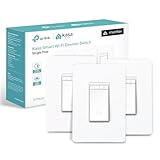
Overview: The Kasa Matter Smart Dimmer Switch 3-Pack represents the next generation of smart lighting, featuring Matter certification for universal smart home compatibility. These single-pole switches support Siri, Alexa, and Google Assistant while enabling offline LAN control when internet connectivity fails. Requiring neutral wiring and 2.4GHz Wi-Fi, the UL-certified devices integrate seamlessly across multiple platforms simultaneously through Matter’s Multi-Admin capability.
What Makes It Stand Out: Matter certification is the defining feature, ensuring these switches work with Apple Home, Alexa, Google Home, and SmartThings without platform lock-in. The offline LAN control functionality maintains operation during internet outages—a critical reliability advantage. Kasa’s Multi-Admin support allows family members using different ecosystems to control the same switch. The guided installation process through the Kasa app remains industry-leading, while Away Mode provides intelligent security simulation.
Value for Money: Priced around $20-25 per switch, this 3-Pack commands a 30% premium over non-Matter alternatives. However, the investment future-proofs your smart home against ecosystem shifts and eliminates compatibility guesswork. For households mixing Apple, Android, and Amazon devices, the universal compatibility eliminates needing multiple brands. Compared to Lutron’s Matter-ready options at $50+ per switch, Kasa delivers similar interoperability at half the cost, making it a mid-range value champion.
Strengths and Weaknesses: Strengths include Matter certification, cross-platform voice control including Siri, offline LAN reliability, and robust scheduling features. The UL certification and trusted Kasa brand inspire confidence. Weaknesses include the smaller 3-pack size versus competitors’ 4-packs, 2.4GHz-only Wi-Fi, and neutral wire requirement that excludes older homes. The initial setup requires understanding Matter pairing across platforms.
Bottom Line: This 3-Pack is the smart choice for tech-forward households wanting platform flexibility and future-proofing. It’s ideal for multi-ecosystem families who prioritize interoperability and offline reliability over maximum unit count.
9. TP-Link Tapo Matter Smart Dimmer Switch: Voice Control w/Siri, Alexa & Google Assistant, UL Certified, Timer & Schedule, Easy Guided Install, Neutral Wire Required, Single Pole, Tapo S505D

Overview: The TP-Link Tapo S505D brings Matter certification to the proven Tapo lineup, offering single-pole smart dimming with universal platform support. This individual switch provides 0-100% brightness control via manual, app, or voice commands through Siri, Alexa, Google Assistant, or Samsung Bixby. Requiring neutral wiring and 2.4GHz Wi-Fi, the UL-certified device leverages the Tapo app for guided installation while ensuring seamless integration across major smart home ecosystems.
What Makes It Stand Out: As a Matter-certified device, the S505D eliminates platform fragmentation, working simultaneously with Apple HomeKit, Alexa, Google Home, and SmartThings. The inclusion of Samsung Bixby support is a rare differentiator. The switch’s simple wiring design mirrors traditional switch installation, reducing electrician costs. TP-Link’s reputation for stable firmware and the Tapo app’s intuitive interface make this an accessible entry point into Matter-enabled smart lighting.
Value for Money: At approximately $20-25 for a single unit, the S505D positions itself as a premium single-switch upgrade. While costing more than non-Matter alternatives, it provides insurance against smart home ecosystem changes. For renters or those testing Matter compatibility, the single-pack format offers low-risk experimentation. Bulk buyers should consider the Kasa Matter 3-Pack for better per-unit pricing, but for targeted replacements, this delivers Matter benefits without over-purchasing.
Strengths and Weaknesses: Strengths include broad Matter-certified compatibility, Bixby voice support, UL safety certification, and TP-Link’s reliable ecosystem. The guided installation and memory function enhance user experience. Weaknesses include the single-unit pricing premium, 2.4GHz Wi-Fi limitation, and neutral wire requirement. The Tapo ecosystem, while growing, offers fewer accessories than Kasa. No three-way support limits installation flexibility.
Bottom Line: The Tapo S505D is perfect for homeowners needing one or two Matter-certified switches to unify mixed-platform households. It’s an excellent test case for Matter adoption before committing to whole-home deployment.
10. Amazon Basics Smart Dimmer Switch, Single Pole, Works with Alexa Only, Voice Control, 2.4 GHz Wi-Fi, No Hub Required, Neutral Wire Required, White

Overview: The Amazon Basics Smart Dimmer Switch delivers no-frills smart lighting exclusively for Alexa households. This single-pole switch provides dimming control through the Alexa app and voice commands, requiring neutral wiring and 2.4GHz Wi-Fi. As an Amazon-branded device, it integrates seamlessly with Alexa routines and the Alexa ecosystem, offering straightforward scheduling and remote control without third-party apps or hubs. The package includes a guided installation video for DIY setup.
What Makes It Stand Out: The Alexa-only design eliminates complexity for dedicated Amazon ecosystem users, enabling setup entirely within the familiar Alexa app. This integration allows sophisticated automation through Alexa routines that combine lighting with other smart devices. The guided installation video provides clearer instruction than static manuals, reducing installation errors. As an Amazon Basics product, it prioritizes simplicity over advanced features, making it accessible to non-technical users who want basic smart dimming without ecosystem confusion.
Value for Money: Priced at $15-18 per switch, this is among the most affordable smart dimmers available. The value proposition hinges entirely on Alexa exclusivity—if you use Alexa, you get reliable smart dimming at budget pricing. However, the lack of Google Home or HomeKit support severely limits flexibility. For Alexa-only homes, it matches premium brands’ core functionality at 60% of the cost. For mixed-platform households, its value drops to near zero due to incompatibility.
Strengths and Weaknesses: Strengths include seamless Alexa integration, straightforward setup, competitive pricing, and reliable performance within its limited scope. The guided video installation is genuinely helpful. Weaknesses are the exclusive Alexa lock-in, no Matter support, 2.4GHz-only connectivity, and requirement for neutral wires. The absence of Google Assistant or Siri support alienates many users, and there’s no offline control during internet outages.
Bottom Line: This switch is ideal for Alexa-loyal households wanting the simplest, most cost-effective path to voice-controlled dimming. It’s a pure play for Amazon ecosystem devotees who prioritize ease-of-use over platform flexibility.
Understanding Smart Dimmer Switch Technology
How Traditional Dimmers Differ From Smart Versions
Traditional dimmers simply reduce voltage flowing to your bulbs through basic circuitry, creating a straightforward but limited experience. Smart dimmers, by contrast, incorporate microprocessors and wireless communication modules that enable remote control, automation, and integration with broader home systems. This fundamental difference means smart dimmers can maintain precise brightness levels, remember your preferences, and respond to schedules or triggers from other devices. The internal components are more complex, requiring careful consideration of power requirements and heat management that never factored into old-school installations.
Wireless Protocols Explained
Your smart dimmer’s communication method determines its reliability, range, and compatibility with other devices. Wi-Fi-enabled switches connect directly to your home network, offering straightforward setup but potentially adding congestion to your bandwidth. Zigbee and Z-Wave alternatives create mesh networks that strengthen as you add more devices, providing excellent reliability even in larger homes. These protocols require a central hub but typically consume less power and respond faster than Wi-Fi counterparts. Some newer models support multiple protocols, giving you flexibility as your smart home evolves.
Hub vs. Hub-Free Operation
The hub debate centers on convenience versus capability. Hub-free dimmers connect directly to your router, eliminating an extra piece of hardware and often reducing initial costs. However, hub-based systems offer superior reliability, faster response times, and the ability to control devices even during internet outages. They also enable more complex automation scenes that involve multiple device types. Consider your home’s size, your tolerance for potential latency, and whether you plan to expand beyond lighting before deciding which approach serves you better.
Key Features to Evaluate
Dimming Range and Smoothness
The difference between a mediocre and exceptional dimming experience lies in the granularity of control. Premium smart dimmers offer thousands of brightness steps rather than dozens, creating imperceptible transitions that feel natural and luxurious. Look for specifications mentioning “smooth start” or “soft on/off” features that gradually ramp power instead of jarringly snapping to the desired level. The lowest dimming point matters too—quality switches can dim LEDs to nearly imperceptible glows without flickering, while inferior models bottom out at 10-20% brightness, limiting your ability to create true nightlight effects.
Minimum Load Requirements
This technical specification often trips up first-time buyers. Smart dimmers require a minimum wattage load to function properly—typically 10-25 watts. If you’re controlling a single LED bulb that consumes only 8 watts, the dimmer may flicker, behave erraticallyically, or fail to turn off completely. Some advanced models feature adjustable minimum load settings or built-in load resistors to accommodate low-wattage LED installations. Always calculate your total bulb wattage and compare it against the dimmer’s requirements before purchasing.
Multi-Way Switching Support
Staircases, hallways, and large rooms often have multiple switches controlling the same light fixture. Smart dimmers handle this differently than traditional three-way setups. Some require companion switches at each location, creating a dedicated communication network between devices. Others work with your existing mechanical switches but may limit functionality at secondary locations. Understanding your current wiring configuration and desired control points prevents the frustration of discovering your new dimmer won’t work with that second switch by the garage door.
Scene Setting and Automation Capabilities
The true power of smart dimming emerges when you move beyond manual control. Evaluate how easily the switch integrates with automation platforms and how many scenes it can store internally. Does it support fade durations? Can it trigger based on time of day, occupancy sensors, or external events like sunset? The ability to create nuanced lighting programs—bright white light for morning routines, warm dimmed light for evening relaxation—transforms your home from simply automated to intelligently responsive.
Compatibility Considerations
Bulb Type Compatibility
Not all dimmers work with all bulbs, and mismatched pairings create frustrating performance issues. LED bulbs require specifically designed LED-compatible dimmers that understand their unique electrical characteristics. Even within LED categories, compatibility varies between standard bulbs, smart bulbs, and fixtures with integrated LEDs. Some dimmers maintain compatibility databases listing tested bulb models, while others use adaptive technology to learn and optimize performance with your specific bulbs. Always verify compatibility with your exact bulb type and brand before committing.
Voice Assistant Integration
Seamless voice control requires more than basic compatibility claims. Investigate whether the dimmer supports natural language commands like “set the lights to movie mode” or requires clunky, specific phrasing. Check if it appears as a dimmable light in your assistant’s app or as a generic on/off switch. Multi-language support, response speed, and the ability to control multiple switches simultaneously through group commands all impact daily usability. Some dimmers even support presence detection through smart speakers, automatically adjusting lights when you enter a room.
Existing Smart Home Ecosystem Fit
A dimmer that works perfectly in isolation but creates friction within your broader smart home ecosystem causes more problems than it solves. Consider how it integrates with your security system, thermostat, and other smart devices. Can your “goodnight” routine simultaneously lock doors, adjust temperature, and dim lights to zero? Does it support the same automation platform (like SmartThings, Hubitat, or Home Assistant) that your other devices use? Ecosystem lock-in is real—choosing dimmers that play well with your existing investments prevents fragmentation and simplifies management.
Neutral Wire Requirements
Many older homes lack neutral wires in switch boxes, creating a significant installation hurdle. While some smart dimmers work without a neutral by allowing a small current to pass through the bulb even when off, this approach can cause LED bulbs to glow faintly in the off state. Neutral-wire-required dimmers offer more reliable performance and broader bulb compatibility but may necessitate electrical rewiring. Before shopping, remove your existing switch plate to verify neutral wire availability or be prepared to select from the more limited pool of no-neutral-compatible options.
Installation Requirements
Single-Pole vs. Multi-Location Wiring
Your home’s wiring topology directly impacts which dimmer models will work. Single-pole configurations—one switch controlling one light—offer the simplest installation and broadest product selection. Multi-location setups involving three-way, four-way, or more complex arrangements require compatible dimmer systems. Some manufacturers offer dedicated companion switches that communicate wirelessly, while others allow you to keep existing mechanical switches in secondary locations. Understanding your current wiring scheme, including traveler wire configurations, prevents purchasing incompatible hardware that can’t be returned once opened.
Neutral Wire Availability
We’ve touched on this in compatibility, but installation deserves deeper consideration. If your home lacks neutral wires, you’re limited to specific no-neutral dimmer models that pass leakage current through the bulb. These work best with incandescent or halogen loads and can cause LED ghosting. Alternatively, you might need to run new neutral wires—a project that ranges from simple fishing wire through conduit to opening walls in finished spaces. Some electricians can retrofit neutrals using clever routing through attic or basement spaces, but this adds cost. Weigh the expense of rewiring against the performance limitations of no-neutral dimmers.
Professional vs. DIY Installation
Smart dimmer installation sits at the intersection of homeowner capability and safety considerations. If you’re comfortable with basic electrical work—turning off breakers, using voltage testers, and connecting wire nuts—many smart dimmers offer straightforward installation with clear diagrams. However, complications arise with older wiring, aluminum wires, shallow electrical boxes, or when neutrals need to be added. Professional installation typically costs $50-150 per switch but includes troubleshooting, proper grounding verification, and peace of mind. Many jurisdictions require licensed electricians for any electrical work, and improper installation can void home insurance policies.
Electrical Box Depth Considerations
Smart dimmers pack considerable technology into their housings, making them deeper than traditional switches. Standard electrical boxes may be too shallow, especially if they’re already crowded with wires. Measure your box depth and compare it against dimmer specifications, which typically range from 1.5 to 2.5 inches deep. Some manufacturers offer low-profile models specifically for shallow boxes. You might need to replace existing boxes with deeper “old work” boxes—a task that requires cutting drywall and potentially repairing plaster. Factor this into your project timeline and budget, especially when retrofitting older homes.
Control Options and User Experience
Physical Switch Design and Feel
Despite our digital world, you’ll still interact physically with your dimmer dozens of times daily. Premium switches offer satisfying tactile feedback—smooth paddle action, subtle detents at common brightness levels, and quiet operation. Some feature capacitive touch surfaces with customizable LED indicators, while others maintain traditional toggle aesthetics with hidden smart capabilities. Consider switch behavior during power outages: does it remember its last state or default to off? The physical design should complement your home’s style while providing intuitive control for guests and family members who aren’t invested in your smart home vision.
App Interface Quality
The companion app becomes your primary programming interface, so its quality significantly impacts long-term satisfaction. Look for clean, intuitive layouts that don’t bury essential functions in nested menus. Does the app offer quick brightness sliders, scene management, and scheduling in an easily accessible format? Check app store reviews for mentions of stability issues, slow performance, or poor update support. Some manufacturers abandon app development after launch, leaving you with buggy software that never improves. The best apps work equally well on phones and tablets, support multiple users with permission controls, and offer backup/restore functionality for your carefully crafted scenes.
Voice Control Capabilities
Beyond basic on/off commands, advanced dimmers understand nuanced voice instructions. Can you ask for specific brightness percentages, gradual transitions over time periods, or activation of named scenes? Some integrate with voice assistants to provide status responses (“The living room lights are at 73%”). Consider latency—how quickly does the light respond after you speak? Also evaluate offline functionality: if your internet fails, do voice commands through local network control still work? The most sophisticated dimmers support multiple voice platforms simultaneously, letting you switch assistants without replacing hardware.
Remote Access and Scheduling
True smart lighting means control from anywhere, not just within your home. Evaluate the dimmer’s remote access architecture—does it require a cloud subscription, or is it free for life? Cloud-dependent systems leave you helpless during internet outages or if the manufacturer discontinues service. Locally-controlled options with optional remote access provide better reliability and privacy. Scheduling capabilities should include astronomical timing (sunset/sunrise based on your location), randomization features for security while traveling, and conditional logic that adjusts behavior based on other triggers like door sensors or weather conditions.
Energy Efficiency and Performance Metrics
Power Consumption in Standby Mode
Smart dimmers consume electricity even when lights are off to maintain their wireless connections and listening capabilities. This phantom load typically ranges from 0.5 to 2 watts—seemingly negligible but adding up across dozens of switches over years. More efficient models use less than 0.8 watts, while power-hungry units can exceed 2.5 watts. Calculate the long-term cost: a 2-watt dimmer running 24/7 costs about $2.50 annually at average electricity rates. Across 20 switches, that’s $50 per year in standby costs alone. Energy-conscious manufacturers prominently display standby power specifications.
LED Optimization Features
LED bulbs present unique challenges for dimmers due to their low power draw and electronic drivers. Advanced dimmers include adjustable dimming curves that compensate for LED behavior at low brightness levels. Look for features like “bulb setup modes” that automatically detect and calibrate to your specific LEDs, eliminating flicker and ensuring smooth operation across the entire dimming range. Some dimmers also provide adjustable ramp rates—the speed at which lights brighten or dim—which can be tuned to complement LED response characteristics. These optimizations separate premium dimmers from basic models that treat all bulb types identically.
Energy Monitoring Capabilities
Some smart dimmers include built-in power monitoring that tracks real-time and cumulative energy consumption. This data reveals which lights you use most, helps identify inefficient bulbs, and can even alert you to fixtures left on accidentally. The granularity of monitoring matters—basic models show current wattage, while advanced versions track usage patterns, calculate costs, and generate monthly reports. Integration with home energy management systems allows dimmers to automatically reduce brightness during peak rate periods, maximizing utility bill savings. Consider whether the monitoring data remains local or gets uploaded to manufacturer servers, impacting both privacy and accessibility.
Heat Dissipation and Safety
The electronics in smart dimmers generate heat, particularly when controlling high-wattage loads or operating at partial brightness. Quality switches include heat sinks and thermal protection that automatically derate performance if temperatures climb too high. This prevents premature failure and fire hazards. Check the operating temperature range specification, especially if installing in poorly ventilated areas or hot climates. Metal wall plates dissipate heat better than plastic, and some dimmers actively monitor internal temperatures, sending alerts if conditions become unsafe. Never install a dimmer in a sealed box or cover it with insulation—these devices need airflow to operate safely.
Design and Aesthetic Factors
Switch Style and Finish Options
Smart dimmers should blend with your home’s design language, not scream “gadget.” Manufacturers offer various styles: traditional toggle switches with hidden intelligence, modern Decora paddles, minimalist touch panels, and even vintage push-button designs. Finish options extend beyond basic white and almond to include matte black, brushed nickel, brass, and custom colors. Some premium lines offer interchangeable faceplates, letting you update your look without replacing the entire switch. Consider how the switch’s LED indicators behave—some remain constantly lit, others illuminate only when touched, and a few allow complete disablement for bedroom installations where any light is disruptive.
LED Indicator Behavior
Those tiny LEDs on smart switches provide valuable feedback but can become annoyances in dark spaces. Evaluate whether indicators are configurable—can you adjust brightness, change colors to indicate status, or turn them off entirely? Some switches use multi-color LEDs to communicate different states: blue for connected, red for disconnected, green for a specific scene active. The indicator’s position matters too—top-mounted LEDs reflect off white walls, creating unwanted ambient light. Side-mounted or recessed indicators minimize light pollution. For bedrooms and media rooms, seek dimmers with “sleep mode” that disables all LEDs during specified hours.
Customization and Personalization
Advanced dimmers let you tailor behavior to your lifestyle. Can you adjust the default brightness when manually tapping the switch? Some models allow you to set different default levels for different times of day—bright in morning, dim in evening. Customizable fade rates let you specify how quickly lights respond to commands, from instant snap changes to leisurely 30-second transitions. The most sophisticated options support user profiles, giving each family member their preferred settings. Consider whether these customizations are stored locally on the switch or in the cloud, affecting both response speed and privacy.
Gang Box Configuration Support
Most homes have multiple switches ganged together in single boxes. Smart dimmer width becomes critical here—bulkier models may not fit side-by-side. Measure your gang box dimensions and check manufacturer specifications for multi-gang installation. Some brands offer reduced-depth or narrow-width versions specifically for tight configurations. Also consider how multiple smart switches interact when physically adjacent—do they create radio interference? Do their LED indicators create confusing light patterns? The best systems coordinate behavior, allowing you to create unified scenes across multiple switches in the same box while maintaining independent control.
Security and Privacy Considerations
Data Transmission Encryption
Your dimmer switch knows when you’re home, awake, and following routines—valuable data that deserves protection. Verify that the switch uses modern encryption (AES-128 or higher) for all communications, whether local or cloud-based. Some devices transmit data in plain text, making them vulnerable to network snooping. Look for mentions of “end-to-end encryption” or “TLS/SSL” in technical specifications. The most privacy-conscious options keep all control local, sending nothing to external servers. Remember, even seemingly innocuous lighting data can reveal vacation schedules, sleep patterns, and daily routines to malicious actors.
Local vs. Cloud Control
Cloud dependency introduces multiple failure points: internet outages, manufacturer server downtime, and potential service discontinuation. Locally-controlled dimmers operate through hub-based systems or direct Wi-Fi/LAN connections, functioning even when your ISP fails. They also respond faster and keep your data within your home network. However, remote access becomes more complex, often requiring VPN setup or port forwarding. Cloud-based systems offer effortless remote control and simpler setup but sacrifice privacy and reliability. The ideal solution provides local control with optional, encrypted cloud access for remote management.
Firmware Update Practices
Smart devices require updates for security patches and feature improvements, but update mechanisms vary widely. Some manufacturers push updates automatically without notification, potentially breaking functionality at inopportune times. Others let you schedule updates during maintenance windows. Investigate the manufacturer’s track record—do they support devices with updates for years, or abandon older models? The best practice involves manual update approval with detailed changelogs explaining what’s new. Also consider whether updates can be applied locally or require cloud connectivity, affecting your ability to maintain security on an isolated network.
Network Security Best Practices
Your dimmer switch shouldn’t become a gateway for hackers into your home network. Look for devices that support VLAN separation, allowing you to isolate smart home devices from personal computers and phones. Some switches offer guest network isolation, preventing compromised devices from accessing your primary network. The setup process should require strong password creation and support two-factor authentication for app access. Avoid dimmers with hardcoded default credentials or those that don’t allow password changes. Regular security audits by independent researchers indicate manufacturers who take security seriously rather than treating it as an afterthought.
Budget and Value Assessment
Initial Purchase Price Factors
Smart dimmer prices span from budget-friendly to luxury-tier, but cost correlates with features and quality. Basic models offer simple on/off/dim functionality with app control. Mid-range options add better build quality, broader compatibility, and advanced features like energy monitoring. Premium dimmers justify their price through exceptional dimming performance, robust automation engines, and premium materials. Consider the cost per controlled circuit—multi-button panels controlling multiple zones may offer better value than individual switches. Also factor in required accessories like companion switches for multi-way setups or faceplates sold separately.
Long-Term Cost Considerations
The purchase price tells only part of the story. Calculate total cost of ownership including standby power consumption, potential subscription fees for advanced features or cloud storage, and expected lifespan. A $30 dimmer that fails after two years costs more than a $60 model that lasts a decade. Some manufacturers charge for firmware updates after a warranty period or lock energy monitoring data behind paywalls. Also consider the cost of replacing incompatible bulbs—the “perfect” dimmer might require you to replace $200 worth of LED bulbs to achieve flicker-free performance, negating any savings.
Multi-Pack Savings Strategies
Outfitting an entire home requires many switches, making bulk purchasing attractive. Many manufacturers offer 3-packs, 10-packs, or contractor packs at significant discounts—sometimes 20-30% less than individual units. However, buying in bulk commits you to one model, so verify it meets all your needs through a single-switch test first. Some retailers offer mix-and-match multi-buy discounts, letting you combine different switch types (dimmer, on/off, fan control) while still saving. Consider coordinating purchases with neighbors or friends to qualify for contractor pricing, which often requires buying 50+ units.
Warranty and Support Value
A generous warranty indicates manufacturer confidence and protects your investment. Standard warranties range from one to five years, with premium brands offering lifetime coverage. Read the fine print—some warranties require professional installation for validity, while others exclude certain bulb types or usage patterns. Evaluate support quality before buying: test the manufacturer’s help line with pre-purchase questions, check community forum activity, and review their responsiveness on social media. Companies with active user communities and detailed knowledge bases provide better long-term support than those offering only email tickets that go unanswered for weeks.
Future-Proofing Your Investment
Emerging Protocol Support
The smart home landscape evolves rapidly, with new standards like Matter promising universal compatibility. While no device is truly future-proof, selecting dimmers from manufacturers who actively support emerging protocols extends useful lifespan. Look for brands that have committed to firmware updates adding new protocol support rather than forcing hardware upgrades. Some dimmers include modular radio designs allowing you to swap communication modules as standards change. Consider whether the switch supports over-the-air updates and has sufficient processing power to handle new features—underpowered devices may technically “support” new protocols but perform poorly.
Firmware Update Commitment
A dimmer’s feature set should expand over time, not stagnate. Research manufacturers’ update histories—do they consistently add features, improve performance, and patch security vulnerabilities years after release? The best companies maintain public roadmaps and engage with user communities to prioritize improvements. Avoid brands that treat firmware as static or charge for basic feature updates. Check whether updates are reversible; a bad update can brick devices, but the ability to rollback provides safety. Also verify that updates don’t reset your custom scenes and settings, forcing tedious reconfiguration.
Expandability and Scalability
Your lighting needs will grow and change. Choose dimmers that work within expandable ecosystems supporting hundreds of devices without performance degradation. Some mesh networks slow down as you add more nodes, while others become more robust. Consider whole-home coverage—can you add signal repeaters if needed? Does the system support advanced features like zoning, grouping, and conditional logic once you have dozens of switches? The ability to start with a few switches and gradually build a sophisticated system without replacing early purchases saves money and prevents frustration.
Backward Compatibility Assurance
As you upgrade other smart home components, your dimmers should remain compatible. Manufacturers who maintain backward compatibility across product generations protect your investment. This means a 2024 dimmer should still communicate with your 2020 hub and respond to commands from your 2025 voice assistant. Look for companies with track records of supporting legacy devices—even their first-generation products still receive updates. Avoid proprietary ecosystems that lock you into one manufacturer’s complete product line, limiting your ability to shop for better or more affordable alternatives in other categories.
Frequently Asked Questions
Will smart dimmer switches work with my existing LED bulbs?
Compatibility varies significantly between dimmer models and LED brands. Most quality smart dimmers work with the majority of modern LED bulbs, but some combinations cause flickering, limited dimming range, or failure to turn off completely. Check the dimmer manufacturer’s compatibility list for your specific bulb models. If unavailable, purchase one dimmer to test with your bulbs before committing to a whole-house installation. Dimmers with adjustable minimum load settings or automatic bulb calibration features offer the best compatibility across different LED types.
Do I need a neutral wire for installation?
Many smart dimmers require a neutral wire for proper operation, but several models are designed to work without one. No-neutral dimmers allow a small current to pass through the bulb even when off, which can cause some LED bulbs to glow faintly. Check your switch box by removing the cover plate—neutral wires are typically white and bundled together. If you lack neutrals, choose a no-neutral compatible dimmer or budget for electrical rewiring. No-neutral options work best with incandescent bulbs or higher-wattage LED loads.
Can I install smart dimmers myself or do I need an electrician?
If you’re comfortable turning off breakers, using a voltage tester, and connecting three wires, many smart dimmers offer straightforward DIY installation with clear instructions. However, complications arise with older wiring, aluminum wires, shallow boxes, or multi-way circuits. Many jurisdictions require licensed electricians for any electrical work, and improper installation can void insurance. Professional installation typically costs $50-150 per switch but includes troubleshooting and safety verification. When in doubt, consult a professional—electrical work carries real risks.
What’s the difference between hub-based and hub-free dimmers?
Hub-free dimmers connect directly to your Wi-Fi network, offering simple setup without extra hardware. They work well for small installations but can congest your Wi-Fi and typically require cloud connectivity. Hub-based systems using Zigbee or Z-Wave create mesh networks that become more reliable as you add devices, respond faster, and work during internet outages. They require a central hub but offer superior performance for whole-home setups and more complex automation. Choose based on your home size, existing smart home ecosystem, and tolerance for potential cloud dependency.
How many dimmer switches can I have on one circuit?
Technically, you can have multiple dimmers controlling separate lights on the same electrical circuit, but you cannot have two dimmers controlling the same light fixture in a standard setup. For multi-location control of one light (like staircases with switches at top and bottom), you need a master dimmer and compatible companion switches that communicate wirelessly or through traveler wires. Always check the dimmer’s specifications for maximum load capacity and ensure your total bulb wattage across all switches on the circuit doesn’t exceed circuit breaker limits.
Will smart dimmers save money on electricity bills?
Smart dimmers can reduce energy consumption by 20-60% depending on usage patterns, but their own standby power consumption partially offsets savings. The biggest efficiency gains come from scheduling lights off when not needed, dimming to appropriate levels rather than full brightness, and integrating with occupancy sensors. Energy monitoring features help identify waste and optimize usage. While individual savings may seem small, whole-home implementation typically reduces lighting electricity costs by 30-40%, with payback periods of 2-4 years depending on local electricity rates and usage habits.
What happens to smart dimmers during a power outage?
Most smart dimmers default to off when power is restored, though some remember their last state. During the outage, they obviously cannot control lights without electricity. Battery-backed smart switches exist but are rare and expensive. Hub-based systems with local control resume normal operation once power returns, while cloud-dependent models may need time to reconnect. Consider this when using smart lighting for security—install one mechanical switch as backup for critical areas. Some advanced systems can send power outage notifications if connected to an uninterruptible power supply.
Can guests use smart dimmer switches without the app?
Quality smart dimmers function as normal switches for manual operation, allowing guests to tap or hold for on/off/dim functionality without needing app access. The physical control experience should feel intuitive and responsive. Some models offer “guest modes” that restrict app access or provide temporary control through QR codes. Consider switches with clear visual feedback like LED level indicators that help guests understand current brightness. For rental properties or Airbnbs, choose dimmers with simple operation and the ability to disable advanced features that might confuse temporary occupants.
How long do smart dimmer switches typically last?
Quality smart dimmers should last 10-15 years, similar to traditional switches, though their smart features may become obsolete sooner. Mechanical components like paddles and buttons typically wear out before electronics. Firmware support from manufacturers often ends after 5-7 years, potentially leaving security vulnerabilities. Look for brands with track records of long-term support and hardware designed for durability. Premium models use higher-grade components that better withstand heat and electrical stress. A robust warranty (3+ years) suggests manufacturer confidence in longevity.
Do smart dimmers work with ceiling fans or other appliances?
Standard smart dimmers are designed exclusively for lighting loads and will damage motors or other appliances if misused. Ceiling fans require specialized fan speed controllers that handle inductive loads differently. However, some smart switches offer dual functionality—one product line supporting both dimming and fan control through different wiring configurations. Always verify the switch is rated for your specific load type. For appliances like coffee makers or space heaters, use smart on/off switches, not dimmers. Attempting to dim non-lighting loads creates fire hazards and will void warranties.
See Also
- The 10 Best Dimmer Switches Every DIY Enthusiast Needs This Year
- 10 Essential Dimmer Switches with Remote Control Every Smart Home Needs in 2026
- 10 Best Smart Dimmer Switches for Home Automation Enthusiasts This Year
- We Tested 50 Smart Dimmer Switches - Here are the 10 Best for Home Use
- We Tested 50 Smart Dimmer Switches - Here are the 10 Best for Home Integration