Table of Contents
Smart lighting has evolved from a luxury into a cornerstone of modern home automation, and Z-Wave technology sits at the heart of this transformation. As we look toward 2026, homeowners are increasingly demanding lighting solutions that offer not just remote control, but true integration with broader smart home ecosystems. Z-Wave lighting controllers provide that critical bridge, enabling your light switches, dimmers, and fixtures to communicate seamlessly with security systems, thermostats, and voice assistants while maintaining rock-solid reliability.
Choosing the right Z-Wave lighting controller, however, requires navigating a complex landscape of technical specifications, compatibility requirements, and evolving standards. Whether you’re building your first smart home or upgrading an existing Z-Wave network, understanding what separates exceptional controllers from mediocre ones will save you countless headaches and ensure your investment remains relevant for years to come. This comprehensive guide breaks down everything you need to know to make informed decisions without getting lost in technical jargon.
Top 10 Z-Wave Lighting Controllers
Detailed Product Reviews
1. Zooz 800 Series Z-Wave Long Range Scene Controller ZEN32 800LR, White | Z-Wave Hub Required

Overview: The Zooz ZEN32 800LR is a versatile 5-button scene controller that combines direct light fixture control with comprehensive scene management. It features a main button for controlling up to 150W of LED lighting and four additional programmable buttons for triggering scenes throughout your Z-Wave network. Built on the latest 800 series chip, it supports both traditional mesh networking and new Z-Wave Long Range technology for extended coverage.
What Makes It Stand Out: This device eliminates the need for add-on switches in 3-way configurations—a rare feature that simplifies installation and reduces costs. The 800 series Z-Wave chip delivers superior signal coverage and faster communication, while S2 authenticated security and SmartStart ensure effortless pairing. The five-button layout provides immediate physical control over multiple devices without opening an app.
Value for Money: Priced competitively for a multi-function controller, the ZEN32 effectively replaces separate devices for load control and scene activation. The direct 3-way capability saves $20-40 per auxiliary switch location, making it economical for larger installations. However, its hub-specific compatibility limits universal appeal.
Strengths and Weaknesses: Strengths include the innovative direct 3-way wiring, robust 800 series hardware with S2 security, SmartStart pairing, and versatile button programming. Weaknesses are the mandatory neutral wire requirement, limited 150W LED capacity, and restricted hub compatibility—avoid if your hub isn’t explicitly supported.
Bottom Line: Ideal for SmartThings, Hubitat, Home Assistant, or HomeSeer users seeking consolidated control. The ZEN32 excels in multi-way lighting setups and delivers exceptional value for whole-room scene management.
2. Minoston 800 Series Z-Wave Scene Controller, 4 ZWave Button, Zwave Plus Wall Switch Remote Control, Support Long Range, Work with Z Wave Hubs (MR40Z)

Overview: The Minoston MR40Z is a battery-powered Z-Wave scene controller featuring four programmable buttons for triggering smart home scenes. It leverages the 800 series Z-Wave chip for enhanced signal penetration and can be installed virtually anywhere without wiring. This device acts as a remote control for your entire Z-Wave ecosystem when paired with a compatible hub.
What Makes It Stand Out: True wireless freedom sets this device apart—powered by battery with a magnetic base, it attaches to any flat surface or fits in standard switch boxes. The 800 series chip provides superior range and interference resistance, while supporting 16 total scenarios (four scenes per button). S2 security certification and SmartStart technology ensure robust, easy pairing with legacy Z-Wave devices.
Value for Money: As an affordable battery-powered controller, it eliminates electrician costs and drywall work. It’s perfect for renters or those wanting temporary control points. While replacement batteries add minor ongoing cost, the installation savings far outweigh this. However, it’s a scene-only device, not a load controller, so you’ll need separate switches for actual lighting control.
Strengths and Weaknesses: Strengths include effortless installation, flexible magnetic mounting, excellent 800 series performance, and portability. Weaknesses involve periodic battery replacement, limited hub compatibility, and lack of direct load control—it’s purely a remote. Basic Z-Wave systems may not support full scene programming.
Bottom Line: An excellent choice for adding convenient scene triggers anywhere. Best suited for SmartThings, HomeSeer, or Home Assistant users who need flexible, wire-free control without modifying electrical circuits.
3. Zooz 800 Series Z-Wave Long Range Dimmer & Scene Controller ZEN35 800LR, White | Z-Wave Hub Required

Overview: The Zooz ZEN35 800LR combines a dimmer switch and scene controller into one sleek device. It controls 120V light fixtures up to 150W for LEDs while offering up to seven button triggers for scene activation. Like other Zooz 800 series devices, it requires a compatible Z-Wave hub and supports both traditional mesh and new Long Range technology for extended coverage. This dual-purpose device reduces wall clutter by handling both local lighting and network-wide scene control.
What Makes It Stand Out: This hybrid device eliminates the need for separate dimmer and scene controllers, streamlining wall space and installation complexity. The 800 series chip ensures exceptional signal coverage, faster communication, and reliable S2 authenticated security. It supports both on/off and dimming functions for the connected load while simultaneously providing multi-button scene control through its main paddle and additional triggers.
Value for Money: Consolidating two devices into one represents solid value, reducing both equipment costs and installation labor. The 800 series future-proofs your investment with Long Range support. However, the limited feature description raises questions about 3-way compatibility and button configuration compared to the more detailed ZEN32 model.
Strengths and Weaknesses: Strengths include dual dimming/scene control functionality, robust 800 series hardware, SmartStart pairing, and space-saving design. Weaknesses are sparse product details, 150W LED limitation, mandatory neutral wire, and hub-specific compatibility. Without confirmed 3-way support, its versatility is uncertain.
Bottom Line: A compelling option for users needing both dimming and scene control from one gang. Verify hub compatibility and wiring requirements before purchasing, especially if multi-way switching is needed.
4. Zooz 800 Series Z-Wave Long Range Remote Control & Scene Controller ZEN34 (Battery Powered), White | Z-Wave Hub Required

Overview: The Zooz ZEN34 is a battery-powered remote and scene controller offering ultimate installation flexibility. It features two paddles that function as remote buttons to trigger scenes and control other Z-Wave devices. Built on the 800 series chip, it supports Long Range technology up to 1300 feet when paired with compatible hubs, providing ultra-reliable connectivity throughout large properties.
What Makes It Stand Out: This device provides true wireless freedom—install it in an existing switch box or magnetically attach it to any flat surface without any wiring. The 800 series hardware delivers exceptional range and reliability, while S2 authenticated security and SmartStart simplify setup. It’s perfect for adding three-way functionality or scene control anywhere you lack proper wiring, acting as a remote control for your entire Z-Wave network.
Value for Money: As an affordable battery-powered solution, it eliminates costly electrical work while providing premium 800 series performance. The versatility justifies the price, though ongoing battery replacement adds minimal long-term cost. It’s ideal for renters or historical homes where electrical modifications are prohibited, saving hundreds in professional installation fees.
Strengths and Weaknesses: Strengths include completely wireless operation, flexible magnetic mounting, excellent 800 series range, and easy installation. Weaknesses are battery maintenance, lack of direct load control, and limited hub compatibility. The device won’t work with basic Z-Wave systems or SmartThings without custom configuration.
Bottom Line: Perfect for adding convenient control points anywhere without wiring. Best for Home Assistant, Hubitat, HomeSeer, or Z-Box Hub users who need flexible scene triggers or three-way solutions in impossible locations.
5. Z-Stick 10 Pro - Zigbee 3.0 & Z-Wave 800 Series USB Adapter - Works with HomeAssistant - Zigbee2MQTT - Z-Wave Controller - Z-Wave Long Range - Up to 1 Mile Wireless Range - cloudfree

Overview: The Z-Stick 10 Pro is a dual-protocol USB adapter supporting both Z-Wave 800 Series Long Range and Zigbee 3.0. Designed for Home Assistant and other open platforms, it enables control of over 8,000 devices from the largest smart home ecosystems. Its slim, compact design prevents blocking adjacent USB ports on your host device, making it ideal for compact setups like Raspberry Pi installations.
What Makes It Stand Out: This is one of the first adapters to combine cutting-edge Z-Wave 800 LR technology—offering up to one-mile range—with a robust Zigbee 3.0 radio. The EFR32ZG23 and EFR32MG21 chips represent the latest in silicon technology, ensuring maximum performance and future compatibility. It supports Z-Wave JS, Zigbee2MQTT, and Open Z-Wave without cloud dependency, giving users complete local control.
Value for Money: Consolidating two premium radios into one compact device at a mid-range price point delivers exceptional value. It eliminates the need for separate Z-Wave and Zigbee sticks, saving money and USB ports. The 800 series LR future-proofs your setup as more Long Range devices enter the market. For Home Assistant users, it’s a one-stop solution that avoids multiple adapter clutter.
Strengths and Weaknesses: Strengths include dual-protocol support, extreme Z-Wave range, wide compatibility, compact non-blocking design, and cloud-free operation. Weaknesses involve software setup complexity requiring technical knowledge, and it functions solely as a coordinator—no standalone operation. Performance depends heavily on host system resources.
Bottom Line: Essential for advanced users building multi-protocol smart homes. The Z-Stick 10 Pro offers unparalleled flexibility and future-proofing, making it the best choice for Home Assistant enthusiasts wanting both Z-Wave LR and Zigbee in one device.
6. GE Enbrighten Z-Wave Plus Smart Switch Plug-In, 2 Simultaneously Controlled Z-Wave Outlets, Works with Alexa, Google Assistant, Repeater/Range Extender, ZWave Hub Required, 14282, White

Overview: The GE Enbrighten plug-in smart switch provides dual Z-Wave outlets for simultaneously controlling two devices without wiring. Ideal for renters or smart home beginners, it converts standard lamps and small appliances into voice-controlled devices via Alexa or Google Assistant (through a Z-Wave hub). The unit doubles as a Z-Wave repeater, extending mesh network coverage. Compatible with SmartThings, Ring, Wink, and other major hubs, it integrates seamlessly into existing ecosystems.
What Makes It Stand Out: Simultaneous dual-outlet control in a single plug-in device is rare, effectively offering two smart outlets at once. Its built-in repeater functionality adds network value beyond basic switching. The space-saving design leaves the adjacent wall outlet free—a thoughtful solution to bulky smart plugs. Operating across 32-104°F, it handles varied indoor environments from basements to sunrooms.
Value for Money: Competitively priced against single-outlet alternatives, this delivers two controlled outlets plus a Z-Wave repeater, making it a strong value. The cost is substantially lower than installing two in-wall switches. However, the inability to control outlets independently limits flexibility, potentially reducing value for users needing separate device control. For mesh network expansion, the repeater feature alone justifies the price.
Strengths and Weaknesses: Pros: No wiring required; dual simultaneous control; Z-Wave repeater; compact design; broad hub compatibility Cons: Cannot control outlets individually; requires Z-Wave hub; limited to small appliances; no energy monitoring
Bottom Line: Perfect for Z-Wave users wanting to smarten two devices simultaneously without electrical work. The repeater functionality adds network value, but lack of individual outlet control limits flexibility for some applications.
7. Zooz Z-Wave Long Range Smart Lighting XS Relay ZEN57 800LR | Z-Wave Hub Required (Sold Separately)

Overview: The Zooz ZEN57 is an ultra-compact Z-Wave relay designed for installations where space is at a premium or neutral wires are absent. This dry-contact switch module fits inside light fixtures or crowded electrical boxes, making it perfect for older homes. Supporting up to 150W of LED lighting, it enables smart control without replacing existing switches. The 800LR range and S2 security protocol represent the latest Z-Wave technology.
What Makes It Stand Out: Its diminutive size sets it apart—small enough to install directly at the fixture when your switch box lacks neutral. The dry contact input accepts any standard toggle or momentary switch, preserving your preferred aesthetic. Advanced features like smart bulb mode and central scene control (hub-dependent) offer customization rarely seen in basic relays. The 800LR range significantly extends network reach compared to older Z-Wave devices.
Value for Money: As a specialized component, it’s priced fairly for its advanced capabilities and compact engineering. The five-year extended warranty (with registration) adds long-term value. While more expensive than basic relays, the space-saving design and latest Z-Wave technology justify the premium. It’s particularly cost-effective for retrofits where rewiring would be prohibitively expensive.
Strengths and Weaknesses: Pros: Extremely compact; dry contact input; 800LR range; S2 security; smart bulb mode; excellent warranty Cons: 150W LED limit; requires hub; no dimming; complex for beginners; switch compatibility limitations
Bottom Line: Perfect for advanced DIYers tackling challenging installations in older homes or tight spaces. The compact size and advanced features justify the learning curve, but beginners may find installation tricky.
8. UltraPro 700 Series Add-On Switch QuickFit and SimpleWire, in-Wall White Rocker Paddle Only, Z-Wave ZigBee Wireless Smart Lighting Controls, NOT A STANDALONE Switch, 2 Pack, 68899

Overview: This two-pack of add-on switches expands your existing smart lighting controls to three-way and multi-location setups. Designed exclusively as companions to primary smart switches, these units enable control from up to five locations. The QuickFit and SimpleWire technologies address common installation frustrations in older or crowded electrical boxes. Compatible with Z-Wave, ZigBee, and Wi-Fi systems from Enbrighten and UltraPro.
What Makes It Stand Out: The revolutionary 20% housing depth reduction solves a major pain point in multi-gang or shallow box installations. SimpleWire’s offset ground ports eliminate interference with mounting screws—a small but significant innovation. Supporting both 120VAC residential and 277VAC light-commercial applications provides unusual versatility. The interchangeable paddles (white and light almond included) offer aesthetic flexibility.
Value for Money: The two-pack offers solid value for multi-location projects, costing less than purchasing individually. As add-ons, they’re priced reasonably compared to buying additional primary smart switches. The time and frustration saved during installation in challenging boxes adds hidden value. However, they provide no standalone functionality, representing sunk cost if you lack compatible primary switches.
Strengths and Weaknesses: Pros: Space-saving design; innovative wiring; commercial voltage rating; paddle options; multi-protocol compatibility Cons: Not standalone; requires specific primary switches; limited to Enbrighten/UltraPro ecosystem; no smart features alone
Bottom Line: Essential for expanding Enbrighten/UltraPro smart switch setups to multiple locations. The space-saving design is invaluable for tricky installations, but ensure compatibility with your existing primary switches first.
9. Enbrighten Add-On Switch QuickFit and SimpleWire, In-Wall Rocker Paddle, Z-Wave ZigBee Wireless Smart Lighting Controls, NOT A STANDALONE Switch, 46199 , White and Light Almond
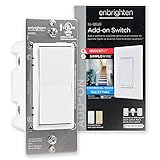
Overview: This single add-on switch extends your smart lighting control to additional locations in three-way or multi-switch configurations. It works exclusively with compatible Enbrighten and UltraPro smart switches, dimmers, or fan controls across Z-Wave, ZigBee, and Wi-Fi protocols. The QuickFit design reduces housing depth by 20%, while SimpleWire technology simplifies installation in cramped electrical boxes. Rated for both residential (120VAC) and light-commercial (277VAC) use.
What Makes It Stand Out: The QuickFit and SimpleWire innovations directly address the most common installation headaches—deep housings and screw interference. Unlike many add-ons limited to one protocol, this works across Wi-Fi, Z-Wave, and ZigBee primary switches. The universal voltage rating opens light-commercial applications rarely seen in consumer smart switches. Removable paddles in white and light almond are included, with additional colors available separately.
Value for Money: As a single unit, it’s fairly priced for expanding an existing smart switch system. The premium over basic add-ons is justified by installation-friendly features and broad compatibility. For DIYers facing challenging boxes, the time saved alone warrants the cost. However, it’s useless without a compatible primary switch, so verify your setup before purchasing.
Strengths and Weaknesses: Pros: Compact design; innovative wiring; multi-protocol support; commercial rating; customizable paddles Cons: Not standalone; requires compatible primary switch; no independent smart features; limited brand compatibility
Bottom Line: A must-have for expanding compatible smart switch systems to multiple locations. The installation-friendly design justifies the price for challenging retrofit projects, but compatibility verification is essential.
10. Z-Wave Wireless Remote Control/Scene Controller, Aeotec WallMote 7, on/Off, dim, Trigger Scenes, add a New Switch Anywhere, Battery Powered, Z-Wave hub Required, Z-Wave Plus, illumino

Overview: The WallMote 7 is a versatile Z-Wave 700 remote control that adds wireless switching and scene control anywhere in your home. This battery-powered device functions as a handheld remote, wall-mounted switch, or scene controller with six multi-tap buttons supporting various commands. It communicates with Z-Wave devices through your hub and can trigger scenes involving non-Z-Wave devices if your hub supports multiple protocols. The sleek design fits standard decora-style plates.
What Makes It Stand Out: The triple-functionality—handheld remote, wall mount, or junction box installation—provides unmatched flexibility. Six-button multi-tap support (on/off, dim/brighten, scene activation) exceeds typical two-button remotes. Z-Wave 700 series delivers extended range (144ft indoor) and S2 encryption with SmartStart for secure, easy pairing. The ability to add a “switch” anywhere without wiring is transformative for smart home expansion.
Value for Money: While pricier than basic remotes, the versatility justifies the cost. You’re getting three devices in one: portable remote, wall switch, and scene controller. The Z-Wave 700 technology ensures future-proofing. Battery replacement is a recurring cost, but long battery life mitigates this. Compared to installing new wired switches, it’s extremely cost-effective for adding control points.
Strengths and Weaknesses: Pros: Flexible mounting options; multi-tap functionality; Z-Wave 700 range; S2 security; portable; no wiring needed Cons: Battery powered (requires periodic replacement); hub required; may have learning curve; higher price than basic remotes
Bottom Line: Excellent for adding convenient control points without wiring. Perfect for renters or anyone wanting portable scene control. The versatility and Z-Wave 700 technology make it worth the premium price.
Understanding Z-Wave Lighting Controllers
What Makes Z-Wave Different from Other Protocols
Z-Wave operates on a dedicated mesh network frequency that avoids interference from Wi-Fi and Bluetooth devices crowding the 2.4GHz band. This 908MHz frequency in North America (and comparable bands internationally) penetrates walls more effectively and creates a self-healing mesh where each powered device acts as a signal repeater. Unlike Wi-Fi devices that compete for router bandwidth, Z-Wave controllers maintain direct, low-latency communication with your smart hub, ensuring your lighting responds instantly even when your internet connection falters.
The Role of Lighting Controllers in Smart Home Ecosystems
Lighting controllers serve as the physical interface between your home’s electrical wiring and your Z-Wave network. They replace or augment traditional switches to provide granular control over illumination levels, scheduling, and automation triggers. In sophisticated setups, these devices become sensor inputs themselves, reporting power consumption, detecting manual button presses for scene activation, and even measuring room temperature in some advanced models. Their dual role as both actuator and sensor makes them indispensable for creating truly responsive smart home environments.
Key Benefits for Modern Households
The advantages extend far beyond smartphone control. Z-Wave lighting controllers enable whole-home scenes that adjust multiple zones simultaneously, occupancy-based lighting that follows family members through the house, and vacation modes that mimic natural usage patterns for security. Parents appreciate the ability to set maximum brightness levels in children’s rooms, while accessibility features help elderly residents avoid dangerous trips to dark switches. Energy savings typically range from 15-40% through intelligent dimming and automated shutoff.
Essential Features to Evaluate in 2026
Z-Wave Chipset Generation Matters
The Z-Wave 800 series chipset represents the current gold standard, offering 50% longer range and 30% lower power consumption compared to previous generations. controllers built on this platform support SmartStart inclusion, which simplifies setup through QR code scanning, and deliver more reliable connections to battery-powered devices in your network. While 500 and 700 series devices remain functional, they lack the future-proofing and performance headroom that new installations demand. Always verify the chipset generation before purchasing.
Power Rating and Load Capacity
Matching controller specifications to your lighting loads prevents dangerous overheating and ensures proper functionality. Residential controllers typically support 600-960 watts for incandescent loads, but LED ratings are more complex due to inrush current. Look for controllers explicitly rated for LED loads, often denoted as “150W LED/CFL” or similar. For controlling ceiling fans or small appliances, you’ll need controllers with motor load ratings and inductive load support. Never exceed 80% of the maximum rating for continuous operation.
Dimming Capabilities and Compatibility
Not all dimmers work with all LED bulbs. Advanced controllers feature adaptive dimming algorithms that detect bulb type and adjust minimum/maximum brightness thresholds to prevent flicker. Trailing-edge dimming generally performs better with modern LEDs than leading-edge designs. Seek controllers offering configurable dimming curves and the ability to set custom fade on/off rates. Some models include built-in neutral wire requirement bypass technology, though performance varies significantly between manufacturers.
Multi-Way Switching Support
Three-way and four-way circuits—where multiple switches control one light—require special consideration. The best controllers work with existing dumb switches in auxiliary positions through traveler wire communication. More sophisticated options use virtual three-way technology, allowing any number of controllers to communicate wirelessly without traveler wires. This approach simplifies installation in retrofit scenarios and enables creative control schemes, like basement lights controlled from both levels without running new wires.
Scene and Association Configuration
Direct association allows controllers to command other Z-Wave devices without hub involvement, providing faster response and continued operation during hub outages. Look for controllers supporting multiple association groups and central scene command classes, which send detailed button press information (single tap, double tap, hold) to your hub for complex automation triggers. The number of configurable scenes varies widely, from basic four-scene support to advanced models handling 30+ scenes with multi-tap gestures.
Installation and Wiring Considerations
Neutral Wire Requirements
Most modern Z-Wave controllers require a neutral wire for power, creating headaches in older homes built before this became standard. Some “no-neutral” models exist but typically support lower wattages and fewer bulb types. When renovating, always run neutral wires to switch boxes—it’s a minor cost during construction that dramatically expands controller options. For existing installations without neutrals, consider in-wall micro controllers installed at the fixture box where neutral is always present.
Single Pole vs. Multi-Location Setups
Single pole circuits offer the simplest installation, while multi-location setups demand careful planning. Map your existing wiring before purchasing controllers, noting which boxes contain line power versus load wires. In multi-way circuits, you’ll typically need one master controller and compatible companion devices. Some manufacturers require their own ecosystem of accessories, while others play nicely across brands. Document wire colors and functions with photos before disconnecting anything—electrical codes vary, and assumptions cause failures.
Outdoor and Damp Location Ratings
Controllers installed in garages, porches, or bathrooms require appropriate environmental ratings. NEMA ratings and IP codes indicate moisture and dust resistance. Look for IP56 or higher for exposed outdoor installations, and ensure any metal faceplates are grounded properly. Temperature operating ranges matter too—garage installations in cold climates need controllers rated down to -4°F or lower. Internal condensation from temperature cycling can destroy improperly rated devices.
Professional vs. DIY Installation
While many homeowners successfully install Z-Wave controllers, certain scenarios warrant professional electricians: aluminum wiring, knob-and-tube systems, or circuits without proper grounding. Multi-gang boxes packed with controllers may exceed box fill calculations, creating fire hazards. Most jurisdictions permit homeowners to work on their own residences, but rental properties typically require licensed electricians. Factor $100-200 per switch for professional installation when budgeting your project.
Smart Home Hub Compatibility
Z-Wave Certification Levels
Formal Z-Wave Alliance certification ensures baseline compatibility, but hub-specific implementation varies. Look for controllers certified at the highest level for your chosen hub platform—some hubs fully support advanced features like central scenes and multi-channel devices, while others only handle basic on/off/dim functions. Community-driven compatibility databases provide real-world insights beyond official certifications. Be particularly cautious with newer hub platforms that may lack mature Z-Wave stacks.
Hub-Specific Feature Support
Your hub determines which controller features you can actually use. Hubitat, for example, excels at local processing and complex rule engines, making it ideal for advanced controller features. SmartThings offers broader cloud integrations but may lag in supporting cutting-edge Z-Wave command classes. Home Assistant provides maximum flexibility but requires more technical configuration. Verify that your hub supports the specific command classes your controller uses for features like energy monitoring or color control.
Firmware Update Mechanisms
Over-the-air (OTA) firmware updates fix bugs and add features post-purchase, but require hub support. Some controllers update seamlessly through hub interfaces, while others need manual intervention with USB sticks. Check whether the manufacturer regularly releases updates and if your hub can deliver them. Controllers locked to proprietary update systems often languish with unresolved issues. The Z-Wave 800 series improves OTA reliability significantly over older generations.
Backup Controller Integration
Large Z-Wave networks benefit from secondary controllers that maintain basic functionality if the primary hub fails. Some lighting controllers can be configured as inclusion controllers, allowing you to add devices without the primary hub online. This feature proves invaluable during hub migrations or failures. Understand your hub’s stance on secondary controllers—some platforms actively discourage them while others embrace distributed control.
Advanced Functionality for Power Users
Energy Monitoring Capabilities
Premium controllers include built-in power meters measuring voltage, current, wattage, and kWh consumption. This data enables sophisticated automations like alerting when lights are left on or tracking energy costs by room. Accuracy varies—compare reported values against a Kill-A-Watt meter to calibrate. Some controllers report energy at one-second intervals, while others sample less frequently. Consider whether you need per-switch monitoring or if whole-home monitoring suffices.
RGBW and Color Temperature Control
For LED strips and smart bulbs, controllers must support color channels beyond simple dimming. Look for five-channel controllers handling red, green, blue, warm white, and cool white independently. Color temperature control (2200K-6500K) requires precise mixing of white channels. Verify that your hub’s automation engine can send properly formatted color commands—some hubs require custom device handlers for full color control. The difference between 8-bit and 16-bit color depth significantly affects smoothness in gradients.
Central Scene Command Class Support
Central scenes transform simple switches into powerful control surfaces. Single tap, double tap, triple tap, hold, and release each trigger distinct actions. Advanced controllers distinguish between taps on the top versus bottom of paddles, effectively doubling available gestures. This enables intuitive control—double-tap up for maximum brightness, hold down to slowly dim to nightlight levels. Ensure your hub’s automation system can parse central scene notifications and that your controller sends distinct scene IDs for each gesture.
Beaming Technology and Battery Devices
Beaming is a Z-Wave feature where powered devices buffer messages for sleeping battery devices. Quality lighting controllers implement beaming correctly, ensuring your battery-powered sensors and remotes reliably trigger lights. The beaming implementation quality varies—some controllers only buffer one message while others maintain queues. This becomes critical in large networks where multiple devices might try to contact a sleeping sensor simultaneously. Test responsiveness of battery devices through different repeater paths to verify beaming performance.
Design and Aesthetic Factors
Switch Style and Form Factor Options
Paddle-style controllers dominate the market, but toggle-style options exist for traditional decors. Some controllers use momentary buttons with relay clicks, while others offer silent solid-state dimming. Consider button feel—does the paddle have a satisfying click or mushy travel? For multi-gang installations, verify that controllers can be ganged without interfering with each other. Some brands require separating clips that increase spacing between switches.
LED Indicator Customization
Most controllers include status LEDs showing on/off state, but advanced models offer configurable brightness, color, and behavior. Set LEDs to illuminate only when lights are off for easy location in dark rooms, or disable them entirely for bedrooms. Some controllers pulse LEDs to indicate dim level or network status. Hub integration may allow LED color to reflect other system states—turning red when security system is armed, for example. The LED brightness range matters—can you dim it low enough for light-sensitive sleepers?
Faceplate Compatibility
Standard Decora-style faceplates fit most controllers, but verify compatibility with metal faceplates which can interfere with Z-Wave signals if not properly grounded. Some premium controllers include custom faceplates with integrated LEDs or touch surfaces. Consider whether you need screwless faceplates for clean aesthetics—controller depth varies, affecting how flush the faceplate sits. For retrofit installations, check if controllers fit existing faceplate screw hole spacing.
Color and Finish Selections
White and light almond remain standard, but black, brown, and gray options exist for designer installations. Some manufacturers offer interchangeable paddle kits in multiple colors. Consider how colors age—pure white may yellow in sunny rooms, while darker colors show dust. Metal finishes like stainless steel or brass typically require special order. Verify that color-matched screws are included, as mismatched hardware detracts from premium installations.
Security and Network Resilience
S2 Security Framework Implementation
S2 security provides encrypted communication and protection against man-in-the-middle attacks. All new controllers should support S2, but inclusion method matters—SmartStart QR codes enforce S2, while traditional inclusion might default to insecure S0. Verify that your hub requires S2 for new devices and that controllers don’t fall back to unencrypted communication. Some older hubs struggle with S2, requiring firmware updates. The security difference is non-negotiable for exterior lighting controllers.
Network-Wide Inclusion Process
Network-wide inclusion allows adding devices through any powered Z-Wave node, not just directly from the hub. This proves essential for distant controllers where hub range doesn’t reach. The inclusion process should be straightforward—press a button, scan a QR code, and confirm. Avoid controllers with complex button sequences or tiny inclusion buttons requiring paperclips. Test the exclusion process too—some controllers make removal frustratingly difficult, complicating network reorganization.
Z-Wave Long Range Considerations
Z-Wave Long Range (ZWLR) extends single-hop range to several miles but operates differently than mesh networking. Standard controllers don’t participate in ZWLR networks, but understanding this distinction helps plan network architecture. For outbuildings or gate lighting, you might need dedicated ZWLR controllers rather than relying on mesh repeaters. Some hubs support hybrid networks combining LR and mesh devices—verify controller compatibility if planning such deployments.
Mesh Network Optimization
Every powered controller strengthens your mesh, but placement matters. Controllers on dedicated circuits (like single-pole switches) make excellent repeaters, while three-way companions may have weaker signals. Avoid placing controllers in metal boxes without external antennas—signal degradation can reach 70%. Use controller placement strategically to bridge gaps between distant sensors and your hub. The Z-Wave network map tool in advanced hubs reveals which devices route through which controllers.
Budget and Value Considerations
Price vs. Feature Tradeoffs
Basic on/off controllers start around $25, while feature-rich dimmers with energy monitoring exceed $60. Determine which features you’ll actually use—a bedroom switch might not need energy monitoring, while a main living area benefits from advanced dimming. Bulk pricing often drops costs 15-20%, making it economical to standardize on one model. Consider total project cost—saving $10 per switch on 30 switches buys a better hub or additional sensors elsewhere.
Bulk Purchase Strategies
Standardizing on one controller model simplifies installation, troubleshooting, and spare parts inventory. However, different rooms have different needs—use basic models for closets, premium dimmers for living spaces, and specialized controllers for fans. Many suppliers offer contractor packs of 10-20 units at discounted rates. Balance bulk savings against flexibility—buying too many of an underperforming model creates sunk costs. Start with a single test unit before committing to large quantities.
Warranty and Support Expectations
Reputable manufacturers offer 2-5 year warranties on controllers, covering defects but not installation errors. Check warranty terms—some require professional installation for validity. Support quality varies dramatically: premium brands offer detailed documentation, active community forums, and responsive technical staff. Budget brands may provide only email support with 48-hour response times. Consider the cost of downtime—waiting days for support costs more than premium pricing.
Future-Proofing Your Investment
Z-Wave’s backward compatibility ensures 2026 controllers will work with future devices, but hub evolution matters more. Choose controllers using standard command classes rather than proprietary extensions. Avoid controllers locked to specific hubs or cloud services. The Z-Wave 800 series provides the best future-proofing, supporting features not yet widely used. Consider Matter compatibility—while Z-Wave and Matter are separate protocols, some hubs bridge them, making Z-Wave lights controllable via Matter.
Troubleshooting and Maintenance
Common Setup Challenges
Failed inclusions often stem from insufficient power during setup or nearby interference. Ensure controllers have full line voltage during inclusion—LED bulbs in the circuit can cause issues. Factory reset procedures vary; some require specific tap patterns while others use button holds. Document the exact procedure for your models. If inclusion fails multiple times, try bringing the hub closer temporarily or using a range extender. Always exclude a device before re-including it.
Range and Connectivity Issues
Intermittent connectivity usually indicates marginal signal strength or routing problems. Check the controller’s Z-Wave routing table—does it have multiple route options or rely on one repeater? Physical barriers like new appliances or furniture can disrupt established routes. Metal junction boxes significantly reduce range—consider external antenna modifications for problematic locations. Power fluctuations from utility companies can cause controllers to drop off the network temporarily.
Firmware Update Best Practices
Never update firmware during storms or when you can’t afford downtime. Start with one non-critical controller to verify the update process. Some hubs update firmware automatically—disable this during initial network building to avoid update storms. Keep firmware release notes to track what each version fixes. If an update fails, controllers may become unresponsive, requiring factory reset and re-inclusion. Always exclude and re-include after major firmware updates to ensure proper command class negotiation.
When to Rebuild Your Z-Wave Network
Network rebuilds, or “heals,” recalculate optimal routing paths. Perform these after adding several new devices, moving controllers, or experiencing persistent routing issues. Automated nightly heals can cause temporary lag—schedule manual heals during low-activity periods. Some hubs allow selective healing of specific branches rather than entire networks. Avoid excessive healing—it stresses the network and provides diminishing returns. A well-planned network may only need healing quarterly.
Frequently Asked Questions
What is the typical lifespan of a Z-Wave lighting controller?
Quality Z-Wave controllers typically last 10-15 years under normal residential use. Solid-state dimmers generally outlast relay-based switches due to fewer moving parts. The Z-Wave radio module often remains functional longer than the mechanical switch components. Environmental factors like humidity and temperature extremes significantly impact longevity.
Can I mix Z-Wave controller brands on the same circuit?
In multi-way circuits, all controllers must be compatible with each other—mixing brands usually fails. For separate circuits, mixing brands works fine and often strengthens your mesh network. Stick to one brand within each three-way/four-way setup, but feel free to use different brands for unrelated single-pole circuits.
Will Z-Wave controllers work during internet outages?
Yes, Z-Wave is a local protocol. Basic on/off/dim functions work via direct hub control without internet. However, cloud-dependent features like voice assistant control and remote access cease until connectivity restores. Pre-configured scenes and schedules stored on your hub continue operating normally during outages.
How many devices can one Z-Wave controller support?
Controllers don’t “support” devices—they join the network as peers. The Z-Wave network itself supports 232 devices per hub. Each powered controller extends range but doesn’t limit device count. However, individual controllers have load limits—typically 600-960W for incandescent, 150-200W for LED.
Do Z-Wave controllers increase electricity usage?
Controllers consume 0.5-1.5 watts in standby—about $1-3 annually per device. Energy monitoring features add minimal overhead. The energy saved through automated shutoff and dimming typically exceeds controller consumption within months. Solid-state dimmers are slightly more efficient than relay switches due to reduced standby power.
Can I install Z-Wave controllers in apartments?
Most leases permit switch replacements if you restore original switches when moving out. Battery-powered controllers that mount over existing switches offer non-invasive alternatives. Always check your lease agreement and local electrical codes. Some jurisdictions prohibit unlicensed electrical work in rentals regardless of landlord permission.
What’s the difference between Z-Wave and Z-Wave Plus controllers?
Z-Wave Plus (500 series) improved range, battery life, and added features over classic Z-Wave. Z-Wave 700 and 800 series further enhanced performance. All generations remain compatible, but older controllers lack modern features. For new purchases, insist on 700 series minimum, preferably 800 series for future-proofing.
How do I ensure my controller firmware stays updated?
Choose hubs with automated OTA update capabilities and enable them for non-critical controllers. Subscribe to manufacturer newsletters for update announcements. Check controller firmware versions quarterly through your hub interface. Avoid updating all controllers simultaneously—stagger updates to isolate any issues.
Will Z-Wave become obsolete with Matter/Thread adoption?
Z-Wave and Matter serve different purposes and will coexist. Z-Wave excels in whole-home lighting control with mature, reliable technology. Matter focuses on IP-based device interoperability. Many hubs now bridge both protocols, making Z-Wave lights controllable via Matter. The Z-Wave Alliance continues developing the standard, ensuring relevance through at least 2030.
What causes LED flickering with Z-Wave dimmers and how do I fix it?
Flickering stems from incompatible bulbs, minimum load issues, or dimmer calibration problems. First, verify bulbs are dimmable and on the controller’s compatibility list. Adjust minimum brightness settings in your hub to prevent low-end flicker. Some controllers require a bypass resistor for very low LED loads. Persistent issues may need different bulb/controller combinations.
See Also
- The 10 Ultimate Best Z-Wave Lighting Controllers for Smart Homes in 2026
- Best Z-Wave Lighting Controllers for DIY Smart Homes: 10 Expert Picks for 2026
- 10 Top-Rated Z-Wave Lighting Controllers According to Experts in 2026
- The 10 Ultimate Best Z-Wave Lighting Controllers for Seamless Integration in 2026
- How to Solve High Energy Bills with the 10 Best Z-Wave Lighting Controllers in 2026