Table of Contents
Gone are the days when controlling your ceiling fan meant pulling a dusty chain or flipping a basic on-off switch. As we move deeper into the smart home revolution of 2026, wall switches have evolved from simple electrical components into sophisticated command centers that orchestrate comfort, energy efficiency, and seamless automation throughout your living spaces. These unassuming devices now pack the power to adjust fan speeds, reverse blade directions, dim integrated lights, and sync with your entire connected ecosystem—all with a single touch or voice command.
Understanding what makes a ceiling fan wall switch truly “smart” isn’t just about following trends; it’s about making informed decisions that enhance your daily life while future-proofing your investment. This comprehensive guide explores the essential features, installation considerations, and integration capabilities you need to know before upgrading your home’s fan controls. Whether you’re building a new smart home from scratch or retrofitting an existing setup, these insights will help you navigate the increasingly complex landscape of connected ceiling fan switches without getting bogged down in brand-specific hype.
Top 10 Ceiling Fan Wall Switches
Detailed Product Reviews
1. ENERLITES 3 Speed Ceiling Fan Control and LED Dimmer Light Switch, 2.5A Single Pole Light Fan Switch, 300W Incandescent Load, No Neutral Wire Required, 17001-F3-W, White

Overview: The ENERLITES 17001-F3-W consolidates fan speed control and light dimming into a single-gang wall switch, eliminating the clutter of dual controls. Engineered for mechanical fans with pull-chain speed control, this unit manages 2.5A ceiling fan loads and 300W incandescent lighting without requiring a neutral wire. The intuitive dual-slider design provides independent operation of both functions, making it ideal for retrofitting older homes where neutral wires are absent from switch boxes.
What Makes It Stand Out: This switch distinguishes itself through dual-functionality combined with a no-neutral-wire requirement, solving a common installation barrier in pre-1980s construction. The pre-wired leads dramatically simplify DIY installation, reducing wiring errors and saving professional electrician costs. Its polycarbonate thermoplastic construction withstands heavy impacts and daily wear, while the light dimmer slider offers tactile feedback with a definitive click-off position at the lowest setting.
Value for Money: Competitively priced against separate fan and light controls, this unit delivers exceptional value through consolidation. The DIY-friendly design eliminates installation labor costs, while compatibility with dimmable LEDs, incandescent, and halogen bulbs ensures future flexibility. The 1-year warranty and ETL listing provide assurance, though the separate wall plate purchase slightly diminishes initial value.
Strengths and Weaknesses: Strengths include integrated dual controls, no-neutral installation, durable construction, and straightforward DIY setup. Weaknesses involve the separate wall plate requirement, incompatibility with variable-speed or remote-controlled fans, and limited LED dimming performance compared to premium dedicated dimmers. The 300W incandescent rating restricts high-wattage lighting applications.
Bottom Line: An excellent solution for upgrading older installations where separate fan and light controls are impractical. Perfect for homeowners seeking integrated functionality without rewiring, provided you have compatible mechanical fans and dimmable bulbs.
2. ENERLITES 3 Speed In Wall Ceiling Fan Control, Slide switch, 120VAC, 2.5A, Single-Pole, No Neutral Wire Required, 17000-F3-W-F, White
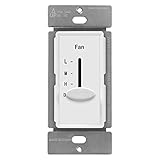
Overview: The ENERLITES 17000-F3-W-F provides dedicated three-speed ceiling fan control in a modern decorator-style wall switch. This single-purpose unit controls mechanical fans up to 2.5A without requiring a neutral wire, making it perfect for targeted retrofit applications. The straightforward slider offers clearly defined low, medium, high, and off positions with notably quiet operation, ideal for bedrooms and living spaces where noise matters.
What Makes It Stand Out: Its focused fan-only design delivers reliable performance without unnecessary complexity or cost. The polycarbonate thermoplastic construction provides exceptional impact resistance and heat tolerance exceeding 100 degrees, preventing discoloration over decades of use. The compact 2.27" x 1.72" dimensions ensure compatibility with crowded electrical boxes, while the no-neutral-wire requirement solves installation challenges in older construction.
Value for Money: As a specialized fan control without light dimming circuitry, this unit is affordably priced for single-purpose applications. It eliminates the cost premium of dual-function units when only fan speed management is needed. The DIY installation capability further reduces expenses, and the durable construction ensures long-term reliability beyond the 1-year warranty period.
Strengths and Weaknesses: Strengths include simple operation, robust thermoplastic build quality, heat resistance, no-neutral installation, and quiet performance. Weaknesses are the lack of light control functionality, separate wall plate requirement, and restriction to three-speed mechanical fans only. The one-year warranty is relatively short compared to premium alternatives offering 3-5 year coverage.
Bottom Line: Ideal for rooms where fan control is the sole requirement, this switch offers reliable, no-fuss performance. It’s a cost-effective upgrade for replacing basic on/off switches with three-speed functionality in older homes.
3. UC9050T Universal Ceiling Fan Control 3 Speed Wall Control Mounted Fan Full Range Dimmer CHQ9051T

Overview: The UC9050T is a universal wireless wall transmitter designed to control ceiling fans and lights, but critically, this package includes ONLY the transmitter—no receiver. It provides three fan speeds, a main power switch, and light dimming for incandescent bulbs (LEDs only switch on/off). Programming requires matching four DIP switches to your existing receiver. Installation involves simple wire connections and surface mounting, but compatibility depends entirely on your fan’s existing receiver.
What Makes It Stand Out: This unit’s wireless nature allows installation without running new wires, simply mounting to any wall surface. The universal design works with numerous fan models, and the DIP switch configuration enables easy syncing with existing receivers. The dedicated main power button provides convenient one-touch fan shutdown, a feature often missing in basic remotes. The compact design eliminates pull-chain dependency.
Value for Money: While affordably priced as a transmitter-only unit, total cost requires factoring in a separate receiver purchase if your fan lacks one. This makes it less economical for complete new installations but an excellent value as a replacement transmitter for existing setups. The ability to avoid electrical rewiring provides significant additional cost savings for retrofit applications.
Strengths and Weaknesses: Strengths include wireless convenience, universal compatibility potential, simple DIP switch programming, and easy surface mounting. Major weaknesses are the TRANSMITTER-ONLY limitation (clearly stated but easily overlooked), minimal LED dimming capability, inability to control reverse function, and complete dependence on existing compatible receivers. Documentation regarding receiver compatibility is insufficient.
Bottom Line: Purchase ONLY if you have a working receiver or need to replace a lost/damaged transmitter. Verify existing receiver DIP switch compatibility and protocol before ordering to avoid a non-functional purchase. Not suitable for new installations without an existing receiver system.
4. 53T Universal Ceiling Fan Wall Remote Control, 3 Speed, Light Dimmer, 4-DIP Switch Compatible with Hampton Bay, Harbor Breeze, Hunter (Wall Remote Only)

Overview: The 53T Universal Ceiling Fan Wall Remote offers wireless control of fan speed and lighting for most major ceiling fan brands, including Hampton Bay, Harbor Breeze, and Hunter. This wall-mounted remote eliminates pull-chain operation through three-speed fan control and press-and-hold light dimming. The DIP switch programming ensures broad compatibility, but like similar units, it requires an existing compatible receiver (not included) for functionality.
What Makes It Stand Out: Its broad brand compatibility makes it a versatile replacement option for lost or broken brand-specific remotes. The wireless design permits installation anywhere within range without electrical wiring, while the press-and-hold dimming function cycles smoothly through brightness levels. The DIP switch technology ensures reliable pairing with existing fan receivers, and the elimination of pull chains provides modern convenience.
Value for Money: As a universal remote solution, it avoids the premium pricing of OEM brand-specific replacements, typically costing 30-50% less. The wireless installation saves significant electrical work costs. However, the implied requirement for an existing receiver potentially adds hidden expense for uninformed buyers. The convenience factor and brand compatibility justify the price for compatible setups, making it a smart replacement choice.
Strengths and Weaknesses: Strengths include wide compatibility, wireless convenience, intuitive operation, and elimination of pull chains. Weaknesses are the unmentioned but critical need for an existing receiver, potential compatibility issues with some fan models despite “universal” claims, and limited documentation regarding receiver requirements. Battery replacement adds minor long-term maintenance not present in hardwired switches.
Bottom Line: An excellent replacement remote for compatible ceiling fans with existing receivers, but verify your fan’s receiver before purchasing. Check DIP switch compatibility and ensure your fan model is among the supported brands to guarantee seamless integration and avoid returns.
5. ENERLITES 3 Speed Ceiling Fan Control and Dimmer Light Switch, 2.5A Single Pole Light Fan Switch, 300W Incandescent Load, No Neutral Wire Required, 17001-F3-W, 120 Volts (AC), White, 2 Pack
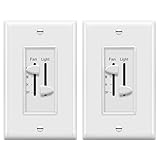
Overview: This ENERLITES 2-pack delivers the same dual-control functionality as the single unit, combining three-speed fan control and light dimming in each switch. Both units handle 2.5A fan loads and 300W incandescent lighting without requiring neutral wires. The dual-slider design provides independent control of fan speed and light brightness from a single gang position, making it ideal for whole-home ceiling fan upgrades with consistent aesthetics.
What Makes It Stand Out: The two-pack packaging offers immediate multi-room upgrade capability with identical performance across installations. Each switch features pre-wired leads for DIY installation and polycarbonate thermoplastic construction. The no-neutral-wire requirement remains a key advantage for older homes, while the included pair ensures design continuity. U.S.-based technical support provides accessible assistance for installation questions.
Value for Money: The 2-pack provides significant per-unit savings compared to purchasing two individual switches, typically reducing cost by 15-20%. The DIY-friendly design eliminates electrician costs, and the dual-function capability replaces two separate switches per location, maximizing overall project value. For multi-room renovations, this bundle is economically superior to individual purchases and ensures consistent performance throughout.
Strengths and Weaknesses: Strengths include bulk cost savings, dual functionality, no-neutral installation, durable construction, and accessible U.S. tech support. Weaknesses mirror the single unit: separate wall plate purchase required, incompatibility with variable-speed or remote-controlled fans, limited LED dimming performance, and the 300W incandescent rating. The 2-pack may be excessive for single-room projects, forcing unnecessary purchase.
Bottom Line: Perfect for homeowners renovating multiple rooms, this 2-pack offers exceptional value and consistent performance. It’s the most economical choice for comprehensive ceiling fan control upgrades in older homes lacking neutral wires, provided you need both units.
6. ENERLITES 3 Speed Decora in Wall Ceiling Fan Control, Slide Switch, 120VAC, 2.5A, Single-Pole, Neutral Wire NOT Required, 17000-F3-W2P, White, 2 Pack

Overview: The ENERLITES 17000-F3-W2P offers a modern Decora-style solution for controlling three-speed ceiling fans without requiring a neutral wire. This two-pack provides quiet fan speed control via an easy-to-use slider switch that transitions smoothly between low, medium, and high settings, plus an OFF position. Designed for both residential and commercial applications, each switch measures 2.27" x 1.72" and fits standard wall plates. The package includes two units, making it ideal for multi-room installations or as a spare for future use.
What Makes It Stand Out: This product distinguishes itself through its contemporary Decora aesthetic that upgrades any room’s appearance compared to traditional toggle-style controls. The neutral-wire-free design simplifies installation in older homes where neutral wires may be absent from switch boxes. Constructed from Polycarbonate Thermoplastic (PCT), it withstands heavy impacts and resists heat up to 100°F without discoloration. The two-pack configuration offers exceptional value for homeowners managing multiple fans, while the ETL listing ensures reliable safety standards.
Value for Money: Priced competitively as a dual-unit package, this offering undercuts buying two separate controls by approximately 20-30%. Comparable single-unit Decora fan controls retail for $12-15 each, making this two-pack economical for whole-home projects. While basic fan-only models without Decora styling cost slightly less, the premium aesthetic and durable construction justify the moderate price increase.
Strengths and Weaknesses: Pros: No neutral wire required; Modern Decora design; Durable PCT construction; Two-pack value; ETL listed; Simple slider operation.
Cons: Limited to 3-speed fans only; No light control functionality; 2.5A maximum load restricts some high-power fans; Requires Decora wall plate (not included).
Bottom Line: The ENERLITES two-pack delivers excellent value for homeowners seeking to modernize multiple ceiling fans without rewiring. Its combination of contemporary styling, straightforward installation, and robust construction makes it a top choice for basic fan speed control upgrades, provided you don’t need integrated light dimming.
7. TOPGREENER Kalide Fan Speed Control Switch, 3-Speed Fan Wall Switch, Single Pole, 120VAC, 60Hz, 2.5A, Neutral Wire Not Required, TGFS3-W, White

Overview: The TOPGREENER Kalide TGFS3-W provides straightforward three-speed fan control through a clean, vertical slider design. Engineered for mechanical ceiling fans with pull-chain controls, this single-pole switch operates at 120VAC with a 2.5A maximum load. Installation requires no neutral wire, making it compatible with older electrical systems. The switch features an audible click at the OFF position for positive feedback and accepts 12-18 AWG wiring. UL listing and a one-year warranty back its commercial-grade construction.
What Makes It Stand Out: TOPGREENER’s reputation for electrical component quality shines through in the Kalide’s robust Polycarbonate Thermoplastic housing, which resists impacts, heat up to 100°F, and fading. The precise slider mechanism delivers satisfying tactile feedback when changing speeds, while the definitive OFF click eliminates guesswork. Its focus on mechanical fan compatibility ensures reliable performance with traditional pull-chain models, avoiding the electronic interference issues that plague some universal controls.
Value for Money: Positioned in the mid-range price segment ($10-15), this single-unit control offers professional-grade features without premium pricing. It costs roughly 30% less than comparable Decora-style units while maintaining UL certification and durable construction. Budget alternatives may save a few dollars but often lack UL listing and use inferior plastics that yellow over time.
Strengths and Weaknesses: Pros: No neutral required; UL listed; Durable thermoplastic construction; Positive OFF click feedback; Compatible with mechanical fans; Straightforward installation.
Cons: Single-unit purchase (no multi-pack discount); Basic appearance lacks modern styling; No light control; Limited to 2.5A; Requires neutral-free wiring configuration.
Bottom Line: The TOPGREENER Kalide excels as a reliable, no-frills replacement for traditional fan switches. Its durable construction and UL certification make it ideal for homeowners prioritizing safety and longevity over aesthetic flair. Choose this for straightforward mechanical fan control in single installations where modern styling isn’t a priority.
8. Westinghouse 7787200 Ceiling Fan Wall Control , White
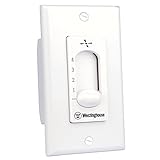
Overview: The Westinghouse 7787200 offers fundamental four-speed fan control through a simple two-wire installation that replaces standard toggle switches. This basic wall control provides an additional speed setting beyond typical three-speed models, allowing finer airflow adjustment. Designed for direct replacement applications, it works with most standard ceiling fans requiring wall-mounted speed control. The white finish matches common switch plates, and the unit mounts in standard electrical boxes without requiring neutral wires or complex wiring configurations.
What Makes It Stand Out: The four-speed capability represents a notable advantage over conventional three-speed controls, providing users with enhanced airflow customization. Its two-wire installation system simplifies retrofitting in older homes where advanced wiring is unavailable. The straightforward toggle-style operation maintains familiar user interaction while delivering variable speed control. As a product from the established Westinghouse brand, it carries legacy recognition in the lighting and fan category.
Value for Money: This unit typically retails at the lower end of the price spectrum ($8-12), positioning it as a budget-conscious alternative to feature-rich controls. While lacking advanced features like light dimming or modern aesthetics, it delivers core functionality at 30-40% less than premium brands. However, the minimal feature set and absence of safety certifications in the product description may concern quality-focused buyers.
Strengths and Weaknesses: Pros: Four-speed control (unique in this category); Simple two-wire installation; Budget-friendly pricing; Familiar toggle operation; Brand recognition.
Cons: No UL/ETL listing mentioned; Basic styling; No light control; Limited product information; Potentially inferior durability compared to thermoplastic models.
Bottom Line: The Westinghouse 7787200 suits budget-minded homeowners needing simple, reliable fan speed control with an extra speed setting. Its straightforward installation and operation make it practical for basic applications, though the lack of explicit safety certifications and detailed specifications should give quality-conscious buyers pause. Consider this for utility spaces where advanced features aren’t necessary.
9. UC9051T 3 Speed Ceiling Fan Wall Control Replacement, Fan Speed, Light Control, & Reverse.
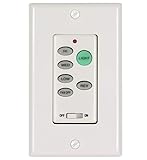
Overview: The UC9051T serves as a comprehensive replacement control for OEM ceiling fan systems, integrating three-speed fan control, light dimming capability, and reverse functionality into a single two-wire wall unit. Designed to replace original equipment manufacturer controls in Hunter, Hampton Bay, Harbor Breeze, and other major brands, it simplifies complex fan operations without requiring additional wiring. The 120V unit includes a dedicated fan OFF button and supports incandescent light dimming, making it a versatile upgrade for compatible ceiling fan systems.
What Makes It Stand Out: This control’s reverse function sets it apart from standard speed-only switches, allowing seasonal airflow direction changes directly from the wall. The integrated light dimming with dedicated OFF button provides complete lighting control without separate switches. Its broad brand compatibility makes it an invaluable replacement part for aging or discontinued OEM controls, potentially saving the cost of entire fan replacement. The two-wire installation maintains retrofit simplicity despite advanced features.
Value for Money: Priced between $25-35, the UC9051T commands a premium over basic speed controls but delivers three functions in one unit. Comparable OEM replacement parts often exceed $40, while separate controls for speed, light, and reverse would require multiple devices and complex wiring. For compatible fans, it offers exceptional value by restoring full functionality at a fraction of replacement cost.
Strengths and Weaknesses: Pros: Integrated light dimming and reverse functions; Broad brand compatibility; Two-wire installation; Dedicated OFF button; Replaces expensive OEM parts.
Cons: Compatibility varies by model (requires verification); No neutral wire support limits some applications; May not work with all fan types; Documentation can be unclear.
Bottom Line: The UC9051T is an ideal solution for restoring full fan functionality when original controls fail. Its combination of speed, light, and reverse control in a simple two-wire package makes it uniquely valuable for compatible Hunter, Hampton Bay, and Harbor Breeze fans. Verify compatibility before purchasing, but for qualifying models, it delivers unmatched convenience and cost savings compared to fan replacement.
10. Ceiling Fan Remote Control Kit, Universal Ceiling Fan Remote Control Kit, Ceiling Fan Wall Switch UC9050T, Compatible with Hunter Hampton Bay

Overview: This universal remote control kit combines a wall-mounted switch with a wireless remote, offering dual control methods for ceiling fans. The system requires three-wire installation with an included receiver unit that must be mounted in the fan canopy. Compatible with Hunter, Hampton Bay, and numerous other brands, it uses DIP switch pairing to sync with existing fan receivers. The wall switch provides speed control and incandescent light dimming, while the remote offers convenient wireless operation. Note that this system does not support WiFi connectivity or reverse functions.
What Makes It Stand Out: The dual-control capability allows operation from either the wall switch or handheld remote, providing flexibility unmatched by single-method controls. The DIP switch pairing system enables compatibility with many existing fan receivers, potentially eliminating the need for receiver replacement. Its universal design targets major brands like Hunter and Hampton Bay, addressing the common problem of lost or broken remotes. The three-wire design supports more sophisticated fan electronics than two-wire alternatives.
Value for Money: Retailing around $20-25, this kit offers reasonable value for those needing both wall and remote control. Purchasing separate remote and wall controls would typically cost $30-40. However, the installation complexity requiring receiver mounting reduces DIY appeal compared to simple wall switches. For users replacing lost remotes, it’s significantly cheaper than OEM replacements ($35-50) while adding wall control functionality.
Strengths and Weaknesses: Pros: Dual wall and remote control; DIP pairing for broad compatibility; Cost-effective replacement for lost remotes; Light dimming capability; Universal design.
Cons: Complex three-wire installation; Receiver mounting required; No reverse function; Not WiFi enabled; Limited to incandescent dimming; May not work with all fan receivers.
Bottom Line: This kit best serves users who’ve lost original remotes and want added wall control convenience. While installation demands more effort than simple switches, the dual-control flexibility and universal compatibility justify the complexity for compatible fans. Avoid if you need reverse functionality or smart home integration, but consider it a cost-effective alternative to expensive OEM remote replacements.
Understanding Smart Ceiling Fan Controls
The Evolution from Basic Switches to Smart Controls
Traditional wall switches offered binary control—on or off—with perhaps a separate dial for speed adjustment. Today’s smart switches represent a quantum leap forward, incorporating microprocessors, wireless connectivity, and advanced power management. These modern devices communicate with your home network to provide granular control over every aspect of your ceiling fan’s operation. The transformation isn’t merely about adding WiFi; it’s about rethinking how we interact with one of our home’s most effective climate control tools.
How Smart Fan Switches Differ from Light Switches
While they may look similar on the outside, smart fan switches contain fundamentally different internal components than their lighting counterparts. Fan switches must handle inductive loads created by the fan motor, which requires specialized electronics to prevent motor hum and ensure smooth speed transitions. They also need to manage multiple speed taps or capacitive control circuits, unlike the simple dimming circuits used for LED or incandescent lights. Understanding this distinction is crucial because using a light switch to control a fan motor can damage both devices and create safety hazards.
Core Components of Smart Fan Wall Switches
The intelligence inside these switches centers on several key elements: a radio module for wireless communication (typically WiFi, Zigbee, or Z-Wave), a microcontroller that processes commands, triacs or capacitive networks for speed control, and robust relay systems for handling motor loads. Quality switches also include surge protection, thermal monitoring, and electrical isolation to protect both the switch and your fan motor. These components work in concert to deliver the responsive, reliable performance smart home enthusiasts expect.
Key Features to Look For
Multi-Speed Control Capabilities
Essential smart fan switches offer at least three distinct speed settings, though premium models provide four or five incremental levels. Look for switches that deliver smooth, consistent speed changes without causing the motor to buzz or hesitate. The best implementations use capacitive speed control rather than phase-cutting dimming technology, which can cause motor overheating. Some advanced models even allow you to customize speed curves through companion apps, fine-tuning the relationship between the switch setting and actual fan RPM.
Directional Control Integration
Ceiling fans don’t just cool—they can warm your space in winter by circulating rising hot air. Smart switches with built-in directional control let you reverse blade rotation directly from the wall plate or app, eliminating the need to climb a ladder and flip the manual switch on the fan motor housing. This feature becomes especially valuable when creating seasonal automation routines that automatically adjust direction based on temperature sensors or calendar dates.
LED Light Dimming Functions
For fans with integrated lighting, a combo switch that handles both fan and light functions is non-negotiable. The dimming circuit must be compatible with modern LED fixtures, which require trailing-edge or universal dimming technology to prevent flickering. Advanced models offer independent control of both functions from a single gang box, saving wall space while providing sophisticated scene-setting capabilities. Look for switches with adjustable minimum brightness levels to prevent LED bulbs from cutting out at low settings.
Voice Assistant Compatibility
In 2026, seamless voice control isn’t a luxury—it’s an expectation. Quality smart fan switches work natively with major voice platforms without requiring complex workarounds or third-party skills. The integration should support natural commands like “set fan to medium” or “turn on fan light” rather than awkward phrasing. Pay attention to whether the switch supports multiple concurrent voice ecosystems, which provides flexibility if you switch platforms later.
Remote Access Through Mobile Apps
While wall-mounted control is convenient, remote access transforms your fan into a true smart device. The companion app should offer intuitive control, scheduling options, and the ability to group multiple fans into zones. Look for apps that work both locally (when you’re home on the same network) and remotely via cloud connectivity. The best implementations provide fast, responsive control without frustrating lag times that make you wonder if your command was received.
Types of Smart Wall Switches
Single-Pole Switches for Standard Setups
The most common configuration controls a fan from a single location. These switches replace your existing wall switch directly and work with standard electrical boxes. When evaluating single-pole options, consider the depth of the switch body—some smart switches require deeper boxes than older homes provide. Modern slim-profile designs have addressed this issue, but always verify your gang box dimensions before purchasing.
Multi-Location Switches for Three-Way Configurations
If your fan is controlled from two or more locations (like at the top and bottom of stairs), you’ll need a multi-location setup. These systems use a primary smart switch paired with secondary companion switches that communicate via traveler wires or wireless mesh networks. The key consideration is whether the secondary locations require full smart functionality or can use simpler remote switches. Advanced systems allow any location to provide complete control, while budget options may limit advanced features to the primary switch only.
Scene-Enabled Switches for Whole-Room Automation
Scene controllers represent the next evolution, allowing a single button press to orchestrate multiple devices simultaneously. A “movie night” scene might dim the fan light to 20%, set the fan to low speed, and close smart shades—all from one switch. These devices often require a compatible smart home hub but deliver unparalleled convenience. When evaluating scene-enabled switches, confirm the number of customizable scenes and whether they can trigger devices beyond just the fan and light.
Fan-Only vs. Fan-Light Combo Switches
Your existing fan configuration determines which switch type you need. Fan-only models control just the motor, ideal for fans without integrated lighting or where the light is controlled separately. Combo switches handle both functions and come in two varieties: single-gang units with dual controls (space-saving but potentially complex) and two-gang setups with separate switches for fan and light (more intuitive but requiring more wall space). Consider user experience alongside technical specifications—guests should be able to operate the fan without consulting a manual.
Installation Considerations
Wiring Requirements and Neutral Wires
Most smart switches require a neutral wire in the electrical box to provide continuous power to the radio module. Homes built before the 1980s often lack neutral wires in switch boxes, necessitating either professional rewiring or choosing a switch specifically designed to work without a neutral. Some newer models use battery backup or draw minimal power through the load wire, but these solutions may have limitations. Always turn off power at the breaker and use a voltage tester to confirm wiring before beginning installation.
Gang Box Space and Fitment Issues
Smart switches are substantially deeper than traditional switches due to their internal electronics. Measure your gang box depth and compare it to switch specifications, which typically range from 1.5 to 2.5 inches deep. Shallow boxes may require box extenders or complete replacement. Also consider the wall plate design—some smart switches use proprietary plates that may not match your existing décor, while others accept standard decorator-style plates for seamless integration.
Professional vs. DIY Installation
While many homeowners can install smart switches themselves, certain scenarios warrant professional help: aluminum wiring, lack of neutral wires, multi-location setups, or integrating with whole-home automation systems. Electricians can also verify that your fan motor is compatible with electronic speed control and isn’t an older induction motor that requires mechanical speed settings. Factor installation costs into your budget—saving $50 on a switch isn’t worthwhile if it requires $200 in electrical work to function properly.
Safety Protocols for Electrical Work
Never work on live circuits. Always use a non-contact voltage tester to confirm power is off, and tape the breaker in the off position to prevent accidental activation. If you encounter anything unexpected—like cloth-insulated wiring or corroded connections—stop and consult a professional. Smart switches contain sensitive electronics that can be damaged by electrical faults, so ensuring your wiring is in good condition protects both your investment and your safety.
Integration with Smart Home Ecosystems
Compatibility with Major Smart Home Platforms
Before purchasing, verify that the switch works with your existing smart home platform, whether it’s a proprietary system or an open standard like HomeKit, Google Home, or Amazon Alexa. The level of integration varies—some switches offer basic on/off control within the platform, while others expose all features including speed levels, direction, and dimming. Look for Matter-certified devices, which promise seamless interoperability across ecosystems starting in 2026.
Matter Standard Adoption in 2026
Matter represents a watershed moment for smart home compatibility, allowing devices to work across previously siloed ecosystems. Ceiling fan switches adopting Matter 1.2 or later standards should work with any Matter-compatible hub or app. This future-proofs your investment against platform changes and ensures your switch remains functional even if your preferred smart home company discontinues service. However, verify that Matter implementation includes all fan-specific features—not all Matter devices support the full range of capabilities.
Hub-Based vs. Hub-Free Operations
WiFi switches connect directly to your home network and work independently, ideal for smaller setups or renters. Zigbee and Z-Wave switches require a compatible hub but offer superior reliability, faster response times, and don’t congest your WiFi network. They also continue functioning locally if your internet goes down. Consider your long-term smart home strategy—a hub-based approach scales better for whole-home automation, while hub-free works for targeted upgrades.
Creating Automated Routines and Scenes
The true power of smart switches emerges when they’re woven into automated routines. A “good morning” routine might gradually increase fan speed as your thermostat calls for cooling, while a “leaving home” scene ensures all fans turn off to save energy. Evaluate how easily the switch integrates with your existing routines and whether it can serve as a trigger for other devices. Advanced switches include built-in temperature or humidity sensors that can automatically adjust fan operation based on environmental conditions.
Advanced Control Options
Sensor-Based Automation
Premium smart switches incorporate environmental sensors that enable truly autonomous operation. Temperature sensors can ramp up fan speed as rooms warm, while humidity sensors activate exhaust functions in bathrooms or kitchens. Some models even include occupancy sensors that turn fans off when rooms are empty for extended periods. When evaluating sensor-equipped switches, consider sensor accuracy, calibration options, and whether sensor data is exposed to your broader smart home system for use in cross-device automation.
Scheduling and Timer Functions
Beyond basic on/off schedules, sophisticated switches offer conditional scheduling based on external factors. Set your bedroom fan to run on high for 30 minutes at bedtime, then automatically step down to low for overnight circulation. Vacation modes can randomly operate fans to simulate occupancy. Look for switches that support sunrise/sunset scheduling and can adjust timing seasonally without manual reprogramming. The best implementations allow different schedules for weekdays, weekends, and holidays.
Energy Monitoring Capabilities
Smart switches with built-in energy monitoring reveal exactly how much power your fan consumes at each speed setting. This data helps identify the most efficient speed for comfort and can highlight when a motor is struggling and may need maintenance. Advanced models track usage patterns over time, generating reports that show which rooms use the most fan power and suggesting schedule optimizations. Ensure the energy data integrates with your whole-home monitoring system if you track total household consumption.
Group Control for Multiple Fans
In open-concept homes or large spaces with multiple fans, group control synchronizes operation across all devices. Set every fan on your main floor to the same speed with one command, or create zones like “downstairs fans” and “bedroom fans.” The key consideration is whether group commands execute simultaneously or cascade through devices, which can create noticeable delays. Mesh network protocols like Zigbee typically outperform WiFi for group operations due to their peer-to-peer communication structure.
Energy Efficiency Benefits
Optimizing Air Circulation Patterns
Smart switches help maximize the “wind chill” effect that makes fans effective. By programming gradual speed increases rather than abrupt changes, you maintain comfort while using less energy than air conditioning. Advanced models can coordinate with smart thermostats, running fans strategically to distribute conditioned air more effectively. This allows you to raise your AC setpoint by 2-4 degrees while maintaining the same comfort level, potentially reducing cooling costs by 15-20%.
Seasonal Settings for Year-Round Comfort
The ability to easily reverse fan direction transforms your fan from a cooling device to a heating efficiency tool. In winter, clockwise rotation at low speed gently circulates warm air trapped at the ceiling, allowing you to lower your thermostat by several degrees. Smart switches with seasonal automation handle this transition automatically, switching directions on preset dates or when outdoor temperatures drop below a threshold. This maximizes the return on your ceiling fan investment throughout the entire year.
Reducing HVAC Dependency
Strategic fan use can significantly reduce heating and cooling system runtime. Program bathroom fans to run during showers, removing humidity before your HVAC needs to dehumidify the whole house. Use fans in occupied rooms to create micro-climates, allowing you to set back whole-house temperature when bedrooms are unoccupied during the day. Smart switches with humidity and temperature sensors make these decisions automatically, optimizing comfort while minimizing energy waste.
Monitoring and Reducing Energy Consumption
Real-time energy feedback helps identify inefficient usage patterns. You might discover that running your fan on high 24/7 consumes more energy than occasional AC use. Smart switches can implement energy-saving modes that cap maximum speed or limit runtime, perfect for households with children who might otherwise leave fans running constantly. Some utilities offer time-of-use rates where running fans during off-peak hours is significantly cheaper—smart scheduling can automatically shift usage to these economical windows.
Troubleshooting Common Issues
Connectivity Dropouts and WiFi Interference
WiFi-enabled switches sometimes drop connection due to signal strength issues or router limitations. If your switch periodically becomes unresponsive, check whether it’s connecting on a crowded 2.4GHz channel. Many modern routers automatically manage channels, but manually setting your switch to use 5GHz (if supported) or ensuring your 2.4GHz network uses channels 1, 6, or 11 can improve stability. For persistent issues, consider switches that use mesh networks like Zigbee, which self-heal and maintain local control even when internet connectivity fails.
Buzzing or Humming Noises
Electronic interference between the switch and fan motor often manifests as audible humming, especially at lower speeds. This typically indicates incompatible motor types or poor-quality speed control circuits. Ensure your fan uses a capacitor-start motor (most modern fans do) rather than an older shaded-pole design. Some switches include motor compatibility settings in their apps that adjust control algorithms for different motor types. If buzzing persists, you may need a switch with better electromagnetic interference (EMI) filtering or a fan motor rated specifically for electronic speed control.
Inconsistent Speed Control
When fan speeds don’t match the indicated setting—jumping from off directly to high speed, for instance—the switch may be incorrectly detecting your fan’s motor type. Many switches auto-calibrate during initial setup by measuring motor characteristics. Re-running this calibration process often resolves inconsistencies. For fans with integrated light kits, ensure the switch isn’t confusing the light load with the motor load during calibration. Some advanced models allow manual motor parameter entry for fine-tuning.
Firmware Update Failures
Smart switches require periodic firmware updates to maintain security and add features. Updates can fail due to power interruptions, weak WiFi signals, or corrupted files. Most switches automatically retry failed updates, but a bricked switch may require factory reset. To minimize risks, perform updates during stable power conditions and ensure strong network connectivity. Switches with local update capability (via Bluetooth or direct connection) provide a fallback if cloud updates fail repeatedly.
Future-Proofing Your Investment
Scalability for Home Expansion
Choose switches that support mesh networking even if you start with just one device. This allows easy expansion as you add more smart devices throughout your home. Consider whether the switch brand offers a full ecosystem of complementary products—light switches, sensors, and thermostats—that can create a cohesive automation system. Open standards like Matter ensure your switches remain compatible with future devices from any manufacturer, preventing vendor lock-in.
Software Update Policies
Research how long manufacturers typically support their devices with firmware updates. Companies committed to long-term support release updates for 5-7 years or more, while others abandon devices after 2-3 years. Look for brands with transparent update policies and active developer communities. Some premium manufacturers have committed to supporting Matter updates even for older hardware, significantly extending device lifespan.
Backward Compatibility Concerns
When upgrading existing fans, ensure the smart switch is compatible with your motor’s age and wiring configuration. Some modern switches don’t work properly with older fans that have separate pull-chain speed controls. If your fan has multiple capacitors for speed control, verify the switch can interface with this configuration. For fans with remote controls, you may need to disable the receiver unit to prevent conflicts with the smart switch commands.
Emerging Technologies on the Horizon
Ultra-wideband (UWB) technology promises room-level presence detection, allowing fans to automatically adjust based on exactly where you are in a room. Thread networking is gaining traction as a robust, low-power mesh protocol that could supersede current standards. Energy harvesting switches that generate their own power from button presses eliminate the need for neutral wires or batteries. While these technologies aren’t essential in 2026, choosing switches from manufacturers active in these standards bodies increases the likelihood of future upgrade paths.
Frequently Asked Questions
What makes a ceiling fan switch different from a regular light switch?
Ceiling fan switches are engineered to handle inductive motor loads and provide multiple speed taps, while light switches simply interrupt power. Using a light switch for a fan motor can cause damage, create electrical noise, and potentially pose fire hazards due to inadequate load handling.
Do I need a neutral wire for smart ceiling fan switches?
Most smart switches require a neutral wire to power their radio modules continuously. However, some newer models work without a neutral by using battery backup or drawing minimal power through the load wire. Check your electrical box wiring before purchasing, as lacking a neutral significantly limits your options.
Can I control both fan speed and light dimming from one switch?
Yes, combo switches handle both functions from a single gang box. They use separate internal circuits for the fan motor and light fixture, allowing independent control of each. Some models use touch sliders or multiple buttons, while others rely primarily on app control for advanced functions.
Will smart fan switches work with my existing ceiling fan?
Most fans manufactured after 1990 with capacitor-start motors work with smart switches. However, older fans with mechanical speed controls or shaded-pole motors may be incompatible. Verify your fan’s motor type and check manufacturer compatibility lists before installation.
How do I choose between WiFi, Zigbee, and Z-Wave switches?
WiFi switches work independently but can congest your network and rely on cloud connectivity. Zigbee and Z-Wave require a hub but offer mesh networking, faster response times, and local control. Choose based on your existing smart home infrastructure and whether you plan to expand beyond a few devices.
Can smart fan switches really save energy?
Yes, by optimizing fan usage patterns and coordinating with HVAC systems, smart switches can reduce heating and cooling costs by 15-30%. Features like occupancy sensing, humidity-based automation, and time-of-use scheduling ensure fans run only when needed and at optimal speeds.
What should I do if my smart switch causes the fan motor to hum?
Humming indicates electrical interference or incompatible motor control. First, check if your switch has motor type settings in its app and try different configurations. If humming persists, the switch may lack adequate EMI filtering. Consider upgrading to a switch specifically rated for your fan’s motor type or consult an electrician about adding a motor-rated filter.
Are Matter-certified ceiling fan switches worth the premium?
Matter certification ensures cross-platform compatibility and future-proofs your investment against ecosystem changes. While Matter switches may cost 20-30% more, they eliminate the risk of vendor lock-in and provide flexibility to switch smart home platforms without replacing hardware.
How difficult is DIY installation of smart fan switches?
Installation is straightforward for those comfortable with basic electrical work: turn off power, connect wires according to the diagram, and secure the switch in the box. However, complications like missing neutral wires, aluminum wiring, or multi-location setups warrant professional installation to ensure safety and proper function.
What happens to smart switches when the internet goes down?
Hub-based switches (Zigbee/Z-Wave) continue working locally via direct control from the hub or associated remotes. WiFi switches vary—some offer local network control without internet, while others become completely unresponsive. Check the switch’s offline capabilities before purchasing, especially if you live in an area with unreliable internet service.
See Also
- 10 Essential Smart Ceiling Fans Every Smart Home Owner Needs in 2026
- 10 Essential Ceiling Fan Damp Rated Blades Every Patio Owner Needs in 2026
- 10 Best Ceiling Fan Remotes for Smart Home Integration in 2026
- 10 Most Durable Ceiling Fan Wall Switches Based on Real User Reviews in 2026
- 10 Essential Traditional Ceiling Fans with Lights Every Classic Home Needs in 2026