Table of Contents
If you’ve opened your monthly electric bill lately and felt that familiar sting of rising energy costs, you’re not alone. Across the country, homeowners are searching for practical solutions that deliver real savings without sacrificing comfort or convenience. The good news? The smart home revolution has evolved beyond simple voice commands and flashy apps—today’s intelligent lighting control systems offer measurable reductions in energy consumption while actually enhancing your daily living experience.
Among the various protocols available, Z-Wave technology stands out as a particularly robust and reliable solution for tackling excessive lighting costs. Unlike Wi-Fi-based systems that can congest your network, Z-Wave operates on a dedicated frequency, creating a secure mesh network where each device strengthens the signal for others. This comprehensive guide explores how the right lighting controllers can transform your home’s energy profile in 2026, focusing on the essential features that translate directly into lower utility bills.
Top 10 Z-Wave Lighting Controllers
Detailed Product Reviews
1. Zooz 800 Series Z-Wave Long Range Scene Controller ZEN32 800LR, White | Z-Wave Hub Required

Overview:
The Zooz ZEN32 800LR is a hardwired scene controller that combines a primary load-controlling button with four dedicated scene buttons in a single-gang wall switch. Designed for 120V LED fixtures up to 150W, it runs on the advanced 800 series Z-Wave chip with Long Range support and S2 security. This device requires a compatible Z-Wave hub like SmartThings, Hubitat, Home Assistant, or HomeSeer—basic systems won’t suffice. Note that your smart speaker is not a hub.
What Makes It Stand Out:
The direct 3-way capability without requiring an add-on switch sets this apart from competitors. Both boxes must be rewired per the manual, but it eliminates extra hardware costs. The main button supports up to seven distinct triggers (press, hold, release combinations), while each of the four scene buttons can activate complex lighting presets or control other devices. The 800 series chip delivers superior signal coverage and faster communication compared to older 500/700 series devices.
Value for Money:
Priced in the premium range for scene controllers, the ZEN32 justifies its cost through the 800 series technology and integrated 3-way solution. Buying separate devices for load control and scene management would cost more and create wall clutter. The direct 3-way wiring saves $20-30 on companion switches.
Strengths and Weaknesses:
Strengths include direct 3-way wiring, robust 800 series performance, S2 security, flexible trigger options, and clean single-gang installation. Weaknesses are limited hub compatibility requiring custom SmartThings drivers, mandatory neutral wire, complex 3-way rewiring that intimidates DIY beginners, and no dimming capability for the main load.
Bottom Line:
The ZEN32 excels for advanced users with compatible hubs who need hardwired scene control with 3-way functionality. It’s a powerful, space-saving solution that rewards technical competence but punishes hub mismatch. Avoid if you have a basic Z-Wave system or need dimming.
2. Zooz 800 Series Z-Wave Long Range Dimmer & Scene Controller ZEN35 800LR, White | Z-Wave Hub Required

Overview:
The Zooz ZEN35 800LR combines a fully-featured dimmer with a four-button scene controller in one sleek device. Like its sibling ZEN32, it controls a 120V LED fixture up to 150W but adds precise dimming capability via Z-Wave commands. The main paddle offers on/off/dimming plus up to seven button trigger combinations, while four dedicated scene buttons provide one-touch activation of smart home presets. Built on the 800 series Z-Wave chip, it supports Long Range, S2 security, and SmartStart pairing. A compatible hub is mandatory.
What Makes It Stand Out:
This is the rare device that merges load-controlling dimmer and scene controller without compromising either function. The 800 series chip ensures exceptional signal reach and responsiveness. The direct 3-way capability (no add-on switch required) works with existing 3-way setups when neutral is present, following the same wiring diagrams as the ZEN71. This eliminates the cost and complexity of companion switches while providing advanced scene control.
Value for Money:
The ZEN35 commands a premium price but delivers double functionality that would otherwise require two separate devices. Consolidating dimmer and scene controller saves $40-60 compared to buying individual units, plus installation labor. For rooms where you want both dimming and scene control from one location, it’s economically compelling.
Strengths and Weaknesses:
Strengths include dual dimmer/scene functionality, 800 series performance, direct 3-way wiring, S2 security, and space-saving design. Weaknesses mirror the ZEN32: hub compatibility is limited (SmartThings needs custom drivers), requires neutral wire, 3-way rewiring demands careful diagram following, and the single-gang format limits you to four scene buttons.
Bottom Line:
Perfect for bedrooms, living rooms, or dining areas where both dimming and scene control are essential. The ZEN35 simplifies your wall while expanding control options. Just verify hub compatibility first and ensure you’re comfortable with the wiring requirements.
3. Minoston 800 Series Z-Wave Scene Controller, 4 ZWave Button, Zwave Plus Wall Switch Remote Control, Support Long Range, Work with Z Wave Hubs (MR40Z)

Overview:
The Minoston MR40Z is a battery-powered Z-Wave scene controller offering four physical buttons with unprecedented scene capacity. Powered by an 800 series chip with S2 security and SmartStart, this wire-free remote installs anywhere without electrical work. Each button supports four distinct scenes (single press, double press, hold, release), enabling 16 total scenarios. It works with SmartThings, HomeSeer, and Home Assistant, though basic Z-Wave systems may lack scene programming capabilities. The device fits standard switch boxes or magnetically attaches to any flat surface.
What Makes It Stand Out:
The 16-scene capacity dwarfs most competitors offering 4-8 scenes total. The magnetic base provides genuine installation flexibility—stick it to nightstands, refrigerator, or walls without damage. True wire-free operation means renters can add smart controls without violating leases. The 800 series chip ensures strong signal penetration and future-proof compatibility with Long Range networks when hubs support it.
Value for Money:
Positioned as a mid-range battery remote, the MR40Z delivers exceptional value through its scene density and installation freedom. Avoiding electrician fees ($100-200) for new switch locations makes it instantly economical. Competing remotes offer fewer scenes and often require wall plates; this device’s magnetic versatility is unique at this price point.
Strengths and Weaknesses:
Strengths include 16-scene capacity, magnetic anywhere installation, 800 series performance, renter-friendly design, and easy DIY setup. Weaknesses are battery dependence (requiring periodic replacement), no direct load control capability, limited hub support compared to Zooz, and potential lag in large mesh networks. Basic Z-Wave systems won’t unlock its full potential.
Bottom Line:
Ideal for renters, apartment dwellers, or anyone wanting flexible scene control without construction. The MR40Z excels as a secondary control point. Just keep spare batteries handy and confirm your hub’s scene programming support before purchasing.
4. Z-Stick 10 Pro - Zigbee 3.0 & Z-Wave 800 Series USB Adapter - Works with HomeAssistant - Zigbee2MQTT - Z-Wave Controller - Z-Wave Long Range - Up to 1 Mile Wireless Range - cloudfree

Overview:
The Z-Stick 10 Pro is a dual-protocol USB adapter that transforms a computer into a powerful Z-Wave and Zigbee hub. Featuring the latest 800 series Z-Wave chip (EFR32ZG23) with Long Range support up to one mile, plus a state-of-the-art Zigbee 3.0 chip (EFR32MG21), it enables control of over 8000 devices across both ecosystems. Designed for Home Assistant, Zigbee2MQTT, Z-Wave JS, and other open platforms, this compact stick avoids USB port blocking and operates entirely cloud-free.
What Makes It Stand Out:
Dual-radio design with cutting-edge chips makes this the most future-proof adapter available. The one-mile Z-Wave Long Range capability eliminates repeaters in most homes, while Zigbee 3.0 ensures compatibility with the vast Philips Hue, IKEA, and Tuya ecosystems. Its slim profile is thoughtfully engineered to avoid interfering with adjacent USB ports—a common flaw in competing sticks. The 800 series chip brings S2 security and SmartStart to DIY hubs.
Value for Money:
While priced higher than single-protocol sticks or older Z-Wave adapters, the Z-Stick 10 Pro replaces two separate devices. Considering a quality Zigbee stick costs $30-40 and Z-Wave 700 series sticks run $40-50, this unified adapter is fairly priced. The extreme range reduces infrastructure costs, and the 800 series ensures longevity.
Strengths and Weaknesses:
Strengths include dual-protocol support, exceptional 1-mile range, compact non-blocking design, broad compatibility, cloud-free operation, and cutting-edge chipsets. Weaknesses are the steep learning curve for beginners, requirement for always-on computer, software setup complexity, and lack of standalone hub convenience.
Bottom Line:
A must-have for serious Home Assistant users wanting best-in-class performance across both protocols. The Z-Stick 10 Pro justifies its price through future-proofing and eliminating repeater clutter. Avoid if you prefer plug-and-play standalone hubs or lack technical confidence.
5. Zooz 800 Series Z-Wave Long Range Remote Control & Scene Controller ZEN34 (Battery Powered), White | Z-Wave Hub Required

Overview:
The Zooz ZEN34 is a battery-powered paddle remote that brings familiar switch control anywhere in your home without wiring. Built on the 800 series Z-Wave chip with Long Range support up to 1300 feet, it uses two paddles to trigger scenes and control devices. The device installs in a standard switch box using a provided bracket or magnetically attaches to surfaces. It requires a compatible hub—Z-Box, HomeSeer, Hubitat, or Home Assistant—to function, as basic Z-Wave systems lack scene programming capabilities.
What Makes It Stand Out:
The paddle design feels natural to anyone accustomed to traditional switches, unlike button-based remotes. The 1300-foot Long Range capability ensures reliable operation even in large homes or detached buildings when paired with a compatible hub. Installation flexibility is exceptional: use it as a wall switch replacement, stick it to bed frames, or place it on coffee tables. The magnetic base is stronger than most competitors, preventing accidental drops.
Value for Money:
Priced competitively for a battery remote, the ZEN34 avoids costly electrical work while delivering premium 800 series performance. Electrician fees for adding a switch location typically exceed $150, making this an instant bargain. Compared to other battery remotes, the paddle form factor and Zooz reliability justify a modest premium.
Strengths and Weaknesses:
Strengths include intuitive paddle control, excellent 1300-foot range, versatile installation options, strong magnetic base, S2 security, and clean aesthetics. Weaknesses are battery dependence, no direct load control, limited hub compatibility, and requirement for advanced Z-Wave systems. The paddle design limits scene count compared to multi-button remotes.
Bottom Line:
Perfect for adding convenient paddle-style control anywhere without construction. The ZEN34 excels as a bedside remote or secondary switch location. Its Long Range reliability and familiar interface make it a top choice for existing Zooz ecosystem users. Confirm hub compatibility and stock up on batteries.
6. Z-Wave Wireless Remote Control/Scene Controller, Aeotec WallMote 7, on/Off, dim, Trigger Scenes, add a New Switch Anywhere, Battery Powered, Z-Wave hub Required, Z-Wave Plus, illumino

Overview: The Aeotec WallMote 7 revolutionizes smart home control by offering a versatile, battery-powered Z-Wave remote that installs anywhere. This 700-series scene controller eliminates wiring constraints, letting you command devices through six customizable button presses.
What Makes It Stand Out: Its six multi-tap buttons support single, double, triple, and long-press commands for on/off, dimming, and scene activation. The flexible mounting options—surface tape, junction box installation, or handheld use—provide unmatched placement freedom. Z-Wave 700 series technology delivers extended wireless range up to 144ft indoors and 394ft outdoors, while S2 encryption ensures robust security.
Value for Money: At its price point, the WallMote 7 competes favorably with wired smart switches when you factor in installation savings. The battery-powered design eliminates electrician costs, and its multi-device control capability replaces several single-purpose remotes, offering solid value for comprehensive smart home setups.
Strengths and Weaknesses: Strengths include versatile mounting, extensive command options, excellent range, and strong security. The 700-series chip ensures future-proof compatibility. Weaknesses involve battery dependency requiring periodic replacement, hub requirement limiting standalone use, and potential complexity for users wanting simple on/off control. The learning curve for multi-tap gestures may frustrate some household members.
Bottom Line: The WallMote 7 excels for tech-savvy homeowners seeking flexible, wire-free control. It’s ideal for renters, three-way switch retrofits, and scene-heavy automation systems where traditional wiring is impractical.
7. UltraPro 700 Series Add-On Switch QuickFit and SimpleWire, in-Wall White Rocker Paddle Only, Z-Wave ZigBee Wireless Smart Lighting Controls, NOT A STANDALONE Switch, 2 Pack, 68899

Overview: The UltraPro 700 Series Add-On Switch is a companion device designed to expand smart lighting control across multiple locations. This two-pack enables three-way and four-way configurations when paired with primary smart switches, but cannot function independently.
What Makes It Stand Out: Revolutionary QuickFit design reduces housing depth by 20%, solving crowded junction box problems. SimpleWire technology features offset ground ports that avoid mounting screws, streamlining installation. The versatile compatibility works with Enbrighten and UltraPro Z-Wave or Zigbee primary switches, while interchangeable paddles in white and light almond (with optional black, brown, ivory) ensure aesthetic consistency.
Value for Money: Sold as a cost-effective two-pack, these add-ons deliver significant savings over purchasing individual units. The innovative design reduces installation time and potential professional costs, while the multi-location capability eliminates the need for multiple primary switches in complex wiring scenarios.
Strengths and Weaknesses: Strengths include space-saving design, versatile paddle options, broad compatibility, and support for up to five control locations. Light-commercial 277VAC capability adds professional appeal. Critical weakness: it is NOT a standalone switch and requires a compatible primary smart switch. Performance depends entirely on the primary device’s features, limiting flexibility.
Bottom Line: Perfect for homeowners upgrading existing multi-switch setups. Ensure you already own compatible Enbrighten/UltraPro primary switches before purchasing. Electricians and installers will appreciate the space-saving design in challenging retrofit projects and light-commercial applications.
8. Zooz Z-Wave Long Range Smart Lighting XS Relay ZEN57 800LR | Z-Wave Hub Required (Sold Separately)

Overview: The Zooz ZEN57 800LR XS Relay packs powerful Z-Wave lighting control into an ultra-compact form factor. This innovative dry-contact relay installs discreetly behind existing switches or directly at fixtures, enabling smart automation without replacing your wall plates.
What Makes It Stand Out: Its extra-small design conquers crowded electrical boxes and enables neutral-free installations at light fixtures. The dry-contact input accepts any toggle or momentary switch, preserving your preferred aesthetic. Advanced users gain smart bulb mode and central scene tap functionality through compatible hubs. S2 security and SmartStart pairing ensure safe, instant setup.
Value for Money: The relay justifies its price with exceptional flexibility and a 5-year extended warranty (with registration). Lifetime tech support adds long-term value and peace of mind. Compared to full smart switch replacements, it saves money when retrofitting multiple switches or preserving premium designer plates.
Strengths and Weaknesses: Strengths include tiny footprint, versatile switch compatibility, advanced hub-enabled features, and robust security. The 150W LED rating suits most residential applications. Weaknesses: requires hub for all functions, supports only simple switches (no dimmers), and advanced features vary by hub capability. Installation at fixtures demands comfort with electrical work.
Bottom Line: Ideal for challenging retrofits, neutral-lacking switch boxes, and users wanting to maintain existing switch styles. Tech enthusiasts will leverage its advanced settings, but novices should verify hub compatibility and wiring first.
9. Enbrighten Z-Wave Plus Fan Control, Works with Alexa, Google Assistant, 3-Way Compatible, ZWave Hub Required, Repeater/Range Extender, Smart Ceiling Fan Control, Smart Switch, White & Almond, 14314
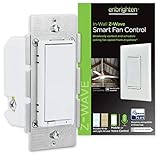
Overview: The Enbrighten Z-Wave Plus Fan Control delivers purpose-built automation for ceiling fans, offering three-speed wireless control that generic dimmers cannot safely provide. This in-wall solution replaces standard switches to smarten your ventilation throughout your home.
What Makes It Stand Out: Unlike multi-purpose devices, it’s engineered specifically for fan motor control, preventing motor damage and annoying hum. It operates two fans simultaneously from one switch—a unique multi-fan capability. The built-in Z-Wave repeater extends network range by 150ft, while included white and light almond paddles ensure design harmony.
Value for Money: Dedicated fan controls command premium pricing over standard switches, but this unit’s dual-fan capacity and integrated range extender deliver strong overall value. Avoiding incompatible dimmer-related motor damage saves costly fan replacements, making it financially prudent for multi-fan installations and long-term reliability.
Strengths and Weaknesses: Strengths include purpose-built fan optimization, three-speed control, dual-fan capacity, and signal repeating. The 3-way compatibility adds flexibility. Critical weaknesses: it cannot control lights, requiring a separate switch for combination fan/light fixtures. Hub dependency limits standalone operation, and installation demands neutral wire presence.
Bottom Line: Essential for homeowners automating ceiling fans. Perfect for multi-fan rooms or whole-house fan control. Verify your fans have separate wiring from lights and that your hub supports Z-Wave Plus for optimal performance.
10. GE Enbrighten Z-Wave Plus Smart Switch Plug-In, 2 Simultaneously Controlled Z-Wave Outlets, Works with Alexa, Google Assistant, Repeater/Range Extender, ZWave Hub Required, 14282, White

Overview: The GE Enbrighten Plug-In Smart Switch offers instant Z-Wave control without any wiring modifications. This convenient dual-outlet device transforms standard receptacles into smart hubs, controlling two devices simultaneously while extending your Z-Wave network’s reach throughout your home.
What Makes It Stand Out: True plug-and-play installation eliminates electrical work entirely. The space-saving design leaves one outlet free, unlike bulky smart plugs. Dual simultaneous control suits lamp pairs and holiday lighting, while the integrated Z-Wave repeater strengthens mesh networks. Broad hub compatibility includes SmartThings, Ring, Wink, and many more platforms.
Value for Money: At its price point, it undercuts professional installation costs while delivering two controlled outlets. The repeater functionality adds network value, and the no-wiring approach saves significant time and money. Compared to two individual smart plugs, it’s competitively priced with added range extension benefits.
Strengths and Weaknesses: Strengths include effortless installation, dual-device control, space efficiency, and universal bulb compatibility. The 32-104°F operating range suits most indoor environments. Weaknesses: outlets cannot be controlled independently, limiting flexibility. No dimming capability restricts lighting options, and the design may block adjacent outlets in tight spaces. Hub requirement adds initial cost.
Bottom Line: Excellent for renters, dorm rooms, and temporary installations. Ideal for controlling lamp pairs or small appliances where independent outlet control isn’t necessary. Confirm your Z-Wave hub is supported before purchasing.
Understanding Z-Wave Lighting Technology
What Makes Z-Wave Different for Energy Savings
Z-Wave’s low-power radio frequency mesh networking creates a dedicated communication highway for your smart home devices. Each powered device acts as a repeater, extending coverage throughout your home without interfering with your Wi-Fi. This architecture enables reliable control of lighting circuits even in larger properties, ensuring that energy-saving automations execute consistently. The protocol’s optimized power consumption means the controllers themselves draw minimal standby power—often less than 0.8 watts—preventing the “vampire power” drain that plagues many electronic devices.
How Smart Lighting Controllers Reduce Energy Consumption
Traditional lighting operates on a simple binary: on or off. Modern Z-Wave controllers introduce granular control that directly impacts your kilowatt-hour usage. By enabling precise dimming, scheduling, and occupancy-based automation, these devices ensure lights operate only at necessary brightness levels and only when needed. Studies indicate that strategic dimming alone can reduce lighting energy use by 20-40%, while automation features can cut unnecessary usage by an additional 30%. The cumulative effect across your entire home can result in substantial monthly savings.
Key Features That Drive Energy Efficiency
Advanced Dimming Capabilities and Power Reduction
Not all dimming is created equal when it comes to energy savings. Look for controllers offering true forward-phase or reverse-phase dimming with high-resolution adjustment—typically 0-100% in 1% increments. This precision allows you to find the minimum illumination level needed for each task. A light dimmed to 75% doesn’t just use 25% less power; the nonlinear relationship means you might save 30-35% energy while barely noticing the difference in brightness. Controllers with programmable minimum and maximum dim levels prevent energy waste from accidentally setting lights too bright.
Intelligent Scheduling and Automation Functions
The cornerstone of energy reduction is eliminating human error—lights left on in empty rooms, outdoor lights burning during daylight hours, or forgotten basement fixtures running for days. Advanced scheduling goes beyond simple timers, offering astronomical clocks that automatically adjust for sunrise and sunset times throughout the year. Look for controllers supporting multiple daily schedules, vacation modes that simulate occupancy, and conditional logic that can override schedules based on other sensor inputs. The most sophisticated systems learn your patterns and suggest schedule optimizations.
Occupancy and Motion Sensing Integration
Standalone motion sensors have limitations, but when integrated with Z-Wave lighting controllers, they become powerful energy management tools. The key is configurable timeout periods and sensitivity settings that match each room’s usage patterns. A bathroom might need a 5-minute timeout, while a garage could benefit from 15 minutes. Advanced systems support multi-sensor logic—requiring both motion and ambient light level triggers—to prevent unnecessary activation. Some controllers can distinguish between human movement and pets, avoiding false triggers that waste energy in homes with animals.
Real-Time Energy Monitoring and Reporting
You can’t manage what you don’t measure. Controllers with built-in energy monitoring provide circuit-level consumption data, showing exactly how much power each lighting zone uses. This granularity reveals surprising energy hogs—perhaps that chandelier uses 400 watts, or your outdoor lighting consumes more than your refrigerator. Look for systems offering historical data tracking, cost projections, and mobile apps that visualize usage patterns. The most useful platforms identify anomalies, like lights left on unusually late, and send proactive alerts.
Scene Control for Efficient Lighting Groups
Scenes enable one-touch control of multiple lights, but their energy-saving potential comes from pre-configured efficiency settings. A “Cooking” scene might set under-cabinet LEDs to 100% while keeping general lighting at 60%. An “Evening Relaxation” scene could dim all lights to 30% and shift color temperature warmer. The energy advantage comes from avoiding the habit of turning all lights to maximum brightness. Effective controllers allow scene creation through the app and physical button presses, making efficient choices the easiest option.
Geofencing for Location-Based Automation
Your smartphone’s location can trigger lighting changes automatically. As you leave home, geofencing can ensure all non-essential lights turn off—even those you forgot about. More sophisticated implementations use multiple geofence zones, preparing your home when you’re five minutes away versus turning everything off when you’re two miles out. This feature eliminates the “oops, I left the lights on” problem that contributes to unnecessary energy waste, particularly for families with varying schedules.
Adaptive Lighting and Circadian Rhythm Support
While primarily designed for health and comfort, adaptive lighting that automatically adjusts color temperature and brightness throughout the day also saves energy. Morning routines might use cooler, brighter light at lower power levels, while evening settings automatically dim warmer. The energy benefit comes from the system managing brightness proactively rather than users manually setting lights to maximum and forgetting to adjust them. Look for controllers that can shift from 2700K to 6500K while simultaneously managing intensity.
Smart Bulb Versus Smart Switch Controllers
This fundamental choice affects both installation complexity and energy strategy. Smart switches control entire circuits, making them ideal for multiple fixtures or hardwired installations. They work with standard LED bulbs and provide the most reliable energy savings through circuit-level control. Smart bulb controllers offer color and tunable white options but require compatible bulbs and may leave bulbs in a standby state. For pure energy reduction, circuit-level controllers typically deliver better results, especially in multi-bulb fixtures where replacing every bulb would be costly.
Multi-Way Switching Solutions for Large Spaces
Hallways, staircases, and large rooms with multiple entry points traditionally waste energy because users can’t easily turn lights off from different locations. Z-Wave’s virtual three-way and four-way switching solves this without running new traveler wires. By linking multiple controllers wirelessly, any switch can control the circuit. This convenience directly translates to energy savings—lights get turned off more frequently because it’s easy to do so from anywhere. Look for controllers supporting instant status updates, ensuring all switches in a multi-way setup reflect the current state immediately.
Weather-Responsive Outdoor Lighting Automation
Outdoor lighting often represents 15-20% of residential lighting energy use. Controllers that integrate weather data can dramatically improve efficiency. Rather than using fixed timers, these systems adjust for cloud cover, extending runtime on dark, stormy days and reducing it on clear, bright evenings. Some platforms can even delay activation during full moon periods or adjust for seasonal variations more precisely than astronomical clocks alone. This intelligence prevents outdoor lights from operating unnecessarily during daylight hours or when natural illumination suffices.
Installation and System Compatibility
Hub and Ecosystem Integration Requirements
Z-Wave requires a central hub, but not all hubs offer the same energy management capabilities. When selecting controllers, verify compatibility with hubs that provide advanced automation engines, detailed energy reporting, and integration with utility company demand response programs. The hub’s processing power affects how many automated routines you can run simultaneously. For 2026, look for hubs supporting Z-Wave Long Range (ZWLR) and the latest security S2 framework, ensuring your system remains current and protected.
Wiring Configuration and Installation Complexity
Before purchasing controllers, audit your home’s wiring. Most Z-Wave switches require a neutral wire for proper operation—a common issue in homes built before the 1980s. Some newer controllers offer no-neutral options but may have limitations with LED loads or minimum wattage requirements. Assess whether you have single-pole, three-way, or four-way circuits. Controllers supporting flexible wiring configurations simplify installation and reduce electrician costs. For renters, consider plug-in dimmer modules that require no wiring modifications while still delivering energy savings.
Mesh Network Range and Signal Strength
A weak mesh network causes unreliable automation, leading users to abandon energy-saving routines out of frustration. Plan your controller placement to ensure robust coverage. Z-Wave devices typically have a 30-foot indoor range, but each powered device extends this. In larger homes, strategically place controllers to bridge gaps. Avoid installing controllers in metal junction boxes without external antennas, as this can attenuate signals. Test network health through your hub’s diagnostic tools, watching for failed nodes that could compromise your energy-saving automations.
Maximizing Long-Term Energy Savings
Developing Strategic Lighting Schedules
Effective scheduling requires understanding your family’s actual patterns, not idealized ones. Start with a two-week observation period, noting when rooms are truly occupied. Create schedules with gradual transitions rather than abrupt on/off events—this feels more natural and saves more energy. Implement “warning dimming” where lights briefly dim before turning off, giving occupants time to wave a hand and keep them on if needed. This prevents the frustration of premature shutoffs that leads users to disable automation entirely.
Whole-Home Integration Synergies
Lighting controllers deliver maximum energy savings when coordinated with other systems. Integrate with smart thermostats to dim lights when HVAC systems enter high-power modes. Connect to smart blinds, reducing lighting needs when natural light is available. Link with security systems to use efficient “away” scenes automatically. The most powerful integrations tie into time-of-use electricity rates, dimming non-essential lights during peak pricing periods. This holistic approach can reduce whole-home energy use by 25-30% beyond lighting-only savings.
Data-Driven Usage Optimization
Review your energy monitoring data monthly to identify trends. Are certain rooms using more power than expected? Do schedules need adjusting for seasonal daylight changes? Use historical comparisons to measure the impact of schedule changes. Set energy budgets within your hub’s app, receiving alerts when zones exceed targets. Some advanced systems use machine learning to suggest optimizations, like identifying that your kitchen lights average 85% brightness when 70% would suffice, automatically suggesting a scene adjustment.
Future-Proofing Your Investment
Emerging Z-Wave Standards and Protocol Updates
The Z-Wave protocol continues evolving. In 2026, Z-Wave Long Range devices will become more prevalent, offering extended coverage without mesh dependency for certain devices. The Z-Wave Matter bridge specification will enable integration with broader smart home ecosystems. When selecting controllers, prioritize those with over-the-air firmware update capabilities and manufacturers with strong track records of supporting legacy devices. This ensures your energy-saving system won’t become obsolete as standards advance.
AI-Powered Energy Optimization on the Horizon
Next-generation controllers will incorporate local AI processing to predict and optimize lighting usage. These systems will learn occupancy patterns at a granular level, anticipating needs while minimizing waste. For example, the system might notice you always turn off the hallway light at 10:30 PM and begin doing it automatically at 10:25 PM. While this technology is emerging, selecting controllers with sufficient processing headroom ensures you can access these features through firmware updates rather than hardware replacements.
Troubleshooting and System Maintenance
Common Energy-Saving Automation Failures
When lights don’t respond to schedules, users often manually override them, breaking the energy-saving habit. Common culprits include mesh network weaknesses, hub processing overloads, and conflicting automation rules. If a controller frequently fails to execute schedules, check its routing path in the hub’s diagnostic tools. Avoid creating circular logic where multiple rules contradict each other. Keep automation simple and reliable—it’s better to have three dependable schedules than ten complex ones that work intermittently.
Security and Firmware Update Importance
Compromised smart home devices can be hijacked, running your lights continuously and spiking energy bills. The Z-Wave S2 security framework is essential, providing encrypted communications and anti-hacking measures. Enable automatic firmware updates to patch vulnerabilities promptly. However, schedule updates during low-usage periods, as devices may be temporarily unresponsive during the process. A secure system is an efficient system—malware-infected devices often exhibit erratic behavior that undermines carefully planned energy-saving strategies.
Frequently Asked Questions
How much can I realistically save on my electric bill with Z-Wave lighting controllers?
Most households see 20-35% reductions in lighting-related energy costs, which typically translates to $15-40 monthly savings depending on home size, local electricity rates, and previous usage habits. The biggest savings come from eliminating lights left on in empty rooms and reducing overall brightness levels through dimming.
Do Z-Wave controllers work with existing LED bulbs, or do I need special bulbs?
Z-Wave switches and dimmers work with standard dimmable LED bulbs. However, verify compatibility with your specific bulb models, as some low-quality LEDs may flicker or buzz. For smart bulb controllers, you’ll need Z-Wave compatible bulbs, but these are less common and typically less energy-efficient for whole-circuit control.
Will these controllers still save energy if my family members manually override the automations?
Yes, but savings diminish. The key is designing automations that feel helpful, not restrictive. Use gradual dimming, generous timeout periods, and manual overrides that automatically re-engage after a set time. Most systems report that overrides decrease significantly after the first month as users adapt to the convenience.
What’s the payback period for investing in Z-Wave lighting controllers?
Including equipment and professional installation, most systems achieve payback in 18-36 months through energy savings alone. This timeline shortens if you qualify for utility rebates or time-of-use rate optimization. The convenience and home value increase provide additional returns beyond direct energy savings.
Can I install Z-Wave controllers myself, or do I need an electrician?
If you’re comfortable with basic electrical work and have a neutral wire, many homeowners successfully install single-pole switches. However, three-way circuits, no-neutral installations, and complex multi-gang boxes often require professional expertise. Improper installation can create safety hazards and negate energy savings through inefficient operation.
How reliable is Z-Wave compared to Wi-Fi for lighting control?
Z-Wave is significantly more reliable for lighting automation due to its dedicated frequency, mesh networking, and lower power requirements. Wi-Fi devices can become unresponsive during network congestion, while Z-Wave maintains consistent performance. This reliability ensures your energy-saving schedules execute as programmed.
Do these controllers consume power themselves, and is it significant?
Z-Wave controllers typically draw 0.5-0.8 watts in standby—less than $1 per year in electricity costs. This minimal consumption is far outweighed by the energy they save. Compare this to some Wi-Fi devices that draw 2-3 watts, and the efficiency advantage becomes clear.
Can Z-Wave lighting integrate with my utility company’s demand response programs?
Many advanced hubs now support OpenADR (Open Automated Demand Response) protocols, allowing your lighting to automatically respond to utility signals during peak demand events. Participating can earn you bill credits while reducing grid strain. Check with your utility provider and select a compatible hub.
What happens to my energy-saving schedules during a power outage?
Z-Wave controllers retain their programming in non-volatile memory. When power returns, they resume normal operation automatically. However, clocks may need resynchronization with the hub. Battery-backed hubs maintain accurate time, ensuring schedules resume seamlessly without manual intervention.
Are there any tax incentives or rebates for installing energy-saving lighting controls?
Many utilities offer rebates ranging from $10-25 per smart switch, and some states include advanced lighting controls in energy efficiency tax credit programs. Check the Database of State Incentives for Renewables & Efficiency (DSIRE) and contact your utility provider. These incentives can reduce your payback period by 6-12 months.
See Also
- Stop High Energy Bills with the 10 Best Z-Wave Lighting Controllers This Year
- How to Solve High Energy Bills with the 10 Best Lighting Control Systems in 2026
- 10 Top-Rated Z-Wave Lighting Controllers According to Experts in 2026
- The 10 Ultimate Best Z-Wave Lighting Controllers for Seamless Integration in 2026
- 10 Best Z-Wave Lighting Controllers for Smart Homes in 2026