Table of Contents
As smart home technology continues its rapid evolution, lighting control remains the cornerstone of any sophisticated automation setup. In 2026, Z-Wave lighting controllers have reached new heights of reliability, offering homeowners unprecedented flexibility in how they illuminate and interact with their living spaces. These devices have moved far beyond simple on/off functionality, now serving as intelligent nodes in a robust mesh network that can anticipate your needs, reduce energy consumption, and seamlessly integrate with an ever-expanding ecosystem of smart devices.
The landscape of Z-Wave lighting solutions has matured significantly, with advanced features like AI-driven automation, enhanced security protocols, and cross-platform compatibility becoming standard rather than premium options. Whether you’re building a smart home from scratch or upgrading an existing system, understanding what makes a quality Z-Wave lighting controller has never been more crucial. This comprehensive guide dives deep into the essential features, installation considerations, and future-proofing strategies that will help you make informed decisions without getting lost in technical jargon or marketing hype.
Top 10 Z-Wave Lighting Controllers
Detailed Product Reviews
1. Zooz 800 Series Z-Wave Long Range Scene Controller ZEN32 800LR, White | Z-Wave Hub Required

Overview: The Zooz ZEN32 800LR Scene Controller is a versatile in-wall switch that combines a main load-controlling button with four dedicated scene control buttons. Designed for 120V LED fixtures up to 150W, this device functions as both a standard smart switch and a multi-button scene controller when paired with a compatible Z-Wave hub. Its clean white design blends with standard decor while adding powerful automation capabilities.
What Makes It Stand Out: The direct 3-way capability eliminates the need for expensive add-on switches—simply rewire your existing 3-way circuit following Zooz’s detailed diagrams. The 800 series chip delivers Z-Wave Long Range support, extending wireless coverage up to 1300 feet while maintaining S2 security and SmartStart pairing convenience. This combination of hardware flexibility and modern Z-Wave technology is rare in a single device.
Value for Money: At its price point, you’re essentially getting a premium smart switch plus a four-button remote in one device. Competing solutions often require purchasing separate components, making the ZEN32 a cost-effective choice for scene-heavy setups. The 3-way compatibility that typically demands costly companion switches adds significant value for multi-location lighting control.
Strengths and Weaknesses: Strengths include true 3-way wiring without add-ons, robust scene control, 800 series performance, and strong security. The main button can be used for load control or wireless triggers, offering installation flexibility. Weaknesses: requires neutral wire, limited hub compatibility excludes many basic Z-Wave systems, and the small button labels may be hard to read in dim lighting.
Bottom Line: Ideal for SmartThings, Hubitat, Home Assistant, or Z-Box users seeking streamlined scene control without cluttering walls with multiple devices. Verify hub compatibility before purchasing to avoid integration headaches.
2. Zooz 800 Series Z-Wave Long Range Dimmer & Scene Controller ZEN35 800LR, White | Z-Wave Hub Required

Overview: The Zooz ZEN35 800LR Dimmer & Scene Controller elevates the ZEN32 concept by adding precise dimming capability to its main load-control button. This in-wall solution manages 120V LED fixtures up to 150W while providing four additional scene buttons for comprehensive smart home control through a compatible Z-Wave hub. It maintains the same clean aesthetic while expanding functionality.
What Makes It Stand Out: The integrated dimming function sets it apart from standard on/off scene controllers, allowing granular brightness control directly from the wall. Like its sibling, it offers direct 3-way wiring without add-on switches, and the 800 series chip provides Z-Wave Long Range, S2 security, and SmartStart enrollment. The ability to dim loads while offering scene control is a unique combination.
Value for Money: The premium over non-dimming models is justified if you need load dimming. Purchasing separate dimmer switches and scene controllers would cost significantly more. For single-fixture rooms where ambiance matters, it consolidates two functions elegantly. The 3-way support adds further value compared to buying multiple smart dimmers.
Strengths and Weaknesses: Strengths include dimming capability, no-add-on 3-way support, long-range connectivity, and robust scene programming. The main paddle provides familiar operation. Weaknesses: neutral wire required, limited hub compatibility, and the dimming function may be unnecessary for users controlling smart bulbs wirelessly. The price premium may not suit simple on/off needs.
Bottom Line: Perfect for Home Assistant, Hubitat, or SmartThings users wanting both dimming and scene control in one gang box. Skip if your lighting is already smart-enabled or you lack a compatible hub.
3. Minoston 800 Series Z-Wave Scene Controller, 4 ZWave Button, Zwave Plus Wall Switch Remote Control, Support Long Range, Work with Z Wave Hubs (MR40Z)

Overview: The Minoston MR40Z is a battery-powered Z-Wave scene controller featuring four programmable buttons that magnetically mount to any flat surface or fit inside standard switch boxes. This wireless remote eliminates installation complexity, offering flexible control of up to 16 scenarios through a compatible Z-Wave hub. Its minimalist design suits any room aesthetic.
What Makes It Stand Out: The magnetic mounting system and completely wireless design allow placement literally anywhere—on walls, refrigerators, or nightstands—without electrical work. The 800 series chip ensures strong signal penetration and Z-Wave Long Range compatibility, while S2 security keeps communications protected. The 16-scene capacity from four buttons is impressive for its size.
Value for Money: As one of the most affordable 800 series scene controllers, it delivers excellent value for renters or those unable to run wires. Battery replacement is the only ongoing cost, and the 16-scene capacity rivals more expensive wired alternatives. Compared to installing new electrical boxes, the savings are substantial.
Strengths and Weaknesses: Strengths: tool-free installation, flexible placement, strong 800 series performance, and budget-friendly pricing. The magnetic base is genuinely useful. Weaknesses: battery dependency requires periodic replacement, limited to four physical buttons, and hub compatibility is narrower than advertised. Some hubs need custom drivers.
Bottom Line: An excellent choice for adding convenient control points without electrical work. Ideal for SmartThings, Home Assistant, or HomeSeer users seeking affordable, flexible scene control throughout the home.
4. Z-Stick 10 Pro - Zigbee 3.0 & Z-Wave 800 Series USB Adapter - Works with HomeAssistant - Zigbee2MQTT - Z-Wave Controller - Z-Wave Long Range - Up to 1 Mile Wireless Range - cloudfree

Overview: The Z-Stick 10 Pro is a dual-radio USB adapter combining Z-Wave 800 Series Long Range and Zigbee 3.0 protocols in a compact form factor. Designed for DIY smart home enthusiasts, it enables Home Assistant, Zigbee2MQTT, and Z-Wave JS platforms to communicate with over 8,000 devices without cloud dependency. It serves as the foundation for local-only automation.
What Makes It Stand Out: This is one of the few adapters offering both cutting-edge Z-Wave Long Range (up to 1 mile) and modern Zigbee 3.0 simultaneously. The slim design preserves adjacent USB ports, solving a common pain point with bulkier sticks. The 800 series Z-Wave chip ensures maximum range and S2 security, while the Zigbee radio supports the full 3.0 stack.
Value for Money: Purchasing separate Z-Wave and Zigbee adapters would cost significantly more. For Home Assistant users wanting protocol flexibility, it delivers two premium radios for the price of one high-end adapter, making it an economical foundation for mixed-ecosystem homes. The long-range capability reduces need for repeaters.
Strengths and Weaknesses: Strengths: dual-protocol support, exceptional range, compact design, broad software compatibility, and future-proof 800 series. It works across major platforms. Weaknesses: requires technical expertise to configure, no included hub software, and firmware updates may need manual intervention. Beginners will face a learning curve.
Bottom Line: The ultimate adapter for experienced Home Assistant users building multi-protocol systems. Not recommended for beginners seeking plug-and-play solutions.
5. Zooz 800 Series Z-Wave Long Range Remote Control & Scene Controller ZEN34 (Battery Powered), White | Z-Wave Hub Required

Overview: The Zooz ZEN34 is a battery-powered remote control featuring familiar paddle-style buttons that can trigger scenes and control devices wirelessly. Designed for flexible placement, it installs in standard boxes or magnetically attaches to surfaces, providing convenient control points without electrical work. The paddle interface feels natural to use.
What Makes It Stand Out: The paddle design mimics traditional switches, making it intuitive for family members. Its 800 series chip enables Z-Wave Long Range connectivity up to 1300 feet when paired with compatible hubs, while S2 security and SmartStart simplify pairing. The magnetic base offers true anywhere installation without tools or wiring.
Value for Money: Priced competitively for a two-button remote, it bridges the gap between basic remotes and full scene controllers. The premium over simpler button remotes is justified by the familiar paddle interface and Long Range support, which future-proofs your investment. It’s cheaper than installing a new wired switch location.
Strengths and Weaknesses: Strengths: intuitive paddle controls, flexible magnetic mounting, robust 800 series performance, and battery-powered convenience. The design integrates seamlessly with traditional decor. Weaknesses: only two buttons limits scene capacity, requires periodic battery changes, and hub compatibility is restrictive. Some advanced hubs need custom configuration.
Bottom Line: A solid choice for Home Assistant, Hubitat, or HomeSeer users wanting familiar switch feel in flexible locations. Verify hub support before buying, and consider your scene complexity needs.
6. Z-Wave Wireless Remote Control/Scene Controller, Aeotec WallMote 7, on/Off, dim, Trigger Scenes, add a New Switch Anywhere, Battery Powered, Z-Wave hub Required, Z-Wave Plus, illumino

Overview: The Aeotec WallMote 7 is a versatile Z-Wave 700 series remote that transforms any surface into a smart switch. This battery-powered controller commands Z-Wave devices, triggers scenes, and manages non-Z-Wave devices through compatible multi-protocol hubs. Its sleek design accommodates six multi-tap buttons for on/off, dimming, and scene activation commands.
What Makes It Stand Out: Unmatched installation flexibility sets this apart. Mount it permanently with double-sided tape, install it in a standard junction box, or carry it as a handheld remote. The impressive wireless range reaches 144 feet indoors and 394 feet outdoors. S2 encryption and SmartStart technology ensure secure, effortless pairing with your Z-Wave hub.
Value for Money: Priced competitively against other Z-Wave remotes, the WallMote 7 delivers exceptional versatility. Comparable devices often require permanent installation or offer fewer mounting options. The multi-tap functionality essentially provides six switches in one, multiplying its value across your smart home ecosystem.
Strengths and Weaknesses: Strengths include true wireless freedom, extensive range, robust security, and flexible mounting options. The multi-tap buttons enable complex scene control from a single device. Weaknesses revolve around battery dependency requiring periodic replacement, and it’s completely hub-reliant with no standalone functionality. The button labeling could be more intuitive for multi-tap operations.
Bottom Line: Ideal for renters or those wanting switch placement without wiring. Perfect for creating bedside scene controllers, multi-button remotes for home theaters, or adding three-way functionality anywhere. If you need portable, powerful Z-Wave control, the WallMote 7 is an excellent investment.
7. UltraPro 700 Series Add-On Switch QuickFit and SimpleWire, in-Wall White Rocker Paddle Only, Z-Wave ZigBee Wireless Smart Lighting Controls, NOT A STANDALONE Switch, 2 Pack, 68899

Overview: The UltraPro 700 Series Add-On Switch solves multi-location smart lighting control without replacing every switch in a circuit. This two-pack of auxiliary switches works exclusively with primary Wi-Fi, Z-Wave, or Zigbee smart controls, enabling up to five-location operation for single lighting circuits.
What Makes It Stand Out: Revolutionary QuickFit design reduces housing depth by 20%, solving crowded box problems that plague older homes. SimpleWire technology features offset ground ports that cleverly avoid switch box mounting screws, streamlining installation. The switches support both residential (120VAC) and light-commercial (277VAC) applications, offering unusual versatility.
Value for Money: As a two-pack, this delivers solid value for three-way and four-way setups. While requiring a primary smart switch adds initial cost, it’s significantly cheaper than installing independent smart switches at every location. The innovative design saves electrician fees by simplifying tricky installations.
Strengths and Weaknesses: Strengths include space-saving design, multi-protocol compatibility, changeable paddles (white and light almond included), and commercial-grade capability. The offset ground screw design is genuinely innovative. The critical weakness is the “not standalone” limitation—you cannot use these without a compatible primary smart switch, which may confuse buyers. Black, brown, and ivory paddles cost extra.
Bottom Line: Essential for multi-switch circuits when you’ve already invested in compatible Enbrighten or UltraPro primary switches. Skip if you need standalone smart switching. For expanding existing smart three-way setups, this two-pack is an efficient, well-engineered solution.
8. Zooz Z-Wave Long Range Smart Lighting XS Relay ZEN57 800LR | Z-Wave Hub Required (Sold Separately)

Overview: The Zooz ZEN57 800LR is an ultra-compact Z-Wave relay designed for challenging installations. This tiny but powerful device automates lighting up to 150W LED capacity, fitting where traditional smart switches cannot. It connects to any standard wall switch, offering flexibility in aesthetic choices.
What Makes It Stand Out: The extra-small form factor solves the common “no neutral in switch box” problem by allowing installation at the light fixture instead. Dry contact input accepts simple toggle or momentary switches without voltage requirements. Advanced users can enable smart bulb mode and central scene functionality through compatible hubs. The 5-year extended warranty and lifetime tech support demonstrate manufacturer confidence.
Value for Money: Competitively priced against other Z-Wave relays, the ZEN57 offers premium features like S2 security, SmartStart pairing, and advanced customization options. The size advantage alone justifies the cost for difficult retrofit projects where larger modules won’t fit.
Strengths and Weaknesses: Strengths include minimal footprint, versatile installation options, robust security, and exceptional support/warranty. The dry contact design works with virtually any switch style. Weaknesses include incompatibility with dimmers or electronic switches, hub dependency, and potentially confusing configuration for beginners. Advanced features require hub support.
Bottom Line: Perfect for old homes lacking neutral wires or crowded electrical boxes. Ideal for DIYers comfortable with hub configuration. If you need maximum installation flexibility and strong post-purchase support, the ZEN57 is a top-tier choice. Avoid if you require dimming or standalone operation.
9. Enbrighten Z-Wave Plus Fan Control, Works with Alexa, Google Assistant, 3-Way Compatible, ZWave Hub Required, Repeater/Range Extender, Smart Ceiling Fan Control, Smart Switch, White & Almond, 14314
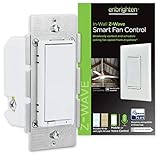
Overview: The Enbrighten 14314 is a purpose-built Z-Wave Plus controller designed exclusively for ceiling fan speed management. It replaces standard in-wall switches to provide wireless control of fan speeds—high, medium, and low—from anywhere using a Z-Wave hub and voice assistants.
What Makes It Stand Out: Unlike multi-purpose dimmers that can damage fan motors, this dedicated device ensures safe, appropriate speed control for up to two fans simultaneously from a single switch. It doubles as a Z-Wave repeater, extending your mesh network range by 150 feet. The included white and light almond paddles match existing decor.
Value for Money: Priced similarly to premium smart switches, it delivers specialized functionality that generic dimmers cannot. Controlling two fans from one switch effectively halves the cost per device. The integrated range extender adds network value beyond simple fan control.
Strengths and Weaknesses: Strengths include fan-specific engineering, dual-fan capacity, signal repeating capability, and 3-way compatibility. The dedicated design prevents motor damage. Weaknesses include inability to control fan lights (requiring a separate switch for three-wire setups) and hub dependency. It’s a one-trick pony that cannot control lighting loads.
Bottom Line: Essential for anyone wanting smart ceiling fan control without risking equipment damage. Perfect for rooms with multiple fans or Z-Wave networks needing range extension. Skip if you need integrated fan and light control from one device. For dedicated fan automation, it’s the safest, most reliable choice.
10. GE Enbrighten Z-Wave Plus Smart Switch Plug-In, 2 Simultaneously Controlled Z-Wave Outlets, Works with Alexa, Google Assistant, Repeater/Range Extender, ZWave Hub Required, 14282, White

Overview: The GE Enbrighten 14282 plug-in smart switch offers instant Z-Wave control without wiring. Featuring two grounded outlets controlled simultaneously, this device schedules and operates lamps or small appliances up to 15 amps total load. Simply plug it into any standard outlet and connect to your Z-Wave hub.
What Makes It Stand Out: True plug-and-play installation makes this ideal for renters or temporary setups. The space-saving design leaves the second outlet free for other devices. It functions as a Z-Wave repeater, strengthening mesh network coverage. Broad hub compatibility includes SmartThings, Ring, Wink, ADT, and more.
Value for Money: Very affordable entry into Z-Wave automation. While outlets cannot be controlled independently (a limitation at this price point), the dual control and repeater functionality provide solid value. Comparable smart plugs cost more while offering only single outlets.
Strengths and Weaknesses: Strengths include zero-installation setup, dual outlets, wide hub compatibility, and range extension capability. It supports all bulb types and small appliances. Weaknesses include simultaneous-only outlet control (no independent operation) and bulky design that may block adjacent outlets. The 15-amp total load limit restricts heavy appliances.
Bottom Line: Perfect for renters, beginners, or anyone needing quick smart control without electrical work. Great for holiday lighting, bedside lamps, or office setups. If you need independent outlet control, look elsewhere. For hassle-free Z-Wave expansion, this plug-in switch delivers exceptional convenience and value.
Understanding Z-Wave Technology for Lighting Control
What is Z-Wave and How Does It Work?
Z-Wave is a wireless communications protocol designed specifically for home automation, operating on a low-frequency band that avoids interference from Wi-Fi and Bluetooth devices. Unlike traditional Wi-Fi devices that connect directly to your router, Z-Wave creates a mesh network where each powered device acts as a repeater, extending the signal range throughout your home. This architecture means your lighting controllers don’t just control lights—they strengthen your entire smart home network.
The protocol uses a hub-centric model where a central controller manages all devices, enabling complex automations and remote access. Each Z-Wave lighting controller contains a small radio that communicates with the hub and other Z-Wave devices using encrypted signals. In 2026, the latest Z-Wave Long Range (Z-Wave LR) specification has dramatically increased transmission distances and network capacity, making whole-home coverage more reliable than ever, even in larger properties.
Z-Wave vs Other Smart Home Protocols
When comparing Z-Wave to Wi-Fi-based lighting solutions, the differences become immediately apparent. Wi-Fi devices consume significantly more power, create network congestion on your main internet connection, and often lack the mesh networking capabilities that make Z-Wave so robust. Bluetooth lighting controllers, while energy-efficient, suffer from extremely limited range and don’t support mesh networking in most implementations, requiring you to be within direct proximity for control.
Thread and Zigbee are Z-Wave’s closest competitors, sharing similar mesh networking principles. However, Z-Wave operates on a different frequency band (908 MHz in North America) that penetrates walls and floors more effectively than Zigbee’s 2.4 GHz signal. In 2026, the emergence of Matter as a unifying application layer has actually strengthened Z-Wave’s position, as many modern controllers now support Matter over Z-Wave, bridging the gap between ecosystems while maintaining Z-Wave’s superior reliability for lighting control.
Benefits of Z-Wave for Lighting Systems
The primary advantage of Z-Wave lighting controllers lies in their rock-solid reliability. Because they operate on a dedicated network separate from your Wi-Fi, they’re immune to bandwidth congestion from streaming services, video calls, or downloads. This isolation ensures your lights respond instantly to commands, whether you’re using a physical switch, smartphone app, or voice assistant. The mesh topology means network strength actually improves as you add more devices, contrary to Wi-Fi networks that degrade with too many connections.
Energy efficiency is another compelling benefit. Z-Wave devices consume minimal standby power—often less than 0.8 watts—making them far more efficient than their Wi-Fi counterparts. For lighting specifically, this means your smart switches aren’t offsetting the energy savings from LED bulbs. Additionally, Z-Wave’s standardized command classes ensure that devices from different manufacturers can communicate effectively, preventing the ecosystem lock-in that plagues proprietary systems.
Key Features to Consider in 2026
Compatibility with Smart Home Ecosystems
In today’s fragmented smart home market, ecosystem compatibility should be your top priority. Modern Z-Wave lighting controllers must support not just basic Z-Wave commands but also bridge seamlessly to platforms like Apple HomeKit, Google Home, Amazon Alexa, and Samsung SmartThings. The Matter standard has become the de facto requirement for new installations in 2026, so look for controllers that explicitly support Matter over Z-Wave or have clear upgrade paths via firmware updates.
Beyond the major platforms, consider compatibility with specialized systems like Home Assistant, Hubitat, or Fibaro if you prefer local control without cloud dependency. Check whether the controller supports S2 security frameworks, as this encryption standard is now mandatory for Matter certification and provides the highest level of protection against network intrusions. Some advanced controllers also offer API access for custom integrations, which is invaluable if you have unique automation requirements or use professional monitoring services.
Dimming Capabilities and Load Types
Not all Z-Wave dimmers are created equal, and understanding load compatibility can save you from frustrating flickering lights or damaged bulbs. The best controllers in 2026 support universal dimming technology that automatically detects and adjusts for different load types—incandescent, halogen, magnetic low-voltage (MLV), electronic low-voltage (ELV), and modern LED fixtures. This auto-detection eliminates the need for manual calibration and ensures smooth dimming from 0-100% without minimum load requirements.
Pay close attention to the dimmer’s wattage rating and whether it’s designed for leading-edge or trailing-edge dimming. Leading-edge dimmers are typically more affordable but can cause buzzing with certain LED drivers, while trailing-edge dimmers provide quieter operation and better LED compatibility. Advanced controllers now feature active load calibration that continuously monitors the connected lights and adjusts dimming curves in real-time, preventing the dreaded “LED ghosting” effect where lights remain faintly illuminated when switched off.
Installation Requirements and Wiring
The electrical installation requirements for Z-Wave lighting controllers vary dramatically between models, and choosing the wrong type can lead to costly rewiring. In 2026, the market offers three main categories: controllers requiring a neutral wire, those that work without a neutral, and battery-powered options for retrofit applications. Neutral-wire models provide the most reliable operation and full feature access but are only suitable for homes with modern electrical wiring.
No-neutral controllers have improved significantly, using capacitive coupling or dedicated micro-generators to power the Z-Wave radio without a neutral connection. However, these may have minimum load requirements (typically 10-25 watts) and can be incompatible with certain LED bulbs. For renters or those with older homes, look for controllers that install behind existing switches or use screw-in bulb adapters. Always verify your existing switch box depth, as some Z-Wave devices are deeper than standard switches and may require box extenders.
Wireless Range and Mesh Network Performance
While Z-Wave’s mesh architecture theoretically extends range indefinitely, real-world performance depends on several critical factors. The 2026 Z-Wave Long Range specification boasts up to 1.5 miles of open-air range, but inside homes, walls, metal boxes, and interference reduce this significantly. When planning your lighting controller layout, consider that each hop between devices adds about 2-5 milliseconds of latency, which can become noticeable in complex scenes involving multiple controllers.
The quality of the Z-Wave antenna and radio chipset plays a crucial role in performance. Premium controllers feature external antennas or advanced PCB antenna designs that provide 20-30% better range than budget options. Look for devices that support beaming technology, which allows battery-powered sensors to wake up sleeping nodes along the communication path. For large homes, strategically placing powered controllers (like switches and plug-in modules) every 30-40 feet ensures robust mesh coverage and prevents isolated “dead zones” where signals can’t reach.
Security Features and Encryption Standards
Security has become non-negotiable in 2026, with smart home devices increasingly targeted by cyberattacks. All modern Z-Wave lighting controllers should implement the S2 security framework, which provides elliptic-curve Diffie-Hellman key exchange and AES-128 encryption. This is a significant upgrade from the older S0 standard and is required for Matter certification. S2 also includes device-specific authentication, preventing rogue devices from joining your network.
Beyond encryption, examine the controller’s physical security features. Tamper detection alerts you if someone removes the device from the wall, and some models include built-in circuit breakers that trip during electrical faults. Cloud-independent operation is another security advantage—controllers that function entirely on your local network aren’t vulnerable to server breaches or company shutdowns. For maximum security, choose controllers that support Z-Wave’s SmartStart feature, allowing secure provisioning via QR codes rather than vulnerable inclusion modes.
Types of Z-Wave Lighting Controllers
In-Wall Switches and Dimmers
In-wall Z-Wave switches represent the most permanent and feature-rich option for lighting control. These devices replace your existing wall switches and provide both manual control and smart functionality. In 2026, the best models feature capacitive touch surfaces, customizable LED indicators, and built-in energy monitoring. Multi-tap scenes allow you to trigger different actions with double, triple, or long presses—turning a single switch into a control hub for entire room scenes.
When selecting in-wall controllers, consider whether you need single-pole, three-way, or four-way configurations. Modern Z-Wave switches can work with existing auxiliary switches in multi-location setups, or you can add companion Z-Wave switches for advanced scene control. Some models include built-in temperature or humidity sensors, turning each switch into a multi-purpose room monitor. The installation is more involved than other types, requiring electrical work, but provides the cleanest aesthetic and most reliable performance.
Plug-In Modules and Lamp Controllers
For renters or those seeking non-permanent solutions, plug-in Z-Wave modules offer incredible flexibility. These devices simply plug into existing outlets, allowing you to control lamps, holiday lighting, or small appliances without any wiring. The 2026 generation includes dimming modules with precise load calibration, dual-outlet models that control two devices independently, and units with built-in USB charging ports that remain powered even when the controlled outlet is off.
Advanced plug-in modules now feature power monitoring capabilities, reporting real-time and cumulative energy consumption to your hub. This data enables sophisticated automations, like turning off energy-hungry devices during peak rate hours or sending alerts when appliances draw abnormal current. Look for models with manual override buttons, so you can still control devices locally if your hub goes offline. The portability of these controllers means you can easily reconfigure your smart home layout without calling an electrician.
Scene Controllers and Keypads
Scene controllers are specialized Z-Wave devices designed to trigger complex lighting scenes with a single button press. Unlike regular switches, these wall-mounted keypads don’t directly control electrical loads but send commands to your hub, which then orchestrates multiple devices. In 2026, the most sophisticated models feature 4-8 programmable buttons, each supporting tap, double-tap, and long-press actions—effectively providing 24+ unique triggers from one device.
These controllers excel in central locations like entryways or master bedrooms, where you want to control lighting throughout the entire house. Many models include customizable LED backlighting that can display different colors to indicate scene status or serve as nightlights. Battery-powered versions install anywhere using adhesive backing, while wired versions replace existing switches and draw power from the mains. The true power of scene controllers lies in their ability to integrate lighting with other systems, triggering HVAC adjustments, security modes, or entertainment systems simultaneously.
Bulb Adapters and Retrofit Solutions
For fixtures where replacing the switch isn’t practical—such as ceiling fans with integrated lights, chandeliers with multiple bulbs, or rented properties—screw-in Z-Wave adapters provide an elegant solution. These devices install between the light socket and bulb, adding smart control without any wiring changes. Modern adapters support dimming for compatible LED bulbs and include built-in power monitoring to track individual fixture consumption.
The latest generation of retrofit solutions includes micro-modules that hide inside existing electrical boxes, converting standard switches into smart controllers while preserving the original appearance. These tiny devices wire directly to the existing switch terminals, making them ideal for historical homes where modern switch designs would clash with the décor. Some models even allow the original switch to remain functional, providing both smart and manual control without compromise. While these solutions offer the easiest installation path, they typically lack the advanced features of dedicated in-wall controllers.
Installation and Setup Considerations
DIY vs Professional Installation
The decision between DIY and professional installation hinges on your electrical comfort level, local building codes, and the complexity of your chosen controllers. Installing plug-in modules and battery-powered devices is universally DIY-friendly, requiring nothing more than pairing with your hub. In-wall switch replacement, however, involves working with mains voltage and should only be attempted if you understand basic electrical safety—turning off breakers, verifying voltage with a multimeter, and properly connecting line, load, neutral, and ground wires.
Professional installation becomes advisable in several scenarios: older homes with knob-and-tube wiring, aluminum wiring that requires special connectors, or situations where you need to expand small electrical boxes to accommodate deeper Z-Wave switches. Electricians can also install dedicated circuits for heavy loads or add neutral wires where needed. In 2026, many smart home integrators offer flat-rate Z-Wave installation packages that include network optimization and scene programming, often costing less than hiring a general electrician who may be unfamiliar with smart home specifics.
Hub Requirements and Pairing Process
Every Z-Wave lighting controller requires a central hub to unlock its full potential, but not all hubs are created equal. The pairing process, known as “inclusion,” varies between hubs but generally involves putting the hub in inclusion mode and activating the controller. Modern Z-Wave controllers support SmartStart, which allows you to pre-configure devices using QR codes before installation, eliminating the need to physically access the device during pairing—a major advantage for hard-to-reach locations.
When selecting a hub, consider its processing power, automation engine sophistication, and cloud dependency. Local-processing hubs respond faster and work during internet outages but may have steeper learning curves. Cloud-based hubs offer easier remote access and frequent feature updates but introduce latency and potential privacy concerns. In 2026, the best approach is hybrid hubs that process time-critical commands locally while using the cloud for remote access and advanced services. Ensure your chosen hub supports all Z-Wave frequency bands used in your region, as these vary internationally and are not cross-compatible.
Firmware Updates and Long-term Maintenance
Smart devices require ongoing maintenance, and Z-Wave lighting controllers are no exception. Firmware updates deliver security patches, bug fixes, and new features, but the update mechanism varies by manufacturer. The most user-friendly controllers support over-the-air (OTA) updates directly from the hub, while others require manual intervention or proprietary bridges. Before purchasing, investigate the manufacturer’s track record for updates—companies with active development communities typically support devices for 5-7 years, while others abandon products after 2-3 years.
Long-term maintenance also involves monitoring device health. Advanced hubs can track signal strength, route changes, and error rates for each controller, alerting you to potential issues before they cause failures. Battery-powered controllers need periodic battery replacement, typically every 1-2 years depending on usage. For hardwired devices, consider models with replaceable radio modules—some manufacturers offer upgradeable components that let you transition to newer Z-Wave specifications without replacing the entire switch. This modularity protects your investment as standards evolve.
Advanced Functionality for Modern Smart Homes
Scene Creation and Automation Programming
The true power of Z-Wave lighting emerges when you move beyond manual control to sophisticated scenes and automations. Modern controllers support multi-device scenes that adjust brightness, color temperature, and timing across numerous lights simultaneously. The programming has evolved from simple time-based schedules to conditional logic that considers occupancy, ambient light levels, and even your calendar appointments. In 2026, visual scene editors in hub apps let you drag-and-drop devices onto floor plans and set precise parameters with intuitive sliders.
Advanced automation engines support variables and state machines, allowing you to create lighting that adapts to your habits. For example, a “Movie Night” scene might dim living room lights to 10%, turn off kitchen lights, and set hallway lights to motion-activated 30% brightness, all while ensuring these changes only occur after sunset and when the house is occupied. Some controllers can store scenes locally, so they execute even if the hub is offline. Look for devices that support association groups, which allow direct device-to-device communication without hub intervention for ultra-fast response times.
Voice Control and AI Integration
Voice control has become ubiquitous, but implementation quality varies widely among Z-Wave lighting controllers. The best integrations support natural language processing that understands context—“make it brighter” adjusts lights in the room you’re currently in, while “turn off all lights” affects the entire house. In 2026, local voice processing has become more common, with some hubs featuring built-in microphones that process commands on-device, eliminating cloud latency and preserving privacy.
AI integration goes beyond simple voice commands. Modern systems learn your lighting preferences over time, automatically adjusting scenes based on factors like weather, season, and your daily routines. Advanced controllers work with AI assistants to generate dynamic lighting that supports circadian rhythms, gradually shifting color temperature throughout the day to promote alertness in the morning and relaxation in the evening. Some systems can even analyze security camera footage to detect when you arrive home and trigger personalized welcome lighting sequences.
Energy Monitoring and Efficiency Features
Energy monitoring has transformed from a niche feature into a standard capability on premium Z-Wave lighting controllers. These devices measure voltage, current, and power factor in real-time, providing granular data about each circuit’s consumption. In 2026, the most advanced controllers can distinguish between different load types and detect when bulbs are failing or fixtures are developing electrical issues by analyzing power draw patterns.
This data enables powerful efficiency automations. Your system can automatically dim lights by 10% during peak electricity rate hours—a change barely perceptible to the eye but yielding measurable savings. Load shedding scenes can temporarily turn off non-essential lighting when your home’s total power consumption approaches maximum capacity, preventing breaker trips. Some controllers integrate with utility company demand-response programs, earning you rebates for allowing automatic adjustments during grid stress events. The best systems provide monthly energy reports that help you identify inefficient fixtures and optimize usage patterns.
Multi-location and Three-Way Switching
Controlling a single light from multiple locations is a common requirement, and Z-Wave offers several solutions beyond traditional three-way wiring. The most elegant approach uses Z-Wave’s direct association capability, where auxiliary controllers communicate directly with the master switch without hub involvement. This provides instant response and works even during network outages. In 2026, virtual three-way setups have become more sophisticated, allowing any Z-Wave controller to control any other through hub programming, eliminating the need for traveler wires entirely.
Advanced multi-location systems support status synchronization, so LED indicators on all switches reflect the current light state. Some controllers offer “smart” three-way operation where each switch can both control the load and trigger independent scenes. For example, tapping the upstairs switch turns off the stairway light, while double-tapping the same switch activates a “Goodnight” scene that secures the entire house. When planning multi-location control, verify that your chosen controllers support the necessary association groups and that your hub can manage the complex routing tables these setups require.
Troubleshooting Common Issues
Connectivity Problems and Range Extenders
Even with Z-Wave’s robust mesh networking, connectivity issues can arise. Symptoms include delayed responses, commands that fail intermittently, or devices that drop off the network entirely. The first step in troubleshooting is checking the Z-Wave network map in your hub, which shows routing paths and signal strengths between devices. A healthy network shows multiple routing options for each device, while problematic networks may reveal isolated nodes or excessive hop counts.
Range extenders can solve many connectivity issues, but they’re often unnecessary if you have sufficient powered Z-Wave devices. Before adding dedicated extenders, try relocating your hub to a more central position or adding another powered controller between the hub and the problematic device. If you must use extenders, place them strategically—ideally halfway between the hub and the device, but not directly adjacent to either. In 2026, Z-Wave Long Range extenders have become available, offering up to four times the range of traditional extenders, though they require compatible devices on both ends of the connection.
Device Pairing Failures
Failed inclusions are among the most frustrating Z-Wave issues. The most common cause is insufficient power during pairing—ensure the controller has stable line voltage and, for battery devices, fresh batteries. Exclusion before inclusion is crucial; many devices ship pre-paired to test hubs and must be excluded (reset) before they can join your network. Always perform exclusion even on brand-new devices as a troubleshooting step.
Interference can also prevent successful pairing. Temporarily disable Wi-Fi on your phone during inclusion, and ensure the controller is within 3 feet of the hub during the process. Some devices enter a low-power inclusion mode that only activates for 30-60 seconds, so timing is critical. If pairing fails repeatedly, try a factory reset of the device, verify your hub’s Z-Wave frequency matches your region, and check for firmware updates on both the hub and controller. In 2026, SmartStart has reduced pairing failures significantly, but legacy devices still require manual inclusion.
Firmware Conflicts and Compatibility Issues
Firmware mismatches between your hub and controllers can cause subtle problems like incorrect status reporting or failed scene executions. Most modern hubs automatically detect device firmware versions and apply compatibility patches, but this isn’t foolproof. When adding a new controller to an established network, update its firmware immediately after inclusion. Some manufacturers release beta firmware that introduces new features but may have bugs—unless you need specific new capabilities, stick with stable releases.
Compatibility issues often manifest when mixing devices from different generations. Z-Wave Plus devices offer better range and battery life but should coexist peacefully with older Z-Wave classic devices. However, some advanced features like S2 security or Long Range may not function when routing through legacy devices. Use your hub’s network map to ensure secure devices have secure routing paths. If you experience compatibility problems, try adjusting the Z-Wave network’s healing interval or manually setting static routes for critical controllers.
Future-Proofing Your Z-Wave Lighting Investment
Matter Standard Integration
Matter has revolutionized smart home interoperability in 2026, and ensuring your Z-Wave lighting controllers can integrate is essential for long-term viability. While Matter doesn’t replace Z-Wave at the protocol level, it provides a universal application layer that allows Z-Wave devices to appear natively in all major ecosystems. Look for controllers that either ship with Matter support or have a clear firmware upgrade path. The best implementations maintain Z-Wave’s local mesh advantages while exposing devices to Matter controllers over IP bridges.
Consider the topology of Matter integration. Some hubs act as Matter bridges, translating Z-Wave commands for Matter controllers, while other setups use Z-Wave-to-Matter gateway devices. Bridge-based solutions are generally more flexible and future-proof, as they don’t require changes to your existing Z-Wave network. Verify that the Matter implementation supports all the controller’s features—not just basic on/off, but also dimming, color control, and energy reporting. As Matter evolves, controllers with OTA update capabilities will be able to support new features and device types without hardware replacement.
Scalability for Growing Smart Homes
Your lighting needs will evolve, so choose controllers that can scale with your ambitions. Z-Wave networks can theoretically support 232 devices, but practical limits are lower due to memory constraints in some hubs. In 2026, high-end hubs support up to 500 devices using Z-Wave LR and advanced routing tables. When planning scalability, consider not just device count but also scene complexity. Each scene consumes network resources, so controllers with local scene storage reduce hub overhead.
Modular controller designs offer the best scalability. Some manufacturers produce switch bodies that accept different radio modules, allowing you to upgrade from Z-Wave to Z-Wave LR or even multi-protocol modules as standards evolve. Daisy-chaining capabilities in plug-in modules let you control multiple devices from a single Z-Wave node, conserving network addresses. For large installations, consider segmenting your network into multiple hubs connected via MQTT or other backbone protocols, treating each Z-Wave network as a subnet for improved performance and easier management.
Battery Backup and Power Failure Modes
Power outages render most smart lighting useless, but advanced Z-Wave controllers now include features to maintain functionality during blackouts. Some in-wall switches incorporate supercapacitors that keep the Z-Wave radio powered for 24-48 hours, allowing you to control lights via battery-powered scene controllers or your hub’s battery backup. This is particularly valuable for security lighting or homes with medical equipment that requires reliable illumination.
Controllers with configurable power-on behavior ensure lights return to a safe state when power is restored. Options include returning to the previous state, defaulting to off, or turning on at a specific brightness level. For whole-home resilience, pair your Z-Wave lighting with a UPS for your hub and key routers. Some advanced setups integrate with home battery systems like Tesla Powerwall, automatically reducing lighting load to conserve backup power. In 2026, certain controllers can even detect grid outages through voltage fluctuations and automatically activate emergency lighting scenes using the limited power available.
Frequently Asked Questions
What makes Z-Wave better than Wi-Fi for lighting control?
Z-Wave operates on a dedicated mesh network that doesn’t congest your Wi-Fi, uses significantly less power, and provides more reliable whole-home coverage. Each Z-Wave device extends the network range, while Wi-Fi devices all compete for router bandwidth. Z-Wave’s lower frequency also penetrates walls better, and its standardized protocol ensures devices from different brands work together seamlessly.
Do I need a neutral wire for Z-Wave light switches?
Many modern Z-Wave switches work without a neutral wire, but neutral-wire models offer better reliability and compatibility with LED bulbs. No-neutral switches require a minimum load (usually 10-25 watts) to power their radio, which can cause flickering with low-power LED bulbs. Always check the specific model’s requirements and your home’s wiring before purchasing.
How many Z-Wave devices can I add to my network?
Standard Z-Wave networks support up to 232 devices, but practical limits depend on your hub’s memory and processing power. Z-Wave Long Range networks can support up to 500 devices. For most homes, 50-100 devices provide excellent coverage without performance issues. Remember that powered devices like switches strengthen the mesh, while battery devices primarily consume network resources.
Can Z-Wave lighting controllers work during internet outages?
Yes, Z-Wave lighting operates locally and doesn’t require internet for basic control. Your hub must have local processing capability—some cloud-dependent hubs lose functionality without internet. With a local hub, manual switches, scene controllers, and pre-programmed automations continue working normally. Remote access and voice control via cloud services will be unavailable until internet is restored.
Are Z-Wave lighting controllers compatible with all LED bulbs?
Most quality Z-Wave dimmers work with the majority of dimmable LED bulbs, but compatibility isn’t universal. Look for controllers with universal dimming technology and adjustable dimming curves. Some LED bulbs, especially budget models, use incompatible drivers that cause flickering, buzzing, or limited dimming range. Check manufacturer compatibility lists or buy from retailers with good return policies to test with your specific bulbs.
What’s the difference between Z-Wave and Z-Wave Plus?
Z-Wave Plus is an enhanced certification introduced in 2016 that requires devices to support longer range (up to 50% more), better battery life, over-the-air updates, and improved pairing processes. All Z-Wave Plus devices are backward compatible with older Z-Wave hubs, but you need a Z-Wave Plus hub to access all features. In 2026, most new controllers are Z-Wave Plus or Z-Wave Long Range certified.
How do I fix Z-Wave devices that respond slowly or inconsistently?
Slow response usually indicates mesh network issues. First, run a Z-Wave network heal from your hub to optimize routing. Check for devices with low signal strength and add powered Z-Wave devices between them and the hub. Remove failed nodes that may be causing routing problems. Ensure your hub’s firmware is updated, and consider increasing the Z-Wave radio power if your hub supports this adjustment.
Will Z-Wave lighting controllers work with Matter?
Yes, through Matter bridges. Your Z-Wave devices connect to a compatible hub, which then exposes them to Matter controllers. The hub translates between Z-Wave and Matter protocols, allowing you to control Z-Wave lights from any Matter-compatible app or voice assistant. Look for hubs that explicitly support Matter bridging, and verify that the specific lighting features you need (dimming, color, etc.) are supported in the Matter implementation.
What happens to Z-Wave lights when the power goes out and comes back on?
This depends on the controller’s power-on behavior setting, which you can usually configure. Options include: returning to the exact state before the outage, defaulting to off, or turning on at a preset brightness. Some controllers remember their last state for up to 24 hours without power. For safety, many people configure critical lights to turn on after outages to prevent being left in the dark.
How long do Z-Wave lighting controllers typically last?
Quality Z-Wave switches and dimmers typically last 10-15 years with normal use—similar to traditional switches. The Z-Wave radio components are solid-state and very reliable. Battery-powered controllers need new batteries every 1-2 years. Firmware support from manufacturers usually continues for 5-7 years after a product’s release. Look for devices with replaceable radio modules or OTA update capability to extend their useful lifespan as standards evolve.
See Also
- 10 Best Z-Wave Lighting Controllers for Smart Homes in 2026
- Best Z-Wave Lighting Controllers for DIY Smart Homes: 10 Expert Picks for 2026
- The 10 Ultimate Best Z-Wave Lighting Controllers for Seamless Integration in 2026
- The 10 Ultimate Best Z-Wave Light Bulbs for Secure Smart Homes in 2026
- 10 Top-Rated Z-Wave Lighting Controllers According to Experts in 2026